
Why is my LAN so slow in transferring files?
Discussion


I have 2 PC’s running Win 10 64 Pro, both linked directly into the back of a Draytek Vigor 2700 router using Cat 5 cable
I’m only seeing a network transfer rate of 11MB/s (via the file copy window) when I go to Task Manager of the send machine, it tells me it is sending at approx. 97MBps, and the receiving machine reports a receive rate of 99MB/s
Can someone shed some light on why I seem to have a low transfer rate somewhere between the two machines?
I’m only seeing a network transfer rate of 11MB/s (via the file copy window) when I go to Task Manager of the send machine, it tells me it is sending at approx. 97MBps, and the receiving machine reports a receive rate of 99MB/s
Can someone shed some light on why I seem to have a low transfer rate somewhere between the two machines?
Your running as fast as you can at the moment.
11 MB/s is as fast as your router port is capable of :-
https://www.speedguide.net/routers/draytek-vigor-2...
97MBps is roughly 11 MB/s.
Dougie.
driver67 said:
Your running as fast as you can at the moment.
11 MB/s is as fast as your router port is capable of :-
https://www.speedguide.net/routers/draytek-vigor-2...
97MBps is roughly 11 MB/s.
Dougie.
As above. The ports on that router are 10/100. If you want to go faster you can either upgrade to a router with gigabit (10/100/1000) ports or add a gigabit switch into your setup to speed up wired transfers.11 MB/s is as fast as your router port is capable of :-
https://www.speedguide.net/routers/draytek-vigor-2...
97MBps is roughly 11 MB/s.
Dougie.
Benefits of a switch is that it has more ports and will be cheaper.
Benefits of upgrading the router would, typically, be improved wireless performance and not having to add a second box.
SBDJ said:
Try running iperf3 between the two computers to verify the actual speed you are getting between them.
Ok, maybe that will just confirm that I have a 'slow LAN' but whill it tell me why, or give me a clue as to why?At the moment I'm copying 400Gb of data and the copy window is telling me 10 Hours!... it's been a long day, not sure i can cope with a long night too...
survivalist said:
driver67 said:
Your running as fast as you can at the moment.
11 MB/s is as fast as your router port is capable of :-
https://www.speedguide.net/routers/draytek-vigor-2...
97MBps is roughly 11 MB/s.
Dougie.
As above. The ports on that router are 10/100. If you want to go faster you can either upgrade to a router with gigabit (10/100/1000) ports or add a gigabit switch into your setup to speed up wired transfers.11 MB/s is as fast as your router port is capable of :-
https://www.speedguide.net/routers/draytek-vigor-2...
97MBps is roughly 11 MB/s.
Dougie.
Benefits of a switch is that it has more ports and will be cheaper.
Benefits of upgrading the router would, typically, be improved wireless performance and not having to add a second box.
Police State said:
Ok, maybe that will just confirm that I have a 'slow LAN' but whill it tell me why, or give me a clue as to why?
At the moment I'm copying 400Gb of data and the copy window is telling me 10 Hours!... it's been a long day, not sure i can cope with a long night too...
You'd be better off physically removing one of the HDDs and plugging it into the other PC, then copying the data... At the moment I'm copying 400Gb of data and the copy window is telling me 10 Hours!... it's been a long day, not sure i can cope with a long night too...
TEKNOPUG said:
Police State said:
Ok, maybe that will just confirm that I have a 'slow LAN' but whill it tell me why, or give me a clue as to why?
At the moment I'm copying 400Gb of data and the copy window is telling me 10 Hours!... it's been a long day, not sure i can cope with a long night too...
You'd be better off physically removing one of the HDDs and plugging it into the other PC, then copying the data... At the moment I'm copying 400Gb of data and the copy window is telling me 10 Hours!... it's been a long day, not sure i can cope with a long night too...
Police State said:
Thanks for confirming this for me. Can you recommend a decent router and/or switch. medium cost £
If your happy with Draytek, this is a reasonable option.https://www.amazon.co.uk/DrayTek-2762ac-Wireless-R...
Dougie.
Police State said:
Thanks for confirming this for me. Can you recommend a decent router and/or switch. medium cost £
£20 for an 8 port switch:https://www.amazon.co.uk/NETGEAR-Ethernet-Unmanage...
slightly less for a 5 port one from the same page. Plug your 2 PCs and one of the router ports in to that and you should see roughly a factor of 10 improvement.
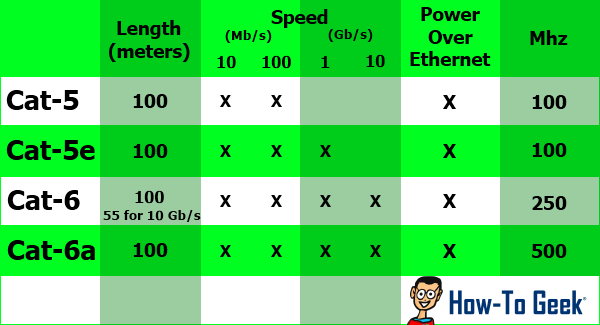
Check all the cables you plan to use have all 8 wires present. 4 wire cables will only ever do 100 mbit or as the ~10MB/sec you have at present.
driver67 said:
Police State said:
Thanks for confirming this for me. Can you recommend a decent router and/or switch. medium cost £
If your happy with Draytek, this is a reasonable option.https://www.amazon.co.uk/DrayTek-2762ac-Wireless-R...
Dougie.
I don't have a brand preference... but I will need a router with at least 2 USB ports (for attached non-networkable printers)
ash73 said:
You don't need to upgrade your router! Any cheap gigabit switch will do, I use TPlink ones they cost buttons.
https://www.amazon.co.uk/TP-Link-LS1005G-Wallmount...
Just plug everything into the switch.
Your internet will be <100Mbps so it's fine to use your existing router with its 10/100 port.
The PCs need to have gigabit ethernet ports as well as the switch.
Ok Ash, bear with me. https://www.amazon.co.uk/TP-Link-LS1005G-Wallmount...
Just plug everything into the switch.
Your internet will be <100Mbps so it's fine to use your existing router with its 10/100 port.
The PCs need to have gigabit ethernet ports as well as the switch.
So i have a virgin router coming into the house.
I have a WD MyNet 750 connected to the Virgin router.
I have two pc's connected to the MyNet750
Everything else is wireless (TV/Tablets, etc) talking to the MyNet.
Do I plug the switch into the MyNet and then plug the two pc's into the Switch?
Also... how can i determine if my NC's are gigabit or not?
Edited by Police State on Tuesday 29th September 21:21
survivalist said:
driver67 said:
Your running as fast as you can at the moment.
11 MB/s is as fast as your router port is capable of :-
https://www.speedguide.net/routers/draytek-vigor-2...
97MBps is roughly 11 MB/s.
Dougie.
As above. The ports on that router are 10/100. If you want to go faster you can either upgrade to a router with gigabit (10/100/1000) ports or add a gigabit switch into your setup to speed up wired transfers.11 MB/s is as fast as your router port is capable of :-
https://www.speedguide.net/routers/draytek-vigor-2...
97MBps is roughly 11 MB/s.
Dougie.
Benefits of a switch is that it has more ports and will be cheaper.
Benefits of upgrading the router would, typically, be improved wireless performance and not having to add a second box.
Gassing Station | Computers, Gadgets & Stuff | Top of Page | What's New | My Stuff