
Telephone calls through TV
Discussion


I have an Iphone 6 - is there a way to run phone calls through the TV? I've bought the leads suggested by websites but they only allow screen mirroring /sharing of music/photos etc.
It is specifically the phone calls I am interested in - note if this means buying a TV then if say sub 1k I would be interested in that too (I read a 2019 OLED Samsung TV will do it, if that is correct I will buy one today as I love my 2018 OLED TV).
It is specifically the phone calls I am interested in - note if this means buying a TV then if say sub 1k I would be interested in that too (I read a 2019 OLED Samsung TV will do it, if that is correct I will buy one today as I love my 2018 OLED TV).
21TonyK said:
No idea about TV's but (it will be old news to most!) I just discovered you can make calls via Amazon echo's to mobiles and landlines... and its free!
Unfortunately that will have the same effect as a mobile phone to me so would not work... But a TV speakers will do the trick!My Samsung TV has Apple TV and Apple Music built in. I can screen mirror and if I play music or video on my phone the audio comes out of the TV.
If I make a call however, screen mirrored or not, the audio comes out the phone, I can transfer it to the speaker, my homepod or my ipad but not the tv. I guess it'll only transfer to a device that has a microphone?
If I make a call however, screen mirrored or not, the audio comes out the phone, I can transfer it to the speaker, my homepod or my ipad but not the tv. I guess it'll only transfer to a device that has a microphone?
frisbee said:
My Samsung TV has Apple TV and Apple Music built in. I can screen mirror and if I play music or video on my phone the audio comes out of the TV.
If I make a call however, screen mirrored or not, the audio comes out the phone, I can transfer it to the speaker, my homepod or my ipad but not the tv. I guess it'll only transfer to a device that has a microphone?
Yes my current Samsung will do the same but I read (possibly wrongly now!) that the new OLED TV will work..... It is annoying as I can run a computer through the TV and use the TV speakers but the Laptop microphone but not the TV... If I make a call however, screen mirrored or not, the audio comes out the phone, I can transfer it to the speaker, my homepod or my ipad but not the tv. I guess it'll only transfer to a device that has a microphone?
Does the TV even have a microphone? If not, I'm not sure how you'd be able to respond to calls.
However, if it does, and has the ability to use the mic via a 3.5mm audio in, then this sort of cable is what I used to connect my iPhone 6s to a non-bluetooth conference speaker using a simple headphone/mic lead (TRRS version with mic pole at each end) - like this for example.
It should mean you don't have to faff with the lightning to usb to xxx cables/adapters.
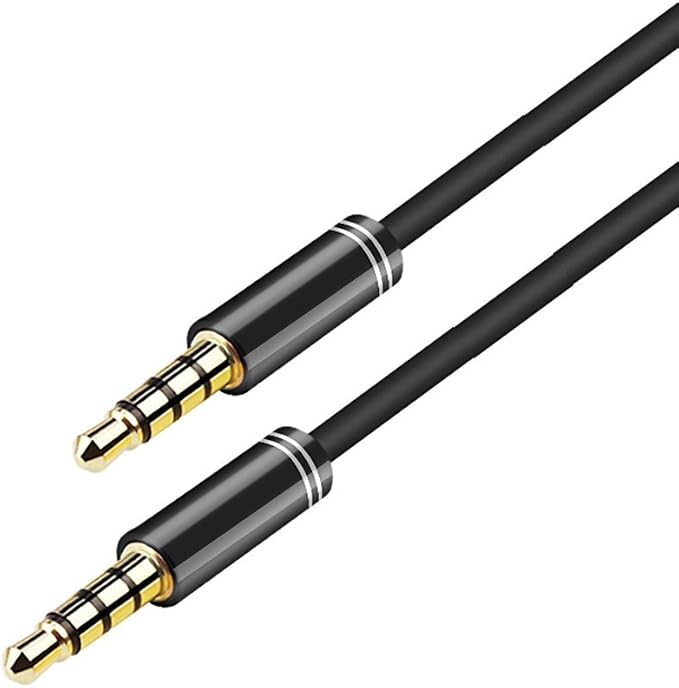
However, if it does, and has the ability to use the mic via a 3.5mm audio in, then this sort of cable is what I used to connect my iPhone 6s to a non-bluetooth conference speaker using a simple headphone/mic lead (TRRS version with mic pole at each end) - like this for example.
It should mean you don't have to faff with the lightning to usb to xxx cables/adapters.
Our Samsung TV works for FaceTime when mirroring to the TV
The incoming audio comes out of the TV and the microphone stays on the handset.
I guess you could use FaceTime and stop the video to achieve this.
I haven’t tried a regular phone call when mirroring to see what happens. I’ll give it a go today if I remember
The incoming audio comes out of the TV and the microphone stays on the handset.
I guess you could use FaceTime and stop the video to achieve this.
I haven’t tried a regular phone call when mirroring to see what happens. I’ll give it a go today if I remember

I have a disability. One of the massive f*** ups that gives me is very, very clear and sensitive hearing. To the extent if you were say 10ft away from me on your mobile phone I would hear the other end of the call. My current record was about 35 ft away but it was a very quiet room...
That means using a phone is impossible for me as the little tinny speakers result in my getting a migraine in about 30 seconds.
For reasons which are not clear to me, a car with a decent sound system is fine so I can use the car bluetooth. I can also listen to a TV. Therefore to save having to go out to the car every time I need to make or receive a call, I wanted to run calls through a TV. I have a TV in my study which I use for video conferencing and this works fine (HDMI from Laptop to TV and use laptop Mic but speakers from TV)
I read that a new Samsung (i.e. 2019 plus) can run the telephone calls through the TV.. The facetime option with no video will work as well in the main I suspect.
That means using a phone is impossible for me as the little tinny speakers result in my getting a migraine in about 30 seconds.
For reasons which are not clear to me, a car with a decent sound system is fine so I can use the car bluetooth. I can also listen to a TV. Therefore to save having to go out to the car every time I need to make or receive a call, I wanted to run calls through a TV. I have a TV in my study which I use for video conferencing and this works fine (HDMI from Laptop to TV and use laptop Mic but speakers from TV)
I read that a new Samsung (i.e. 2019 plus) can run the telephone calls through the TV.. The facetime option with no video will work as well in the main I suspect.
Jasandjules said:
I have a disability. One of the massive f*** ups that gives me is very, very clear and sensitive hearing. To the extent if you were say 10ft away from me on your mobile phone I would hear the other end of the call. My current record was about 35 ft away but it was a very quiet room...
That means using a phone is impossible for me as the little tinny speakers result in my getting a migraine in about 30 seconds.
For reasons which are not clear to me, a car with a decent sound system is fine so I can use the car bluetooth. I can also listen to a TV. Therefore to save having to go out to the car every time I need to make or receive a call, I wanted to run calls through a TV. I have a TV in my study which I use for video conferencing and this works fine (HDMI from Laptop to TV and use laptop Mic but speakers from TV)
I read that a new Samsung (i.e. 2019 plus) can run the telephone calls through the TV.. The facetime option with no video will work as well in the main I suspect.
Really check out Portal TV if WhatsApp calling is enough. It does exactly what you needThat means using a phone is impossible for me as the little tinny speakers result in my getting a migraine in about 30 seconds.
For reasons which are not clear to me, a car with a decent sound system is fine so I can use the car bluetooth. I can also listen to a TV. Therefore to save having to go out to the car every time I need to make or receive a call, I wanted to run calls through a TV. I have a TV in my study which I use for video conferencing and this works fine (HDMI from Laptop to TV and use laptop Mic but speakers from TV)
I read that a new Samsung (i.e. 2019 plus) can run the telephone calls through the TV.. The facetime option with no video will work as well in the main I suspect.
Jasandjules said:
For reasons which are not clear to me, a car with a decent sound system is fine so I can use the car bluetooth.
What about something like this:https://www.amazon.co.uk/dp/B07HFQYD1D/ref=twister...
Lots of Bluetooth Speakers also have "handsfree" capability, I suggest the above as it's a great little speaker for the money (90% as good as my Bose Soundlink Mini at a fraction of the price) and I recently tried it's handsfree capability for another PHer.
Plus, being Amazon you can always send it back if it's not suitable for you.
ETA .... I use this with my phone in my office and it's excellent. Bit pricier than a BT speaker, but the sound quality is very good:
https://www.amazon.co.uk/Jabra-Bluetooth-Portable-...
Edited by sgrimshaw on Tuesday 20th October 16:47
Gassing Station | Computers, Gadgets & Stuff | Top of Page | What's New | My Stuff