
Is this the correct RAM for my PC?
Discussion


This is what is currently in the computer (a 2 year old "HP Slim Desktop 290").
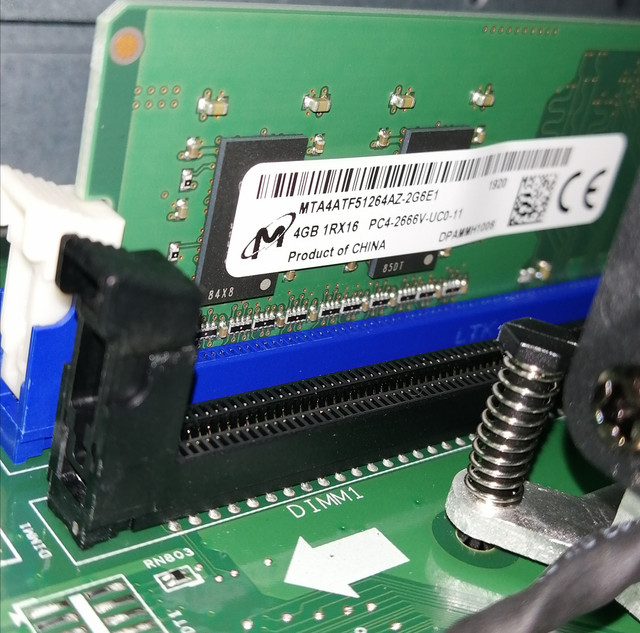
Can I jut buy this and put it in the other slot to upgrade to 8GB?:
https://www.amazon.co.uk/dp/B07GMRJTS9/?tag=micron...
They do a 4GB single rank (£16) and a 4GB (£20) - which should I pick?
Thanks.
IT illiterate of Sussex
Can I jut buy this and put it in the other slot to upgrade to 8GB?:
https://www.amazon.co.uk/dp/B07GMRJTS9/?tag=micron...
They do a 4GB single rank (£16) and a 4GB (£20) - which should I pick?
Thanks.
IT illiterate of Sussex
If you look at https://support.hp.com/gb-en/document/c05964366 you'll find a memory upgrade information section.
Either should work. Personally I'd be tempted to buy an 8GB stick to get to 12GB. 8GB is getting a bit tight nowadays and there are only 2 slots in total.
Either should work. Personally I'd be tempted to buy an 8GB stick to get to 12GB. 8GB is getting a bit tight nowadays and there are only 2 slots in total.
You have Single rank currently and it's always best to match what you have already...
Doubling the RAM from 4GB should give a noticable improvment as Windows 10 at idle will use most of the 4GB itself!
I'd be tempted, for the price to go for 2 x 8GB to future proof yourself and, as above, buy direct from Crucial to make sure it's right.
Doubling the RAM from 4GB should give a noticable improvment as Windows 10 at idle will use most of the 4GB itself!
I'd be tempted, for the price to go for 2 x 8GB to future proof yourself and, as above, buy direct from Crucial to make sure it's right.
Gman20 said:
I think thats the wrong ram
it's hard to see from the picture but it did look a little odd to me
The link to hp page shows 2x DDR4 SODIMM sockets, so basically laptop ram
The PC has recognised it and is now running with 8gb rather 4gb before, after I added the £16 4gb. it's hard to see from the picture but it did look a little odd to me
The link to hp page shows 2x DDR4 SODIMM sockets, so basically laptop ram
Or are you saying that it's not optimised?
Gman20 said:
I think thats the wrong ram
it's hard to see from the picture but it did look a little odd to me
The link to hp page shows 2x DDR4 SODIMM sockets, so basically laptop ram
They're labelled as SODIMM, but the sockets in the motherboard image are full size, as is the OP's photo and the Memory section of the text below.it's hard to see from the picture but it did look a little odd to me
The link to hp page shows 2x DDR4 SODIMM sockets, so basically laptop ram
xeny said:
They're labelled as SODIMM, but the sockets in the motherboard image are full size, as is the OP's photo and the Memory section of the text below.
I thought that too, but I think it is actually a really tiny board making them look longer, it would be very unusual for them to be mislabeledGassing Station | Computers, Gadgets & Stuff | Top of Page | What's New | My Stuff