
WiFi Help Please
Discussion


Hi All,
Sorry for what is going to be quite a long post, but i'm absolutely losing my mind with this now. We used to have virgin fibre in our house (modest 3 bed semi - no footballers pad!) and it WiFi signal always left a lot to be desired, very patchy.
When this BT Mesh signal in every room guarantee package came about, we thought we would try it, so for the past 12 months, we have had that. Its been OK but again, upstairs was very patchy, discs working ok one minute, then glowing orange for poor signal the next, and the kids constantly moaning about the WiFi coverage in their room and random disconnects from the internet etc.
I asked my I.T department what they would recommend next. They said that i shouldn't really need 3 mesh discs in a 3 bed house anyway, just get a decent router (Netgear or along those lines) and that should sort things.
BT was up for renewal recently, so I've decided to go back to virgin (100 fibre - £24.99 a month) but this time I took their advice and bought a Netgear Nighthawk D7000 router, which I had read on reviews had transformed peoples Virgin connections. So there i was last night at 9pm, rapidly setting all the kit up so the kids could do their home schooling before BT cuts me off today.
Unfortunately, things are worse! 1 bar of WiFi signal upstairs now and its so bad, that our lad has had to use his mobile phone as a hotspot to connect his computer to the internet so he can use Microsoft Teams!
I'm at a total loss now really. The cables for BT and Virgin enter our house in the very corner of our lounge, so the router and modem are on a table in the corner of our lounge (not sure whether this affects things, being in a corner, but not on the floor, at normal table height) and obviously the signal has to go all round the house, and the lads room is probably the furthest away from the router, but as i say, its a 3 bed semi, not a mansion!
I also have an old PC in the 3rd bedroom at the front of the house (probably positioned just above the router on the 1st floor), that started buffering last night, when its always been fine on BT, so that's clearly not getting a very good signal either.
So i've got Virgin Fibre 100, with a Netgear D7000 router. The 2 desktop PCs are connected to WiFi with TP Link Nano USB adapters (could these be a problem?). I've set to see how the signal is on the lads xbox, but i assume won't be much better.
Does anyone have any suggestions of what to try next. I've tried a variety of providers and a variety of equipment and i have the same problem always - very poor signal in the house apart from the room the router is actually in, and its driving me nuts now. Thought i'd ask the web before i have to pay to get someone in to look at things.
Thank you
Sorry for what is going to be quite a long post, but i'm absolutely losing my mind with this now. We used to have virgin fibre in our house (modest 3 bed semi - no footballers pad!) and it WiFi signal always left a lot to be desired, very patchy.
When this BT Mesh signal in every room guarantee package came about, we thought we would try it, so for the past 12 months, we have had that. Its been OK but again, upstairs was very patchy, discs working ok one minute, then glowing orange for poor signal the next, and the kids constantly moaning about the WiFi coverage in their room and random disconnects from the internet etc.
I asked my I.T department what they would recommend next. They said that i shouldn't really need 3 mesh discs in a 3 bed house anyway, just get a decent router (Netgear or along those lines) and that should sort things.
BT was up for renewal recently, so I've decided to go back to virgin (100 fibre - £24.99 a month) but this time I took their advice and bought a Netgear Nighthawk D7000 router, which I had read on reviews had transformed peoples Virgin connections. So there i was last night at 9pm, rapidly setting all the kit up so the kids could do their home schooling before BT cuts me off today.
Unfortunately, things are worse! 1 bar of WiFi signal upstairs now and its so bad, that our lad has had to use his mobile phone as a hotspot to connect his computer to the internet so he can use Microsoft Teams!
I'm at a total loss now really. The cables for BT and Virgin enter our house in the very corner of our lounge, so the router and modem are on a table in the corner of our lounge (not sure whether this affects things, being in a corner, but not on the floor, at normal table height) and obviously the signal has to go all round the house, and the lads room is probably the furthest away from the router, but as i say, its a 3 bed semi, not a mansion!
I also have an old PC in the 3rd bedroom at the front of the house (probably positioned just above the router on the 1st floor), that started buffering last night, when its always been fine on BT, so that's clearly not getting a very good signal either.
So i've got Virgin Fibre 100, with a Netgear D7000 router. The 2 desktop PCs are connected to WiFi with TP Link Nano USB adapters (could these be a problem?). I've set to see how the signal is on the lads xbox, but i assume won't be much better.
Does anyone have any suggestions of what to try next. I've tried a variety of providers and a variety of equipment and i have the same problem always - very poor signal in the house apart from the room the router is actually in, and its driving me nuts now. Thought i'd ask the web before i have to pay to get someone in to look at things.
Thank you
Can you run an ethernet cable outside, up the wall (maybe hidden behind a downpipe) and then back in to a bedroom ?
Fit surface mounted network sockets at the internal exit and entrance points of the cable, then have a wired connection to a repeater / access point ?
We did this using a BT Disc in a garden building which was too distant to pick up the house WiFi. Works an absolute treat.
Fit surface mounted network sockets at the internal exit and entrance points of the cable, then have a wired connection to a repeater / access point ?
We did this using a BT Disc in a garden building which was too distant to pick up the house WiFi. Works an absolute treat.
SS2. said:
Can you run an ethernet cable outside, up the wall (maybe hidden behind a downpipe) and then back in to a bedroom ?
Fit surface mounted network sockets at the internal exit and entrance points of the cable, then have a wired connection to a repeater / access point ?
We did this using a BT Disc in a garden building which was too distant to pick up the house WiFi. Works an absolute treat.
I've toyed with the idea of having everything wired in, but I don't think this is something i could do myself, but should this be the case with a 3 bed semi? its not a huge house to get a signal around. Pretty small area infact and its not like the walls are made of granite, they are quite thin really hence why i'm at a bit of a loss really.Fit surface mounted network sockets at the internal exit and entrance points of the cable, then have a wired connection to a repeater / access point ?
We did this using a BT Disc in a garden building which was too distant to pick up the house WiFi. Works an absolute treat.
Maybe the cables coming in at the very bottom corner of our house into the lounge isn't the best location for them. My mrs constantly says could the equipment go in the hallway, which might offer a better signal to the rest of the house rather than everything being shoved in the corner of the lounge, but its still not a huge area to expect decent coverage.
Can you relocate the cabling and router? Positioning is everything... Also worth checking the channel the router is using and maybe finding a less congested one. Failing that, adding a mesh network will help (suspect the BT ones didn't work because of position again).
I've only got a 2 bed terraced house but one router would not cover all rooms but a 2 node mesh network has sorted it. I also had to change the wifi channel manually as despite the router claiming to pick the best one, it didn't.
ETA: You can test the positioning by getting a long ethernet cable and just moving the router around without having the move the Virgin modem.
I've only got a 2 bed terraced house but one router would not cover all rooms but a 2 node mesh network has sorted it. I also had to change the wifi channel manually as despite the router claiming to pick the best one, it didn't.
ETA: You can test the positioning by getting a long ethernet cable and just moving the router around without having the move the Virgin modem.
mouseymousey said:
Can you relocate the cabling and router? Positioning is everything... Also worth checking the channel the router is using and maybe finding a less congested one. Failing that, adding a mesh network will help (suspect the BT ones didn't work because of position again).
I've only got a 2 bed terraced house but one router would not cover all rooms but a 2 node mesh network has sorted it. I also had to change the wifi channel manually as despite the router claiming to pick the best one, it didn't.
I could get an engineer in from virgin to relocate the cables i suppose, if it would help, i'll try anything.I've only got a 2 bed terraced house but one router would not cover all rooms but a 2 node mesh network has sorted it. I also had to change the wifi channel manually as despite the router claiming to pick the best one, it didn't.
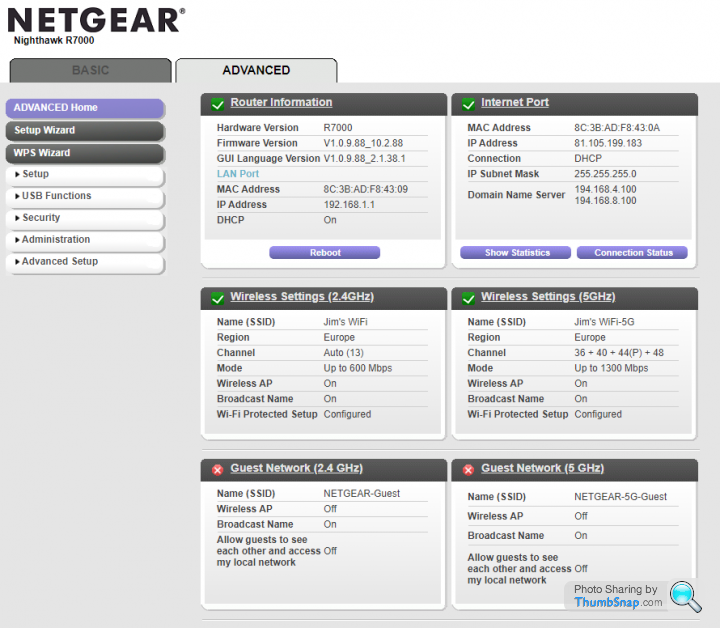
These are my current wireless settings
Thank you
Have you got the 2.4Ghz and 5 Ghz on separate SSID? ETA I see from your post above you have.
The 2,4Ghz channels are often overcrowded, may be neighbours are on the same channels. ETA or though I doubt they are on Channel 13 which is the highest available, it does overlap slightly with channel 11 which is often used.
5Ghz is usually less crowded and faster, although the signal is usually weaker. Problem is some of your older devices may only have 2.4ghz capability.
If you have a Windows PC/ Laptop then download inssider which will tell you what frequencies are being used. Ideally a 5ghz laptop
https://www.metageek.com/support/downloads/
The 2,4Ghz channels are often overcrowded, may be neighbours are on the same channels. ETA or though I doubt they are on Channel 13 which is the highest available, it does overlap slightly with channel 11 which is often used.
5Ghz is usually less crowded and faster, although the signal is usually weaker. Problem is some of your older devices may only have 2.4ghz capability.
If you have a Windows PC/ Laptop then download inssider which will tell you what frequencies are being used. Ideally a 5ghz laptop
https://www.metageek.com/support/downloads/
Edited by megaphone on Friday 15th January 08:49
megaphone said:
Problem is some of your older devices may only have 2.4ghz capability.
Exactly this. I did lump the 2.4 and 5ghz channels together so there was only one SSID being broadcast - much easier but instantly my plex server started doing the old buffering, so i reverted back to seperate 2.4 and 5ghz channels but it appears most of the stuff on my network is connected to 2.4 anyway:
strange considering i know that the phones connect at 5, maybe because ive messed around with it again they have connected at 2.4 but its still a mystery why the signal is utter s
 t!
t!I've never lived anywhere where one wireless router covers a whole house, unless you live in a dolls house, you'll always need another extender/booster.
Get one of these - https://www.amazon.co.uk/NETGEAR-Wi-Fi-Range-Exten...
or one of these - https://www.amazon.co.uk/NETGEAR-Wi-Fi-Range-Exten...
or the latest version with a much bigger range and throughput - https://www.amazon.co.uk/NETGEAR-Wi-Fi-Range-Exten...
Plug the extender in near to your router, wait 60 seconds for it to boot up fully, press the WPS button on the router (padlock type led should flash), press WPS on the extender and wait for them to pair up, shouldn't take more than a minute and then the WPS led on the extender should go solid.
The router and extender are now paired, unplug the extender and move it to somewhere near to the stair case or hallway so that the device is still in range of the router, but sending out a new signal to the rest of the house.
The new extender wifi network will be called Netgear_EXT or similar, password will be the same as the router and should give you a stable signal, but you may need to fine tune the exact extender location.
If you want to go to the next step then a small Mesh system will give you one single network over the whole house, where as your extended wifi will give you two networks and devices will need to swap from router to extender as required.

Get one of these - https://www.amazon.co.uk/NETGEAR-Wi-Fi-Range-Exten...
or one of these - https://www.amazon.co.uk/NETGEAR-Wi-Fi-Range-Exten...
or the latest version with a much bigger range and throughput - https://www.amazon.co.uk/NETGEAR-Wi-Fi-Range-Exten...
Plug the extender in near to your router, wait 60 seconds for it to boot up fully, press the WPS button on the router (padlock type led should flash), press WPS on the extender and wait for them to pair up, shouldn't take more than a minute and then the WPS led on the extender should go solid.
The router and extender are now paired, unplug the extender and move it to somewhere near to the stair case or hallway so that the device is still in range of the router, but sending out a new signal to the rest of the house.
The new extender wifi network will be called Netgear_EXT or similar, password will be the same as the router and should give you a stable signal, but you may need to fine tune the exact extender location.
If you want to go to the next step then a small Mesh system will give you one single network over the whole house, where as your extended wifi will give you two networks and devices will need to swap from router to extender as required.
Edited by KingofKong on Friday 15th January 09:16
James_N said:
megaphone said:
Problem is some of your older devices may only have 2.4ghz capability.
Exactly this. I did lump the 2.4 and 5ghz channels together so there was only one SSID being broadcast - much easier but instantly my plex server started doing the old buffering, so i reverted back to seperate 2.4 and 5ghz channels but it appears most of the stuff on my network is connected to 2.4 anyway:strange considering i know that the phones connect at 5, maybe because ive messed around with it again they have connected at 2.4 but its still a mystery why the signal is utter s
t!megaphone said:
If you have a Windows PC/ Laptop then download inssider which will tell you what frequencies are being used. Ideally a 5ghz laptop
https://www.metageek.com/support/downloads/
Another vote for Insider. Use it to see which of the 13 (or so) WiFi freqs are in use by your neighbours and pick an empty slot.https://www.metageek.com/support/downloads/
Edited by S6PNJ on Friday 15th January 09:23
Another thing to check is alternative wireless kit, cordless phones, baby monitors, wireless door bells etc. Anything like that 'could' be killing the WiFi, that goes for neighbours devices as well.
I was recently on a job with similar issues to you, couldn't work out why the customer had crap 2.4ghz wifi. Noticed the neighbour had a garden office and an entry phone type box on the front gate, it was so he could get deliveries etc when he was in the office. Turned out to be a piece of cheap Chinese crap that was sitting on 2.4ghz. Turned it off and all good, including the neighbours wifi which had also been poor.
I was recently on a job with similar issues to you, couldn't work out why the customer had crap 2.4ghz wifi. Noticed the neighbour had a garden office and an entry phone type box on the front gate, it was so he could get deliveries etc when he was in the office. Turned out to be a piece of cheap Chinese crap that was sitting on 2.4ghz. Turned it off and all good, including the neighbours wifi which had also been poor.
A quick update ref Inssider - use version 3.1.2.1 as far as I know, it's the last 'good' free version - download from here (or other places) https://www.techspot.com/downloads/5936-inssider.h...
I also have to agree with Megaphone as well - my Uncle had poor wifi but only at certain times of the day and traced it back to an outside PIR that was turned on for the evenings (timeclock I guess) and was causing wifi interference.
I also have to agree with Megaphone as well - my Uncle had poor wifi but only at certain times of the day and traced it back to an outside PIR that was turned on for the evenings (timeclock I guess) and was causing wifi interference.
Presume you have downloaded an app so see what channels are less crowded with neighbors, don't trust the auto sensing best channels to use. There are various TP Link Nano USB adapters some only 1 channel and other dual, dont know if this is the cause of your issue. Go with the provider you want dont just go BT for the Mesh, you can set up a Mesh yourself but it is expensive. The construction of house makes a difference as brick walls will affect 5Ghz. For me my BT line comes in the attic and the foil insulation made a big issue and Victorian construction 2 floors to get to ground floor. I went for a NETGEAR Orbi on black friday as it has a dedicated 5ghz 2 way link back to router for its information and 1 extender connected via network cable on ground floor.
Download an app on the phone showing the wifi signal strength and id the channel that best for you.
edit Just seen your router doesn't have MU-MIMO (allows a Wi-Fi router to communicate with multiple devices simultaneously) that will affect the speed of communication internally but not the internet speed, if you do change provider ask if their router has it! This isnt your problem but will help.
Download an app on the phone showing the wifi signal strength and id the channel that best for you.
edit Just seen your router doesn't have MU-MIMO (allows a Wi-Fi router to communicate with multiple devices simultaneously) that will affect the speed of communication internally but not the internet speed, if you do change provider ask if their router has it! This isnt your problem but will help.
Edited by Baron Greenback on Friday 15th January 11:02
Gassing Station | Computers, Gadgets & Stuff | Top of Page | What's New | My Stuff