
Replacing hard drive.
Discussion


Morning,
So i have an Acer Aspire R3 N15W5 notebook with 32gb flash memory, i was looking to change the hard drive for something a little bigger, however, after taking the back off, i cant see where it is, which makes me think its integrated into the motherboard.
Can someone confirm that, or if not, what im missing, thanks.
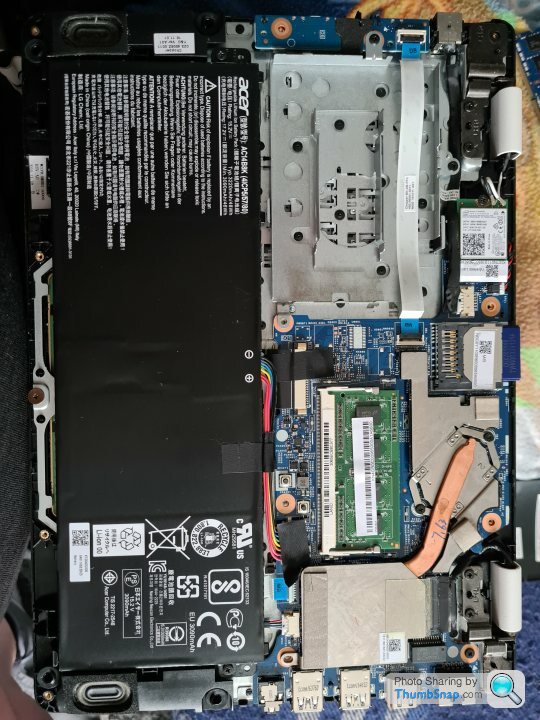
So i have an Acer Aspire R3 N15W5 notebook with 32gb flash memory, i was looking to change the hard drive for something a little bigger, however, after taking the back off, i cant see where it is, which makes me think its integrated into the motherboard.
Can someone confirm that, or if not, what im missing, thanks.
Soldered to the MB apparently and unswappable: https://www.mcbsys.com/blog/2015/09/aspire-r11-r3-...
ETA does it have a card reader? If so the quickest solution would be to buy a high capacity SD card. Good luck.
ETA does it have a card reader? If so the quickest solution would be to buy a high capacity SD card. Good luck.
parabolica said:
Soldered to the MB apparently and unswappable: https://www.mcbsys.com/blog/2015/09/aspire-r11-r3-...
ETA does it have a card reader? If so the quickest solution would be to buy a high capacity SD card. Good luck.
Thanks, Have been using an SD card as well, but struggling to do updates now as there is only 4gb space, and cant clear anymore space, gonna look to see if I can install windows on the SD card, and have it boot from there.ETA does it have a card reader? If so the quickest solution would be to buy a high capacity SD card. Good luck.
ArsE82 said:
Isn’t that a standard drive bay in grey? Pop an SSD in?
I followed the links from the first reply - you end up needing to solder connectors to the motherboard.I've a Win 10 laptop with a 32 GB embedded flash drive. I accept that for every spring feature update it is a wipe and reinstall. Fortunately it only really gets used as an RDP client, with some web browsing, so that isn't too annoying.
Get a decent capacity SD card and mount it as a local drive in Windows.
https://www.easeus.com/partition-manager-software/...
https://www.easeus.com/partition-manager-software/...
sgrimshaw said:
Get a decent capacity SD card and mount it as a local drive in Windows.
https://www.easeus.com/partition-manager-software/...
Already done that, but its not helping with the updates, as they need 8gb on the C: and windows is taking up 27gb.https://www.easeus.com/partition-manager-software/...
Gassing Station | Computers, Gadgets & Stuff | Top of Page | What's New | My Stuff