
Advice on making a 2013 MacBook Air into Win10 PC
Discussion


Hello,
Have an old MacBook Air, was collecting dust in a Hubbard as can no longer be updated beyond El Capitan, kept as a back up. I need to update some kits firmware which can only be done using windows and I'd quite like to have a windows device for this in future.
Initial plan was to use bootcamp, but it wasn't liking Windows 10, it woudn't create a boot drive, I tried every blog and YouTube video, and eventually took advice of a mate, to just make the machine into a windows 10 device using a bootable USB drive. He said it was easy.
He suggested Etcher which he uses on PC, but when I tried it on Mac, it came up with an error

After watching a lot of YouTube videos and searching, this looked promising:
https://www.youtube.com/watch?v=A4LgzMaYCQk
I followed this, seemed to work, I booted the MacBook into USB which worked, I deleted all the partitions for MacOSX, but then it also failed due to missing files.
I just tried to follow the terminal instructions here: https://www.switchingtomac.com/tutorials/how-to-cr...
But got:
sent 6.22G bytes received 20.32K bytes 93.49M bytes/sec
total size is 6.22G speedup is 1.00
rsync error: some files could not be transferred (code 23) at /AppleInternal/BuildRoot/Library/Caches/com.apple.xbs/Sources/rsync/rsync-54.120.1/rsync/main.c(996) [sender=2.6.9]
I'm starting to get a little bit frustrated, I haven't done anything like this for years, so starting from scratch it's really easy to get stuck and not know what isn't working.
Anyone made and older Mac into a PC and got any advice on how to do it?
My main Mac is on Catalina and that's the only way I can make a bootable USB.
Thanks in advance. I'm going out for a walk in the sun for a minute.
Have an old MacBook Air, was collecting dust in a Hubbard as can no longer be updated beyond El Capitan, kept as a back up. I need to update some kits firmware which can only be done using windows and I'd quite like to have a windows device for this in future.
Initial plan was to use bootcamp, but it wasn't liking Windows 10, it woudn't create a boot drive, I tried every blog and YouTube video, and eventually took advice of a mate, to just make the machine into a windows 10 device using a bootable USB drive. He said it was easy.
He suggested Etcher which he uses on PC, but when I tried it on Mac, it came up with an error
After watching a lot of YouTube videos and searching, this looked promising:
https://www.youtube.com/watch?v=A4LgzMaYCQk
I followed this, seemed to work, I booted the MacBook into USB which worked, I deleted all the partitions for MacOSX, but then it also failed due to missing files.
I just tried to follow the terminal instructions here: https://www.switchingtomac.com/tutorials/how-to-cr...
But got:
sent 6.22G bytes received 20.32K bytes 93.49M bytes/sec
total size is 6.22G speedup is 1.00
rsync error: some files could not be transferred (code 23) at /AppleInternal/BuildRoot/Library/Caches/com.apple.xbs/Sources/rsync/rsync-54.120.1/rsync/main.c(996) [sender=2.6.9]
I'm starting to get a little bit frustrated, I haven't done anything like this for years, so starting from scratch it's really easy to get stuck and not know what isn't working.
Anyone made and older Mac into a PC and got any advice on how to do it?
My main Mac is on Catalina and that's the only way I can make a bootable USB.
Thanks in advance. I'm going out for a walk in the sun for a minute.
handbraketurn said:
Hello,
Have an old MacBook Air, was collecting dust in a Hubbard as can no longer be updated beyond El Capitan,
You sure about that? https://en.wikipedia.org/wiki/MacBook_Air#Second_g... says the 2013 variant tops out at Big Sur, which is the latest OS. The version before stops at Catalina, which is also still supported.Have an old MacBook Air, was collecting dust in a Hubbard as can no longer be updated beyond El Capitan,
xeny said:
handbraketurn said:
Hello,
Have an old MacBook Air, was collecting dust in a Hubbard as can no longer be updated beyond El Capitan,
You sure about that? https://en.wikipedia.org/wiki/MacBook_Air#Second_g... says the 2013 variant tops out at Big Sur, which is the latest OS. The version before stops at Catalina, which is also still supported.Have an old MacBook Air, was collecting dust in a Hubbard as can no longer be updated beyond El Capitan,
I've got a new MacBook Air and the hinge for the screen is loose on this one anyway, so I have no use for it as a Mac now, other than as a back up if I lost/broke my main one.
Fishlegs said:
I did similar, but with Fedora33. It works perfectly. Just another option if you don't specifically need Windows installed.
I'll look into that. I did try VMware, but found it quite glitchy and slow, and the software to adjust the device didn't work very well and was difficult to see. HRL said:
If you Google Win 10 Download and visit the MS link, does it allow you to make a bootable USB stick from the link there?
Or does that only work from Windows?
When I select 64bit, it just automatically downloads an ISO. Or does that only work from Windows?
I've just use the video link I posted above again but only coping the files, and it does boot into the initial screen, but then this happens, so that doesn't work either.

Perhaps I need to re-install OSX and do a parallel job.
Does this help (I think you say you have the Mac booted to Windows from USB?):
https://www.howtogeek.com/195530/how-to-convert-a-...
You need to get shot of the EFI partition and then reinitialise and format as NTFS as Windows won't play nicely with an HFS+ formatted drive.
If you don't have a bootable USB, does this help?
https://www.freecodecamp.org/news/how-make-a-windo...
https://www.howtogeek.com/195530/how-to-convert-a-...
You need to get shot of the EFI partition and then reinitialise and format as NTFS as Windows won't play nicely with an HFS+ formatted drive.
If you don't have a bootable USB, does this help?
https://www.freecodecamp.org/news/how-make-a-windo...
Edited by stemll on Monday 5th April 18:15
stemll said:
Does this help (I think you say you have the Mac booted to Windows from USB?):
https://www.howtogeek.com/195530/how-to-convert-a-...
You need to get shot of the EFI partition and then reinitialise and format as NTFS as Windows won't play nicely with an HFS+ formatted drive.
If you don't have a bootable USB, does this help?
https://www.freecodecamp.org/news/how-make-a-windo...
https://www.howtogeek.com/195530/how-to-convert-a-...
You need to get shot of the EFI partition and then reinitialise and format as NTFS as Windows won't play nicely with an HFS+ formatted drive.
If you don't have a bootable USB, does this help?
https://www.freecodecamp.org/news/how-make-a-windo...
Edited by stemll on Monday 5th April 18:15

YESH! The second link you've posted says :-
Update April 2020: One of the files in the Windows 10 ISO – install.wim – is now too large to copy over to a FAT-32 formatted USB drive. So I'll show you how to copy it over separately.
This seems to be the problem, it was not copying all the files over with all other methods. And Etcher does not appear to support Win10 ATM.
That one worked like a treat, went through the whole install process in about 5 mins.
Now have a MacBook Air 2012 running Windows 10!
Thanks a million, wasted most of my bank holiday doing this, stubborn! haha.
Really appreciate everyones advice!!!
handbraketurn said:
Not sure TBH. If I search for updates, it says there aren't any?.
For anyone else's reference, you can feed the serial no into https://support.apple.com/en-gb/HT201862 and it will confirm the version. The wikipedia page then tells you the most recent OS X version supported.Then download from https://support.apple.com/en-gb/HT211683
The store will only offer the most recent OS as an upgrade, so if it's actually supported to Catalina, the store probably won't offer it as an update.
xeny said:
handbraketurn said:
Not sure TBH. If I search for updates, it says there aren't any?.
For anyone else's reference, you can feed the serial no into https://support.apple.com/en-gb/HT201862 and it will confirm the version. The wikipedia page then tells you the most recent OS X version supported.Then download from https://support.apple.com/en-gb/HT211683
The store will only offer the most recent OS as an upgrade, so if it's actually supported to Catalina, the store probably won't offer it as an update.
Now I've updated the firmware, I'll see if I can get OSX back on with latest version and get bootcamp to work.
Quite alot of driver issues with Windows on the Mac, including the network card, making it hard to get new drivers.
SCEtoAUX said:
Sell the Macbook, buy a Windows Laptop.
Got a loose hinge for screen so it wobbles about and a few dents, camera also damaged, doubt I'd get much for it, and been advised by a friend, the hing not fixable. However, at the time of starting this, I thought it would be pretty straight forwards and the quickest/cheapest route to update the firmware on my Sim Rig, which is all I wanted to actually do yesterday. Just ended up being a longer process than I'd first imagined and got stuck several times. 
Most importantly, rig fully updated:
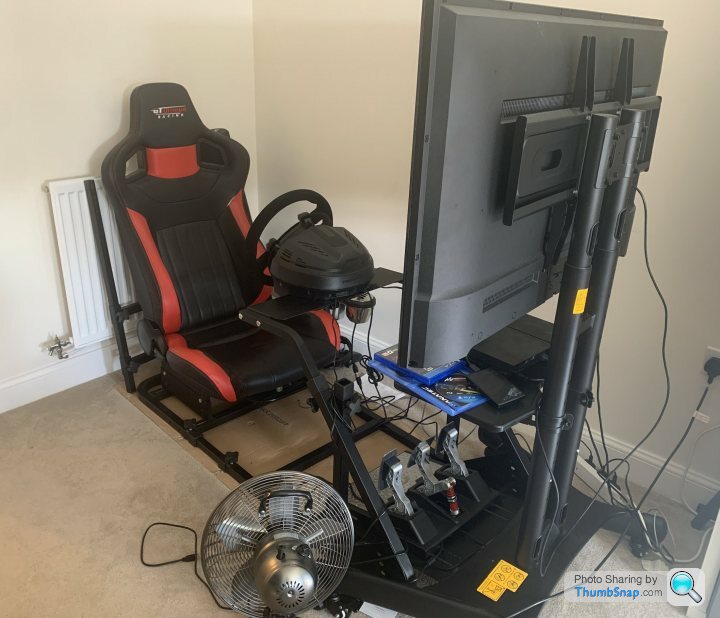

To conclude this thread, in the (fairly unlikely) event anyone searches for this topic in the future for a Mid 2013 MacBook Air and dual boot.
@xeny was right, I managed to download a fresh OSX last night and update to Big Sur (the latest OSX) via App Store, it was quick and easy.
And then installed Windows 10 with Bootcamp, which was also seamless.
The reason I was having trouble creating a bootable USB is that Windows 10 ISO – "install.wim" is now too large to copy over to a FAT-32 formatted USB drive from OSX. The earlier versions of Bootcamp are set up for windows 7. So I used the terminal technique described in this link, posted by Xeny, which splits the file into two to work around it, which successfully created a bootable Win10 USB.
https://www.freecodecamp.org/news/how-make-a-windo...
I'm sure the Big Sur Bootcamp option to create a bootable USB Drive works, but given the hassle I'd been through to create one which was functional, I didn't try and used the existing one. Bootcamp also downloaded the additional files and the whole process took about 30 mins.
I now have a fully functional OSX Big Sur, with Bootcamp Windows 10, also working seamlessly.
You can put windows on as the main OS using a bootable USB, but I wouldn't advise it, as it doesn't work very well and lots of driver issues to deal with, right click doesn't work on the track pad, which bootcamp or virtual machines sort out for you.
Big thanks everyone for the input and Xeny for the solution, really helpful.

Edited by handbraketurn on Tuesday 6th April 16:56
Gassing Station | Computers, Gadgets & Stuff | Top of Page | What's New | My Stuff