
Connection denied by Geolocation Setting
Discussion


All,
I am trying to log in to a website who's certificate has expired, however, I need to log in to make a payment.
Anyway, when trying to access the site, I receive the following error:
Connection denied by Geolocation Setting
Reason: Blocked Country: United States
The connection was denied because this country is blocked in the Geolocation settings.
WatchGuard Technologies Inc
I have no idea what this is - I do not appear to have WatchGuard installed and can't find geolocation settings on my machine.
I'm using Windows 10 and Chrome.
Any idea how I can amend or better still remove this? Or is it their end?
Thanks
Chris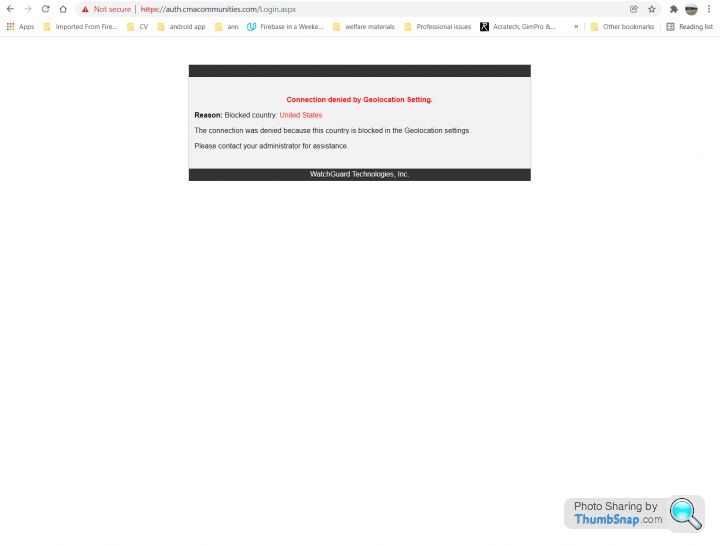
I am trying to log in to a website who's certificate has expired, however, I need to log in to make a payment.
Anyway, when trying to access the site, I receive the following error:
Connection denied by Geolocation Setting
Reason: Blocked Country: United States
The connection was denied because this country is blocked in the Geolocation settings.
WatchGuard Technologies Inc
I have no idea what this is - I do not appear to have WatchGuard installed and can't find geolocation settings on my machine.
I'm using Windows 10 and Chrome.
Any idea how I can amend or better still remove this? Or is it their end?
Thanks
Chris
Edited by toohuge on Friday 31st December 11:41
They are hosting the website behind a watchguard firewall which has geo restrictions enabled.
Your IP address might be in one in the geo ip database as US based, seeing this more often with small isps struggling to get ip ranges in the uk so they end up buying us IP address, takes a little which for the geo records to be update to the uk in all geo databases.
Your IP address might be in one in the geo ip database as US based, seeing this more often with small isps struggling to get ip ranges in the uk so they end up buying us IP address, takes a little which for the geo records to be update to the uk in all geo databases.
toohuge said:
I am not in the USA no....
I have tried a VPN, but I can't seem to get UrbanVPN to work, it connects, but no internet connection from there after.
Try a different VPN. I’ve just tried with Express VPN (I set the VPN location to USA - New York) and it works absolutely fine.I have tried a VPN, but I can't seem to get UrbanVPN to work, it connects, but no internet connection from there after.
It looks like the message is backwards. The site is for a US property management company, and they're trying to block access to visitors from other countries (e.g, the UK),
As you've found, a US-based VPN that spoofs your location as being in the US will solve it.
Sometimes this is because of stuff like GDPR regulations. https://nordvpn.com/blog/gdpr-geo-blocking-vpn/
As you've found, a US-based VPN that spoofs your location as being in the US will solve it.
Sometimes this is because of stuff like GDPR regulations. https://nordvpn.com/blog/gdpr-geo-blocking-vpn/
silentbrown said:
It looks like the message is backwards. The site is for a US property management company, and they're trying to block access to visitors from other countries (e.g, the UK),
As you've found, a US-based VPN that spoofs your location as being in the US will solve it.
Sometimes this is because of stuff like GDPR regulations. https://nordvpn.com/blog/gdpr-geo-blocking-vpn/
Yep, that seems to be the case!As you've found, a US-based VPN that spoofs your location as being in the US will solve it.
Sometimes this is because of stuff like GDPR regulations. https://nordvpn.com/blog/gdpr-geo-blocking-vpn/
toohuge said:
...
I have to ask - what's the point of a website like this with location restrictions!? Doesn't that defeat the purpose of a website?
There are plenty of services that can only be used by nationals of a given country.I have to ask - what's the point of a website like this with location restrictions!? Doesn't that defeat the purpose of a website?
As an example, the national lottery site here always asks me to confirm my location...I'm using a mobile broadband solution so I guess they must throw this up for anyone using a mobile provider's network JIC.
I guess it's possible that the message is actually telling you that the only countries allowed are the "US".
silentbrown said:
It looks like the message is backwards. The site is for a US property management company, and they're trying to block access to visitors from other countries (e.g, the UK),
As you've found, a US-based VPN that spoofs your location as being in the US will solve it.
Sometimes this is because of stuff like GDPR regulations. https://nordvpn.com/blog/gdpr-geo-blocking-vpn/
Watchguard have had a bug for a while that shows the country of destination rather than origin by mistake when geoblocking.As you've found, a US-based VPN that spoofs your location as being in the US will solve it.
Sometimes this is because of stuff like GDPR regulations. https://nordvpn.com/blog/gdpr-geo-blocking-vpn/
Gassing Station | Computers, Gadgets & Stuff | Top of Page | What's New | My Stuff