
Win 11 MediaCreationTool . bat
Discussion


Following on from here: https://www.pistonheads.com/gassing/topic.asp?h=0&... I'm trying to get some Win 11 media to have a play on a non-essential machine (ie a spare one doing nothing). I've visited the github page (never had much success with any code from here to be honest...), found the actual bat file - tried downloading it by 'save as' - didn't work, so I've copied the code directly (using the tool within the github page) and pasted it into a txt file ensuring I've got a .bat extension not a .txt extension.
I've tried it as administrator and as a non administrator, it does something, but it's soo quick, it doesn't give me chance to read what's going on. Suffice to say, it's not creating an ISO as my WiFi is showing no download activity. All the bat file has done, is to create a shortcut to the github page!
I've edited the file to remove one of the rem 'words' leaving the rest of the line ( this one: ::# uncomment to start create iso directly in current folder - or rename script: "iso 20H2 MediaCreationTool.bat"
set /a ISO=1) still no joy.
What am I doing wrong?
I'm trying to create Win 11 media (an ISO) that I can then burn to a pen drive. I'm doing this on a Win 10 64bit machine.
As far as I can make out, I get the blue window but don't get any of the 3 white windows (one behind and 2 in front).
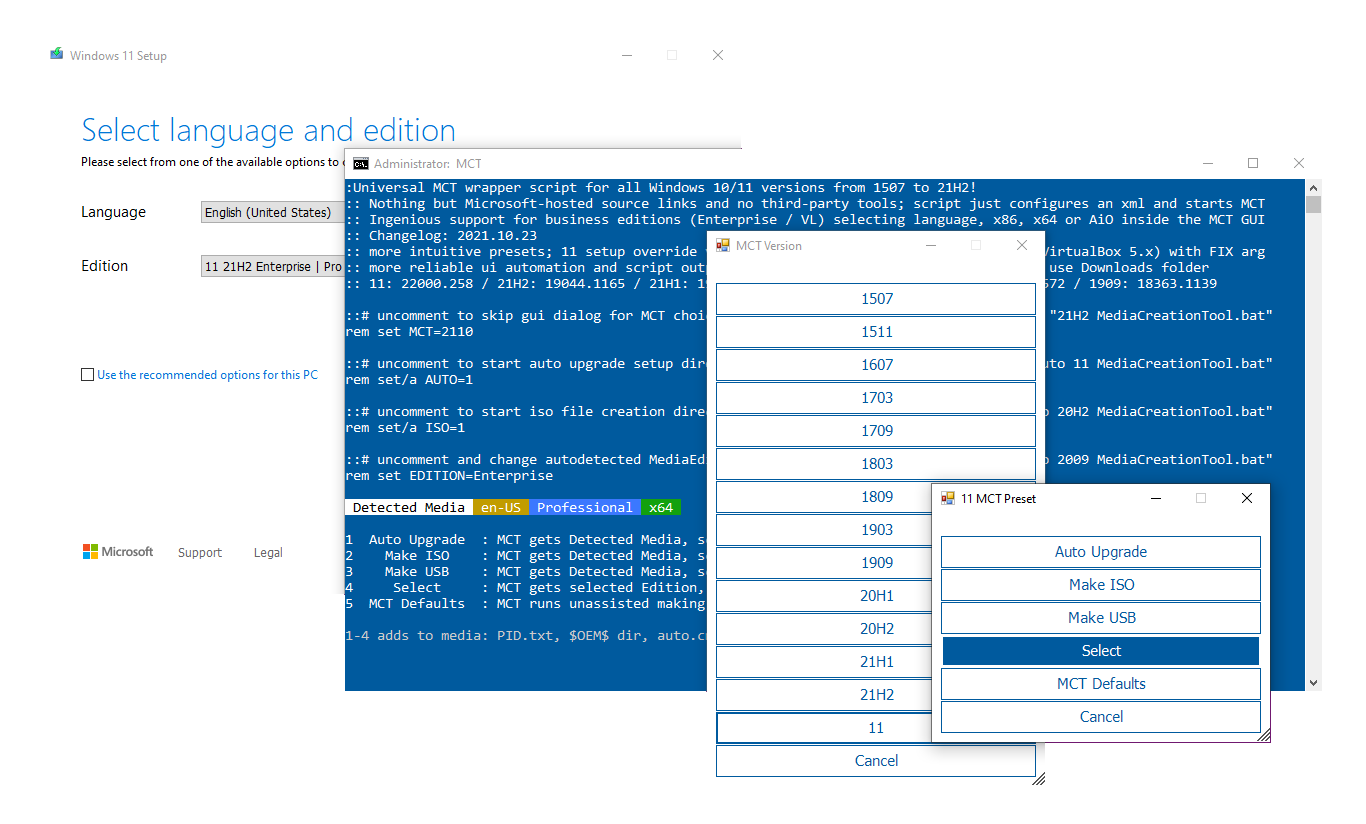
I've tried it as administrator and as a non administrator, it does something, but it's soo quick, it doesn't give me chance to read what's going on. Suffice to say, it's not creating an ISO as my WiFi is showing no download activity. All the bat file has done, is to create a shortcut to the github page!
I've edited the file to remove one of the rem 'words' leaving the rest of the line ( this one: ::# uncomment to start create iso directly in current folder - or rename script: "iso 20H2 MediaCreationTool.bat"
set /a ISO=1) still no joy.
What am I doing wrong?
I'm trying to create Win 11 media (an ISO) that I can then burn to a pen drive. I'm doing this on a Win 10 64bit machine.
As far as I can make out, I get the blue window but don't get any of the 3 white windows (one behind and 2 in front).
Edited by S6PNJ on Thursday 3rd February 13:08
I'm presuming you've downloaded the ISO? Have you tried simply using rufus to burn the stick? I think that makes the changes automatically.
https://rufus.ie/en/
see 3.16 at https://github.com/pbatard/rufus/blob/master/Chang...
https://rufus.ie/en/
see 3.16 at https://github.com/pbatard/rufus/blob/master/Chang...
What's wrong with using the official Windows 11 Media Creation Tool?
Is this for an unsupported processor?
Is this for an unsupported processor?
mmm-five said:
What's wrong with using the official Windows 11 Media Creation Tool?
Is this for an unsupported processor?
The original thread mentions it is for unsupported hardware.Is this for an unsupported processor?
xeny said:
mmm-five said:
What's wrong with using the official Windows 11 Media Creation Tool?
Is this for an unsupported processor?
The original thread mentions it is for unsupported hardware.Is this for an unsupported processor?

Download the whole kit here: https://github.com/AveYo/MediaCreationTool.bat/arc...
It's as clear as mud but you need all of it
It's as clear as mud but you need all of it
 - now downloading and creating the ISO for rufus burning later (I'm a long standing rufus user!)
Gassing Station | Computers, Gadgets & Stuff | Top of Page | What's New | My Stuff