
Is this my BT master socket?
Discussion


Evening all.
New house and the broadband is being temperamental, the supplier agrees and says there is a fault somewhere - they’re sending a new router and cables out to see if that makes any difference.
They’re very keen I use this in my master socket - presumably to see if the fault is with me or BT(?).
This seems to be it but if it is I’m guessing it’s very old, behind it is a nest of teeny tiny wires and no test socket.

Anyone in the know able to give their thoughts? The 2nd cable coming off it goes to an extension in another room, 99% sure.
Cheers
New house and the broadband is being temperamental, the supplier agrees and says there is a fault somewhere - they’re sending a new router and cables out to see if that makes any difference.
They’re very keen I use this in my master socket - presumably to see if the fault is with me or BT(?).
This seems to be it but if it is I’m guessing it’s very old, behind it is a nest of teeny tiny wires and no test socket.
Anyone in the know able to give their thoughts? The 2nd cable coming off it goes to an extension in another room, 99% sure.
Cheers

Just popped the front off and it’s blue however the cable coming up and in (we don’t have telegraph poles) looks to be armoured of sorts (the grey fuzzy thing in the background, red arrow) - so I’m guessing that’s what’s come under and in from the little (old) black box down the side of the front door steps.
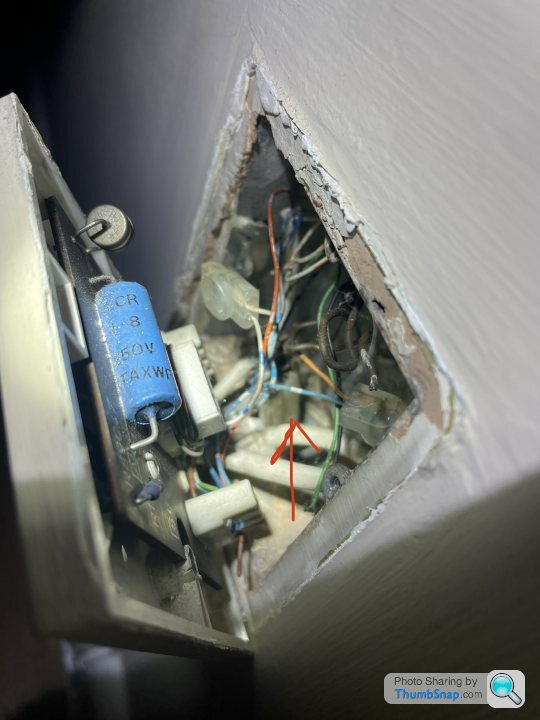
Should these sockets be replaced when they get to a very old age or do you not bother unless something breaks?
Cheers
Should these sockets be replaced when they get to a very old age or do you not bother unless something breaks?
Cheers
Hi. That looks to be your master socket or rather where the external cable first enters the property , I would probably ask your service provider for a visit to eliminate any issues within the home as the route cause , they should also change that socket to nte5c, the one there is very old (telecom logo prior to the bt piper logo)
What’s the state of the wiring leading to the extension? Is the extension in use as that can cause issues if under a trodden carpet etc. I see the crimps also , any chance of a better pic ?
( I used to be a field engineer for openreach)
Edit ; just had another look at the pic. There’s a lot going on there. It’s known as “star wiring” basically you just want one copper pair going to the socket that the router plugs in to, extensions can play havoc with broadband and throttle it .. is Fttp available in your area yet ?
Yours is probably a similar set up to this.
https://community.bt.com/t5/Archive-Staging/Wiring...
What’s the state of the wiring leading to the extension? Is the extension in use as that can cause issues if under a trodden carpet etc. I see the crimps also , any chance of a better pic ?
( I used to be a field engineer for openreach)
Edit ; just had another look at the pic. There’s a lot going on there. It’s known as “star wiring” basically you just want one copper pair going to the socket that the router plugs in to, extensions can play havoc with broadband and throttle it .. is Fttp available in your area yet ?
Yours is probably a similar set up to this.
https://community.bt.com/t5/Archive-Staging/Wiring...
Edited by dotty on Monday 7th February 23:16
Thanks Dotty that’s all v helpful.
Fttp not available here yet I’m afraid Zen are sending out new router kit and I presume running from that socket will show which side any fault is on.
I have a hunch it’ll come down to either there being a proper fault BT side or just the fact the wiring set up is old hat and as per your link, s te for broadband.
When we first moved in Zen said we should be able to get a faster speed than we were getting (which was sufficient anyway), I wonder if the wiring is the cause. The wiring set up looks near identical to that in the link you shared - basically a spider web of mess and connectors.
If it turns out to be a fault BT-side (as far as Zen are concerned anyway) I’m guessing a fault report is made to BT who come and have a poke around? Me paying the call out if they find nothing.
Thanks again
Fttp not available here yet I’m afraid
Zen are sending out new router kit and I presume running from that socket will show which side any fault is on.I have a hunch it’ll come down to either there being a proper fault BT side or just the fact the wiring set up is old hat and as per your link, s
te for broadband.When we first moved in Zen said we should be able to get a faster speed than we were getting (which was sufficient anyway), I wonder if the wiring is the cause. The wiring set up looks near identical to that in the link you shared - basically a spider web of mess and connectors.
If it turns out to be a fault BT-side (as far as Zen are concerned anyway) I’m guessing a fault report is made to BT who come and have a poke around? Me paying the call out if they find nothing.
Thanks again
You mentioned a little black junction box outside, have a look inside and make sure the connections are good and not corroded. I would also remove all the extension wires and test with only the master socket. If you can I would replace the master socket with new, you can get them at Screwfix.
I was going to suggest removing the extns as well. I did copper B/B for years and whilst it's sometimes straight forward such as removing extn wiring most of the time there are other factors involved. If your lucky, you might just be able pull off the wiring that's not required otherwise you'll need a tool like this

Or the cheaper alternative

Or the cheaper alternative
S17Thumper said:
If it turns out to be a fault BT-side (as far as Zen are concerned anyway) I’m guessing a fault report is made to BT who come and have a poke around? Me paying the call out if they find nothing.
Yep, if you want. I've had the engineers out loads, never a hint of being charged from them, I don't think they care they've all just wanted to help fix the issue. I assume the call out fee threat is mostly just to deter people who mess them around. I'd imagine the odds of that socket getting replaced are high.S17Thumper said:
Thanks Dotty that’s all v helpful.
Fttp not available here yet I’m afraid Zen are sending out new router kit and I presume running from that socket will show which side any fault is on.
I have a hunch it’ll come down to either there being a proper fault BT side or just the fact the wiring set up is old hat and as per your link, ste for broadband.
When we first moved in Zen said we should be able to get a faster speed than we were getting (which was sufficient anyway), I wonder if the wiring is the cause. The wiring set up looks near identical to that in the link you shared - basically a spider web of mess and connectors.
If it turns out to be a fault BT-side (as far as Zen are concerned anyway) I’m guessing a fault report is made to BT who come and have a poke around? Me paying the call out if they find nothing.
Thanks again
Feel free to drop me an email. I may be able to help ..Fttp not available here yet I’m afraid
Zen are sending out new router kit and I presume running from that socket will show which side any fault is on.I have a hunch it’ll come down to either there being a proper fault BT side or just the fact the wiring set up is old hat and as per your link, s
te for broadband.When we first moved in Zen said we should be able to get a faster speed than we were getting (which was sufficient anyway), I wonder if the wiring is the cause. The wiring set up looks near identical to that in the link you shared - basically a spider web of mess and connectors.
If it turns out to be a fault BT-side (as far as Zen are concerned anyway) I’m guessing a fault report is made to BT who come and have a poke around? Me paying the call out if they find nothing.
Thanks again
buggalugs said:
I ordered a new master socket off ebay and it was less hassle to fit than mithering on the phone with BT. I would also disconnect all your extensions at this point unless you're using them. Take lots of photos of how things are now before disturbing.
The latest ones currently being fitted by Openreach have toolless push in connections so you only need a Phillips screwdriver.After the supplier sending some test kit out (the router was a few years old), tests showing no change, they sent out Openreach…
They replaced the socket with a 5C and I’m now getting 50% higher download and upload speeds, seems stable too. No charge either.
Happy days.
They replaced the socket with a 5C and I’m now getting 50% higher download and upload speeds, seems stable too. No charge either.
Happy days.
Edited by S17Thumper on Monday 14th February 10:42
When I moved into my current house I'd get awful BB speeds through the one extension I could plug the router into (hallway socket is nowhere near power)
After reading up on it and working out how simple it is, I found the incoming feed to the house, which joined straight onto the internal wiring then off to the master socket. Hooked a length of cat5e up to that incoming connection with new jelly crimps as used by BT, then ran that through the house to behind the TV and fitted a master socket with filtered ADSL faceplate and chucked it all behind the TV. Instant 15mb increase!
Now I'm using 4g I chopped my new cable back to the master socket and looped it insaide but didn't connect anything back up. When I move out I might re-connect it all up for the new tenants...
A krone punchdown tool is best, but a stanley blade can work too (can also just chop the cable/finger too if your not careful!
After reading up on it and working out how simple it is, I found the incoming feed to the house, which joined straight onto the internal wiring then off to the master socket. Hooked a length of cat5e up to that incoming connection with new jelly crimps as used by BT, then ran that through the house to behind the TV and fitted a master socket with filtered ADSL faceplate and chucked it all behind the TV. Instant 15mb increase!
Now I'm using 4g I chopped my new cable back to the master socket and looped it insaide but didn't connect anything back up. When I move out I might re-connect it all up for the new tenants...
A krone punchdown tool is best, but a stanley blade can work too (can also just chop the cable/finger too if your not careful!
Gassing Station | Computers, Gadgets & Stuff | Top of Page | What's New | My Stuff