
PC Cooling - Side Panel Fan as Intake or Exhaust?
Discussion


Have a Ryzen 3600 / Radeon 5600XT system built into an old Cooler Master CM690 II case, its all working fine but the direction of the side fan is bugging me...
The video card more or less divides the case into a top and bottom compartment, it pulls air in from the bottom and then vents it out the top edge of the card towards the side panel. The side fan is positioned mostly underneath the card with some overlap on the top and is currently an intake.
I understand that's is the done thing to have it this but wondering if it would work better as an exhaust?
The idea behind this is as an intake whilst it may be blowing air towards the GPU fan and over the back of the card its also pushing the hot air vented from the card back into the heatsink meaning the side fan and GPU fan are fighting each other and the benefit of cold air over the back of the card is also reduced.
I'm thinking that if the side fan an exhaust then the hot air from the GPU heatsink is being drawn away from the card rather than back towards it and there will be still be some airflow over the back of the card as the side fan will pull it from elsewhere, the concern is the fan on the GPU will struggle to against the side fan to push enough air into the heatsink.
Attached is rough layout of the case and current fans, the purple square is the the side fan - there's fixing holes / vents for another fan above but due to a tall CPU cooler there is not quite enough clearance.
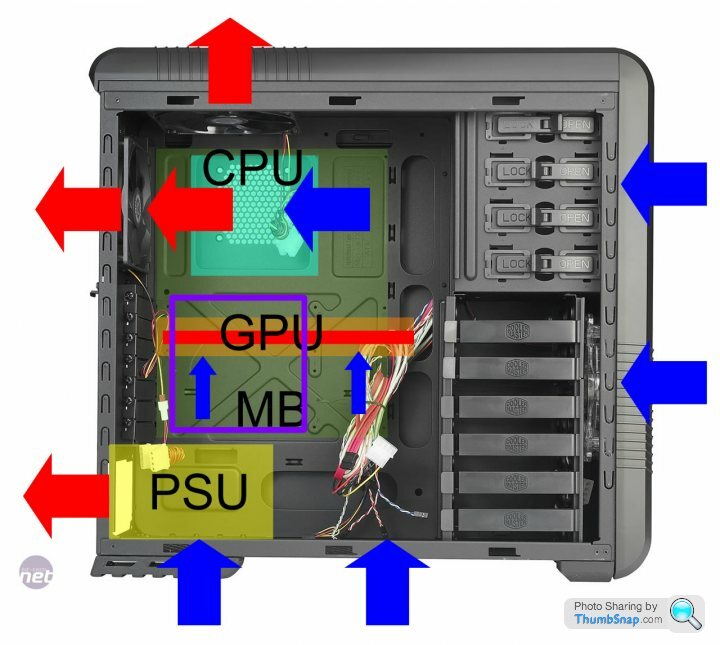
The video card more or less divides the case into a top and bottom compartment, it pulls air in from the bottom and then vents it out the top edge of the card towards the side panel. The side fan is positioned mostly underneath the card with some overlap on the top and is currently an intake.
I understand that's is the done thing to have it this but wondering if it would work better as an exhaust?
The idea behind this is as an intake whilst it may be blowing air towards the GPU fan and over the back of the card its also pushing the hot air vented from the card back into the heatsink meaning the side fan and GPU fan are fighting each other and the benefit of cold air over the back of the card is also reduced.
I'm thinking that if the side fan an exhaust then the hot air from the GPU heatsink is being drawn away from the card rather than back towards it and there will be still be some airflow over the back of the card as the side fan will pull it from elsewhere, the concern is the fan on the GPU will struggle to against the side fan to push enough air into the heatsink.
Attached is rough layout of the case and current fans, the purple square is the the side fan - there's fixing holes / vents for another fan above but due to a tall CPU cooler there is not quite enough clearance.
Intake. I've tried variations and intake wins easily. You are actively blowing external cooler air on the GPU and to some extent, CPU, instead of passively drawing it over them by exhausting. With exhausting you are relying on positive air pressure inside the case to do most of the work, as sucking air over a larger area is far less efficient than blowing it over a targeted area in terms of localised air refreshing. Does that make sense? It's why almost all cooling fans blow over what they are cooling.
On my PC, and I'm a fan of low noise, it's in my lounge, I have one input on the front , one on the side ( blowing on the GPU and CPU), then the exhausts are one on the back, and the PSU, naturally. That works very well and with MOBO fan control, is almost silent, with the GPU fan making the most noise when gaming. I have one on the top too but it's turned off as I found it's not needed at all.
The trick to good and low noise cooling is using large fans, as I'm sure you know.
On my PC, and I'm a fan of low noise, it's in my lounge, I have one input on the front , one on the side ( blowing on the GPU and CPU), then the exhausts are one on the back, and the PSU, naturally. That works very well and with MOBO fan control, is almost silent, with the GPU fan making the most noise when gaming. I have one on the top too but it's turned off as I found it's not needed at all.
The trick to good and low noise cooling is using large fans, as I'm sure you know.
Edited by Griffith4ever on Wednesday 4th May 08:57
Correction, mine only has ONE exhaust fan, and that, is the PSU! :-) So mine has two active inputs and one active (small) exhaust. My case relies on the PUS exhaust fan, plus, all of the case natural venting (grills for unused fans, holes etc) to exhaust the air.
I remember doing the research now, when I built it. Sucking air out is fairly pointless as cases are so "porous" and you can't control where it flows on it's journed from outside, to in, to back out. Whereas you can control where it goes by blowing it in!
I remember being quite surprised the top exhaust fan was totally unnecessary, and quite relieved to remove some extra fan noise too.
All 120mm fans. The case fans are running at their lowest speed most of the time.
Rough pic from random internet PC pic.
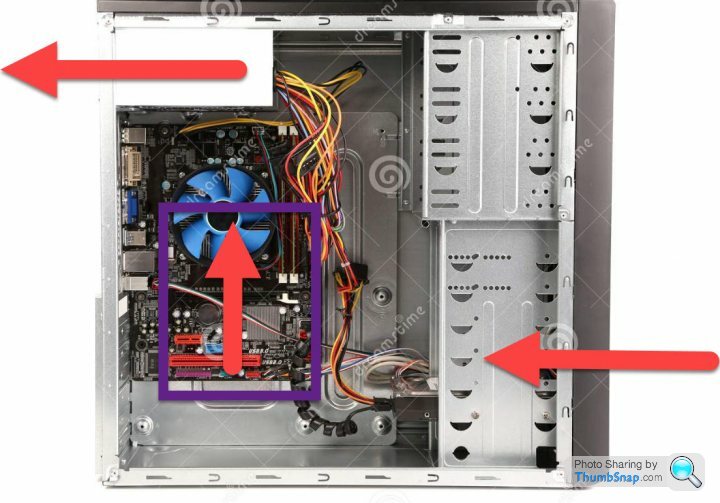
I remember doing the research now, when I built it. Sucking air out is fairly pointless as cases are so "porous" and you can't control where it flows on it's journed from outside, to in, to back out. Whereas you can control where it goes by blowing it in!
I remember being quite surprised the top exhaust fan was totally unnecessary, and quite relieved to remove some extra fan noise too.
All 120mm fans. The case fans are running at their lowest speed most of the time.
Rough pic from random internet PC pic.
Cheers for the detailed reply :-) I get exactly what you mean about directing air in and over the GPU.
For the sake of four screws I'm tempted to try it without a side fan though and see what happens - this way the card can vent hot air directly out the case via the fan vents. At the moment its blowing this air directly on to the side intake and I cant help but wonder if this is then just blowing it back into the heatsink and over the card.
Shame the card doesn't vent air out the back instead of back into to the case really.
For the sake of four screws I'm tempted to try it without a side fan though and see what happens - this way the card can vent hot air directly out the case via the fan vents. At the moment its blowing this air directly on to the side intake and I cant help but wonder if this is then just blowing it back into the heatsink and over the card.
Shame the card doesn't vent air out the back instead of back into to the case really.
Indeed - try both. Fitting the fan and plugging it into the Mobo isnt' exactly a big job :-)
You could run a GPU benchmark or similar, and monitor GPU, CPU, and case temp, with and without the extra side fan.
I'm fairly sure the former will win. However, I was wrong about needing a top case fan , so....
You could run a GPU benchmark or similar, and monitor GPU, CPU, and case temp, with and without the extra side fan.
I'm fairly sure the former will win. However, I was wrong about needing a top case fan , so....
I confidently predict it will make next to no real-world difference. Perhaps a couple of degrees either way when the system is under load, probably less. At most, it might reduce fan speed a bit, if you have a custom fan curve and also are really lucky.
Most modern PCs are hugely over-fanned, you really don't need many to keep the air moving nicely. Far more important is to consider the way the air is going to flow - for instance the way that most GPUs are configured these days, they blow hot air directly over the CPU. That's a much bigger issue than whether your fans suck or blow and the best thing I ever did for my CPU temperatures was to put a water block on my 3090FE. It's done bugger all for the GPU temps but my CPU runs 10 degrees cooler now.
Most modern PCs are hugely over-fanned, you really don't need many to keep the air moving nicely. Far more important is to consider the way the air is going to flow - for instance the way that most GPUs are configured these days, they blow hot air directly over the CPU. That's a much bigger issue than whether your fans suck or blow and the best thing I ever did for my CPU temperatures was to put a water block on my 3090FE. It's done bugger all for the GPU temps but my CPU runs 10 degrees cooler now.
Did some "experimenting" and whilst not very scientific the outcome was....
Side intake: GPU and CPU both a warmer than I'd have expected, re-applied thermal past to CPU cooler and no real difference.
No side fan: Both GPU and CPU a bit hotter.
Side exhaust: Big difference, GPU about 5c cooler and CPU about 10c cooler.
My theory is the side intake was just blowing hot air from the GPU back into the case all over itself and the CPU area / cooler.
Now that this air is being vented directly out the side the cooler air from the top intake isn't mixing with warm GPU air hence the cooler CPU, and the GPU is not recirculating its own warm air as the exhaust fan is removing it at source - the intakes at the lower front and case floor are providing a decent enough airflow to keep the GPU fed with fresh air.
Need to tweak the curves a little to quieten it down at idle but getting there :-)
Side intake: GPU and CPU both a warmer than I'd have expected, re-applied thermal past to CPU cooler and no real difference.
No side fan: Both GPU and CPU a bit hotter.
Side exhaust: Big difference, GPU about 5c cooler and CPU about 10c cooler.
My theory is the side intake was just blowing hot air from the GPU back into the case all over itself and the CPU area / cooler.
Now that this air is being vented directly out the side the cooler air from the top intake isn't mixing with warm GPU air hence the cooler CPU, and the GPU is not recirculating its own warm air as the exhaust fan is removing it at source - the intakes at the lower front and case floor are providing a decent enough airflow to keep the GPU fed with fresh air.
Need to tweak the curves a little to quieten it down at idle but getting there :-)
Gassing Station | Computers, Gadgets & Stuff | Top of Page | What's New | My Stuff