
Creating an A3 printable document?
Discussion


Sorry to be thick here, but I am failing to see how the following can be so difficult.
I'm using a well known 'ancestry' website to create my family tree for my dad. Unbelievably it does not have a 'print tree' option! Only to buy a canvas type wall hanging version.
So I thought I'd be clever and try and print it for him on my friends A3 printer. But all I seem to be able to do is take a screenshot, which when blown up to A3 is going to be horrible quality and even then is at completely the wrong dimensions for A3 and if I amend it it gets really badly distorted.
Am I missing something obvious??
I'm using a well known 'ancestry' website to create my family tree for my dad. Unbelievably it does not have a 'print tree' option! Only to buy a canvas type wall hanging version.
So I thought I'd be clever and try and print it for him on my friends A3 printer. But all I seem to be able to do is take a screenshot, which when blown up to A3 is going to be horrible quality and even then is at completely the wrong dimensions for A3 and if I amend it it gets really badly distorted.
Am I missing something obvious??
audi321 said:
Sorry to be thick here, but I am failing to see how the following can be so difficult.
I'm using a well known 'ancestry' website to create my family tree for my dad. Unbelievably it does not have a 'print tree' option! Only to buy a canvas type wall hanging version.
So I thought I'd be clever and try and print it for him on my friends A3 printer. But all I seem to be able to do is take a screenshot, which when blown up to A3 is going to be horrible quality and even then is at completely the wrong dimensions for A3 and if I amend it it gets really badly distorted.
Am I missing something obvious??
The ancestry website will make more money by selling you a canvas print, then they will by allowing you to print your own. I'm using a well known 'ancestry' website to create my family tree for my dad. Unbelievably it does not have a 'print tree' option! Only to buy a canvas type wall hanging version.
So I thought I'd be clever and try and print it for him on my friends A3 printer. But all I seem to be able to do is take a screenshot, which when blown up to A3 is going to be horrible quality and even then is at completely the wrong dimensions for A3 and if I amend it it gets really badly distorted.
Am I missing something obvious??
Pretty sure My Heritage lets you upload a gedcom file (created from Ancestry, for example) without paying a subscription (myheritage.com)
Their desktop software is definitely available for free:
http://www.myheritage.com/family-tree-builder
both web and desktop let you create loads of different charts and reports for printing at home.
Their desktop software is definitely available for free:
http://www.myheritage.com/family-tree-builder
both web and desktop let you create loads of different charts and reports for printing at home.
Sorry for late reply. Exported .ged file and imported into 'MyHeritage' program.........god that is from 1990 and horrible. No joy there.
Tried to export HTML and convert to .svg, that didn't work either.
Right clicking on the Chrome page is locked for 'save image' etc
I wouldn't mind but I pay bloody ancestry £20 a month and I can't even print the thing...........
Tried to export HTML and convert to .svg, that didn't work either.
Right clicking on the Chrome page is locked for 'save image' etc
I wouldn't mind but I pay bloody ancestry £20 a month and I can't even print the thing...........
eliot said:
hmmmm it might be but for some reason doesn't let me upload a .ged file..........I've even tried another couple of online convertors and they don't either.Mr Pointy said:
audi321 said:
Right clicking on the Chrome page is locked for 'save image' etc
Search the Chrome externsion store for "allow right click" - there are several extensions available.There's an open source genealogy program called GRAMPS which is pretty powerful. Bit of a learning curve, but worth it in the long run.
It'll import GED files, and there's a huge choice of report generators available within the application.
You might need to check everything obviously once you've imported the GED file from Ancestry.
I moved from Ancestry to GRAMPS a number of years ago, as I'd moved beyond the point where I was getting any value from Ancestry with their ongoing subscriptions.
It'll import GED files, and there's a huge choice of report generators available within the application.
You might need to check everything obviously once you've imported the GED file from Ancestry.
I moved from Ancestry to GRAMPS a number of years ago, as I'd moved beyond the point where I was getting any value from Ancestry with their ongoing subscriptions.
audi321 said:
Mr Pointy said:
audi321 said:
Right clicking on the Chrome page is locked for 'save image' etc
Search the Chrome externsion store for "allow right click" - there are several extensions available.audi321 said:
Sorry for late reply. Exported .ged file and imported into 'MyHeritage' program.........god that is from 1990 and horrible. No joy there.
Really?Maybe you need a membership to open up all the Chart Types ....
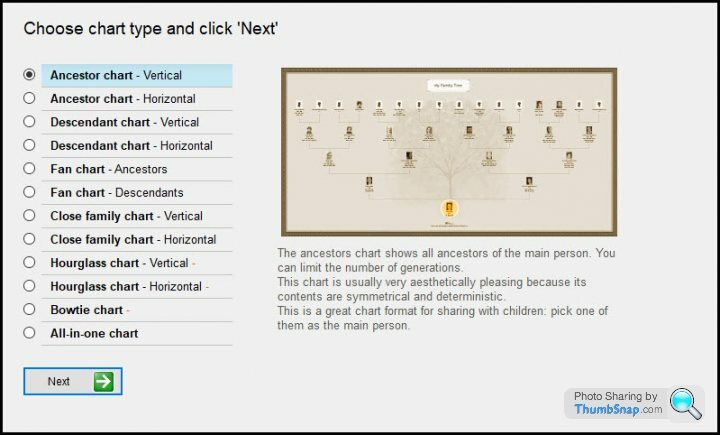
Under Chart Wizard do you see all these choices?
I created an ancestry chart, with just names as an example:
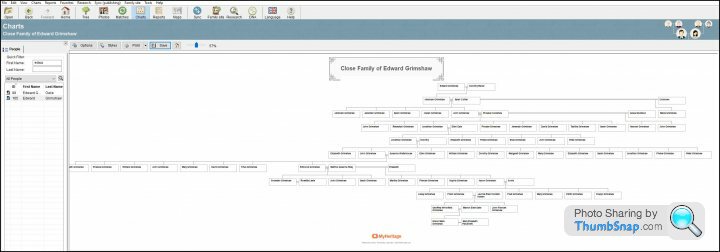
It allows saving to pdf for printing etc, I can send it you if you want to see what it looks like.
Gassing Station | Computers, Gadgets & Stuff | Top of Page | What's New | My Stuff