
Macbook Air M2 - need some help please on attaching stuff
Discussion


Hi, just ordered the 2023 Macbook Air M2 15" (arriving Thursday) and I'm a bit confused as to how I will attach my external stuff like printer, barcode scanner, and another printer. I have 3 bits of equipment with standard USB leads. What do I need and how do I attach them to this Macbook Air? Thanks
Something like this: https://www.anker.com/uk/products/a8346?ref=naviMe...
Anker do a range as do others. Just make sure you get one with necessary ports you need (USB, HDMI etc etc).
Anker do a range as do others. Just make sure you get one with necessary ports you need (USB, HDMI etc etc).
Thanks,
I've just had a look on Amazon. There's too many different types! Is it possible to buy something that will attach 3 or more standard USB devices to the new Macbook Air? Am I right in thinking i need to Google "USB to Thunderbolt Macbook Air M2 2023" or something like that?
Sorry for the dim questions.. i hate computers and tech
I've just had a look on Amazon. There's too many different types! Is it possible to buy something that will attach 3 or more standard USB devices to the new Macbook Air? Am I right in thinking i need to Google "USB to Thunderbolt Macbook Air M2 2023" or something like that?
Sorry for the dim questions.. i hate computers and tech
Condi said:
Thanks Condi. I'm not sure that has the old school type of USB ports does it? I am amazed at how f king confusing this is.
edited to add - do i need to search for Thunderbolt or USB 4?
Phooey said:
Thanks Condi. I'm not sure that has the old school type of USB ports does it? I am amazed at how fking confusing this is.
edited to add - do i need to search for Thunderbolt or USB 4?
It might help if you tell us what you mean by 'old type USB ports'.king confusing this is.edited to add - do i need to search for Thunderbolt or USB 4?
Unless you're connecting to something that needs Thunderbolt, then there's no point paying the huge premium for it. Just get a USB-C to USB-A hub (such as the one already linked). Otherwise you may end up with one of these (Caldigit TS4)...which will work, but will just cost £300 more than you need to spend.
Edited by mmm-five on Tuesday 16th January 16:29
mmm-five said:
It might help if you tell us what you mean by 'old type USB ports'.
Thanks for reply. This is a product (below) i use on my 2015 Macbook Pro to connect up to 4 devices. My equipment (printer etc) has these type USB. Are they USB3?https://www.amazon.co.uk/gp/product/B07L32B9C2/ref...
edited to add - I'm assuming i need to Google USB3 to USB4 / Thunderbolt?
edited to add 2 - I was hoping for an Anker product
Edited by Phooey on Tuesday 16th January 16:29
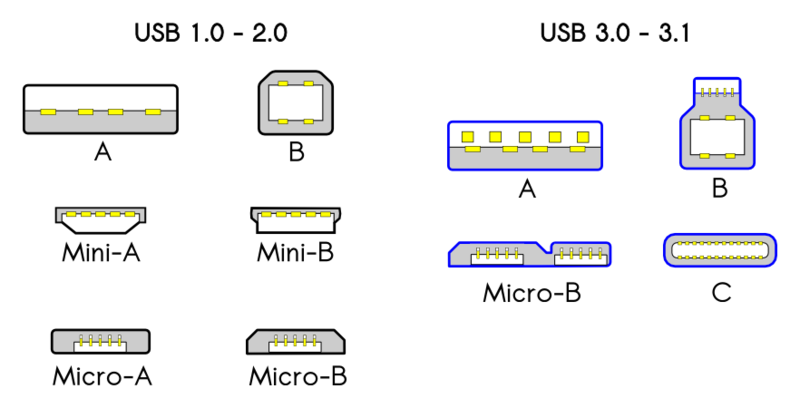
The MB air has two Thunderbolt/USB-C ports. Your older gear has standard USB-A connectors, can be version 2 or 3.
Read this
https://www.macworld.com/article/668462/best-usb-c...
https://www.amazon.co.uk/dp/B07Q29N6H1?tag=mw-webs...
Read this
https://www.macworld.com/article/668462/best-usb-c...
https://www.amazon.co.uk/dp/B07Q29N6H1?tag=mw-webs...
Edited by megaphone on Tuesday 16th January 16:38
Phoey said:
Thanks for reply. This is a product (below) i use on my 2015 Macbook Pro to connect up to 4 devices. My equipment (printer etc) has these type USB. Are they USB3?
You're conflating the connector and the standard.That port is a USB-A port...which is a connector.
USB3 is a USB standard (speed/bandwidth/etc.) along with USB 1.0; USB 2.0, USB 3.0, etc.
So you can end up with a USB-C connector with a USB1 device, or a USB-A connector with a USB3 device.
Printers and such will probably be running at USB1 or USB2 speeds, so no need for ultra-fast USB3/4 or TB hubs...just one with enough USB-A ports for all your devices.
Edited by mmm-five on Tuesday 16th January 16:57
I use this with my MBA M2
USBC to 3x USB and Ethernet - works great and zero issues at all.
https://www.amazon.co.uk/AmazonBasics-Type-C-Ether...
USBC to 3x USB and Ethernet - works great and zero issues at all.
https://www.amazon.co.uk/AmazonBasics-Type-C-Ether...
wyson said:
Have you tried this one? Some of my colleagues have these el cheapo multiport adaptors, they are pretty flakey, overheat etc.
I've not tried that exact one, but had a different cheapy one before which was fine. He's only using it for a few extra USB ports. If you were wanting 2 monitors and power going through it then maybe worth getting a good used one from Ebay, but for simply a USB extender I don't really see the point. If you can afford it a doc may be preferable- I bought one of these, which means one connection for 2 monitors, wired network, and multiple usb devices
https://www.amazon.co.uk/OWC-Thunderbolt-Dock-disp...
https://www.amazon.co.uk/OWC-Thunderbolt-Dock-disp...

x5tuu said:
I use this with my MBA M2
USBC to 3x USB and Ethernet - works great and zero issues at all.
https://www.amazon.co.uk/AmazonBasics-Type-C-Ether...
I have one of these and use it with my M1 PRO. It gets a little warm but not really a problem. USBC to 3x USB and Ethernet - works great and zero issues at all.
https://www.amazon.co.uk/AmazonBasics-Type-C-Ether...
I have one of the usb a ones you posted earlier as well and that works fine with a raspberry pi and other devices, but obviously not the M1.
Phooey said:
What doesn’t help and adds to the confusion - is most of the product pages say compatible with MacBook Air from 2020, M1 etc, but don’t list the 2022/3 M2. It makes you think it won’t work.
Why do manufacturers make stuff like this difficult to understand?
Its probably M1 vintage, they tested it back then, then released it. Didn't bother to test with M2, M3, so don't want to advertise as such, even if technically, its going to work. It does cost £13.99. What do you want for that price? The moon on a stick?Why do manufacturers make stuff like this difficult to understand?
wyson said:
Its probably M1 vintage, they tested it back then, then released it. Didn't bother to test with M2, M3, so don't want to advertise as such, even if technically, its going to work. It does cost £13.99. What do you want for that price? The moon on a stick?
Price is irrelevant. I don’t give a fk what it costs. I just need it to work. Phooey said:
Price is irrelevant. I don’t give a fk what it costs. I just need it to work.
I have around a dozen different connectors and docks that will do this. For your use case, I would recommend a Belkin Thunderbolt 3 Dock Pro, which you can pick up on eBay, make sure it comes with the power brick and USB-C/TB3 cable to connect to your MacBook Airk what it costs. I just need it to work. This will give you five USB-A (USB 3) sockets, charge your MacBook Air and connect to a monitor all from a single cable
Some of the adaptors recommended above are fine for occasional use on the road but liable to get alarmingly hot if kept plugged in in an office environment
Edited to add - Belkin have replaced the TB3 Dock Pro with a Thunderbolt 4 Dock Pro, a bit more expensive, which is worth considering if you want to add high-speed storage as well
Edited by mikef on Thursday 18th January 11:54
If you're using it stationary (I see you've already ordered a thingamybob) I'd suggest grabbing a Dell Thunderbolt dock of some ilk.
https://uk.webuy.com/product-detail/?id=5397184187...
Ebay / CEX Has them quite cheap as they are business favourites.
https://www.dell.com/support/kbdoc/en-uk/000124312...
Full compatibility details are there.
Back in the good old days, Laptops used to come with ports included
https://uk.webuy.com/product-detail/?id=5397184187...
Ebay / CEX Has them quite cheap as they are business favourites.
https://www.dell.com/support/kbdoc/en-uk/000124312...
Full compatibility details are there.
Back in the good old days, Laptops used to come with ports included
Gassing Station | Computers, Gadgets & Stuff | Top of Page | What's New | My Stuff