
Mac files to Windows laptop
Author
Discussion

Red9zero

Original Poster:

11,214 posts

87 months

Monday 29th January 2024
quotequote all
Anyone know how to get files (mainly jpg) off an external hdd that has been formatted for a Mac, using a Windows laptop ? Google gives a couple of options, but I'm a cheapskate and would rather not pay £40 for a one off use.

cobra kid

5,591 posts

270 months

Monday 29th January 2024
quotequote all
Is the Mac still operating? Could you "cloud" them then drag back down onto the Windows PC?

Magnum 475

4,169 posts

162 months

Monday 29th January 2024
quotequote all
My recollection is that it won't work that way.

A Mac will read Windows NTFS or FAT32 disks

Windows will refuse to recognise a Mac or Unix formatted disk.

mmm-five

12,381 posts

314 months

Monday 29th January 2024
quotequote all
5-day trial any good?

https://macdrive.com/trial/

Red9zero

Original Poster:

11,214 posts

87 months

Monday 29th January 2024
quotequote all
cobra kid said:
Is the Mac still operating? Could you "cloud" them then drag back down onto the Windows PC?
There's quite a lot of files, but may be an option.

Red9zero

Original Poster:

11,214 posts

87 months

Monday 29th January 2024
quotequote all
mmm-five said:
5-day trial any good?

https://macdrive.com/trial/
Good find. I will have a look.

xeny

5,484 posts

108 months

Monday 29th January 2024
quotequote all
Red9zero said:
There's quite a lot of files, but may be an option.
Mac OS X will run an SFTP server - enable "Remote Login". I think external drives appear in "/Volumes/...... You can then use WinSCP to SFTP them off over the local network, which is likely to be faster than a round trip to the cloud.

QJumper

3,238 posts

56 months

Monday 29th January 2024
quotequote all
Red9zero said:
cobra kid said:
Is the Mac still operating? Could you "cloud" them then drag back down onto the Windows PC?
There's quite a lot of files, but may be an option.
If it's mainly jpg's and you have Amazon Prime, then they do unlimited photo storage for Prime members.

the-norseman

15,831 posts

201 months

Monday 29th January 2024
quotequote all
Best option is cloud storage or, move the files onto the mac, reformat the drive so Windows can read it and then put the files back on the drive.

Red9zero

Original Poster:

11,214 posts

87 months

Monday 29th January 2024
quotequote all
QJumper said:
If it's mainly jpg's and you have Amazon Prime, then they do unlimited photo storage for Prime members.
Good plan ! I will look at that.

Red9zero

Original Poster:

11,214 posts

87 months

Monday 29th January 2024
quotequote all
the-norseman said:
Best option is cloud storage or, move the files onto the mac, reformat the drive so Windows can read it and then put the files back on the drive.
Reformatting the drive and adding the files again would be far too obvious. No I hadn't thought of it laugh Mac's confuse me ! Just done it and all worked OK. Thanks chaps thumbup

eeLee

1,009 posts

110 months

Monday 29th January 2024
quotequote all
Ubuntu live bootable USB stick. I am sure linux can read macOS-formatted crap

mikef

6,158 posts

281 months

Monday 29th January 2024
quotequote all
Magnum 475 said:
My recollection is that it won't work that way.

A Mac will read Windows NTFS or FAT32 disks

Windows will refuse to recognise a Mac or Unix formatted disk.
Paragon do products that will read/write APFS, HFS+ and Linux files systems on Windows (and vice versa) and they work very well. But as the OP says, £43 a pop so hard to justify for a one-off job

blueg33

46,528 posts

254 months

Tuesday 30th January 2024
quotequote all
Red9zero said:
QJumper said:
If it's mainly jpg's and you have Amazon Prime, then they do unlimited photo storage for Prime members.
Good plan ! I will look at that.
Note. Amazon Prime does seem to mess up the order of your photo library.

Red9zero

Original Poster:

11,214 posts

87 months

Tuesday 30th January 2024
quotequote all
nuyorican said:
There's definitely a file system that can be read by both. I have a windows machine and a mac, and have to use USB thumb drives with them both.

EXFAT maybe? I don't have the drive to hand.
That was it. I reformatted the drive and added the files again. Now to work out how to wipe the hdd on the Mac itself as it's an old one (2007), so doesn't have the option in System Settings or Disk Utilities and Comand + R doesn't work either.

apn

307 posts

314 months

Tuesday 30th January 2024
quotequote all
Send to yourself on your Mac using wetransfer, then download on the PC. You can send up to 2gb free, if you need more than that just repeat the process.

coach

1,118 posts

282 months

Tuesday 30th January 2024
quotequote all
USB drive, format to FAT on Mac, copy files, plug into Windows machine and copy on. Simple.

stemll

5,584 posts

230 months

Tuesday 30th January 2024
quotequote all
Red9zero said:
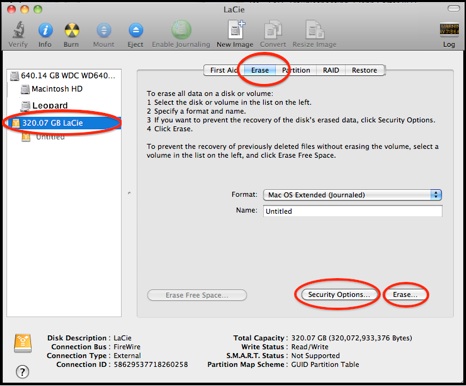
That was it. I reformatted the drive and added the files again. Now to work out how to wipe the hdd on the Mac itself as it's an old one (2007), so doesn't have the option in System Settings or Disk Utilities and Comand + R doesn't work either.
Disk Utilities will still have Erase. Should look something like this if you're back on something like Leopard

Red9zero

Original Poster:

11,214 posts

87 months

Tuesday 30th January 2024
quotequote all
stemll said:
Red9zero said:
That was it. I reformatted the drive and added the files again. Now to work out how to wipe the hdd on the Mac itself as it's an old one (2007), so doesn't have the option in System Settings or Disk Utilities and Comand + R doesn't work either.
Disk Utilities will still have Erase. Should look something like this if you're back on something like Leopard

Fraid not. It was there but greyed out. It was running Snow Leopard, but was an old 2007 Mac, so apparently needed the original cd which it came with, which is now long gone. Now given to a reputable local chap for recycling after I deleted everything on it.

xeny

5,484 posts

108 months

Tuesday 30th January 2024
quotequote all
stemll said:
Disk Utilities will still have Erase. Should look something like this if you're back on something like Leopard

Won't let you erase the drive you booted from.