
Advice on Pi 500
Discussion


I don't have much experince here. I want to give my 79 ry old dad some sort of tech to read emails, watch youtube, print out letters(yes he does still post things to relatives) . Rasb Pi 500 looks good , basic machine, built in keyboard, just add mouse job done, Can you use printers on Pi OS ? . Or just get some cheap heavy old laptop ?
A Pi 500 can do all of those things, but it lacks storage and isn't especially fast.
If you're not familiar with Linux then you might have issues adding printers.
You might consider one of the mini PCs that seem to be popular at the moment
Something like: https://www.hotukdeals.com/deals/gmktec-g2-mini-pc... but there are many similar PCs
hth
If you're not familiar with Linux then you might have issues adding printers.
You might consider one of the mini PCs that seem to be popular at the moment
Something like: https://www.hotukdeals.com/deals/gmktec-g2-mini-pc... but there are many similar PCs
hth
nyt said:
A Pi 500 can do all of those things, but it lacks storage and isn't especially fast.
If you're not familiar with Linux then you might have issues adding printers.
You might consider one of the mini PCs that seem to be popular at the moment
Something like: https://www.hotukdeals.com/deals/gmktec-g2-mini-pc... but there are many similar PCs
hth
Thanks for those replies, seems like the cheap Mini PC are the best value for money option. Hopefully they wion't burn the house down in the future. Fire extinguisher to be kept close by.If you're not familiar with Linux then you might have issues adding printers.
You might consider one of the mini PCs that seem to be popular at the moment
Something like: https://www.hotukdeals.com/deals/gmktec-g2-mini-pc... but there are many similar PCs
hth
Rider007 said:
nyt said:
A Pi 500 can do all of those things, but it lacks storage and isn't especially fast.
If you're not familiar with Linux then you might have issues adding printers.
You might consider one of the mini PCs that seem to be popular at the moment
Something like: https://www.hotukdeals.com/deals/gmktec-g2-mini-pc... but there are many similar PCs
hth
Thanks for those replies, seems like the cheap Mini PC are the best value for money option. Hopefully they wion't burn the house down in the future. Fire extinguisher to be kept close by.If you're not familiar with Linux then you might have issues adding printers.
You might consider one of the mini PCs that seem to be popular at the moment
Something like: https://www.hotukdeals.com/deals/gmktec-g2-mini-pc... but there are many similar PCs
hth
I'm only a 71 year old and my thought is: Are you trying to solve a non-existent problem with something you would like to tinker with?
nyt said:
A Pi 500 can do all of those things, but it lacks storage and isn't especially fast.
If you're not familiar with Linux then you might have issues adding printers.
Shouldn't be that hard with the right DE or having someone help, which is the main downside of moving older and non-techy people onto Linux: they are probably used to Windows, so you need to find a DE that feels like Windows and doesn't have other downsides like speed.If you're not familiar with Linux then you might have issues adding printers.
Paul Drawmer said:
Yes but....
Please check with the user if they would be happy to lose a proper keyboard. (Geriatric user here)
All tablets will connect to a Bluetooth keyboard and mouse. You can even have wired ones on a dock, and connect vis USBC, which is how I sometimes use my iPad (screen sharing via USBC dock on the iPad is inconsistent though).Please check with the user if they would be happy to lose a proper keyboard. (Geriatric user here)
Isn't the best solution for this user case the most user friendly one?
A Windows or Linux laptop is all in one, portable and hassle free.
If you're trying to keep costs down, just go for one of the countless used machines on eBay. Many ex company ones with negligible if any signs of use.
I recently picked up a Dell Inspiron which still had it's protective plastic on. Looked like it had been in a cupboard for 3 years. £100.
A Windows or Linux laptop is all in one, portable and hassle free.
If you're trying to keep costs down, just go for one of the countless used machines on eBay. Many ex company ones with negligible if any signs of use.
I recently picked up a Dell Inspiron which still had it's protective plastic on. Looked like it had been in a cupboard for 3 years. £100.
Pistom said:
A few comments saying iPad here but not sure why anyone would choose a device like that for this user case.
Great as the iPad is, needing a keyboard as an extra device surely makes it unnecessarily clunky. Typing on a screen is never fun.
Who said anything about typing on a screen ?Great as the iPad is, needing a keyboard as an extra device surely makes it unnecessarily clunky. Typing on a screen is never fun.
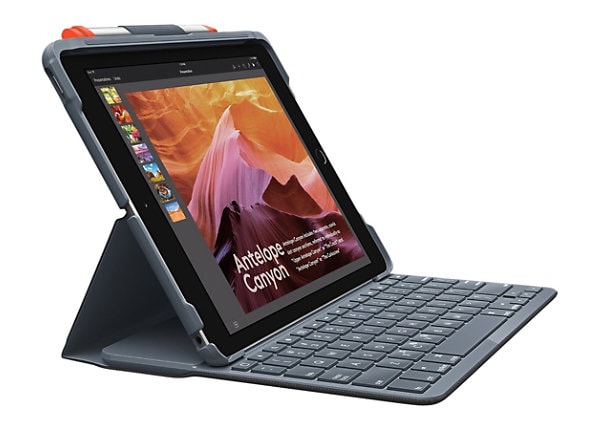
many keyboard available for ipads, some even integrate into a case
OP's requirement for attaching scanner hardware would need investigating though.
Certainly I wouldn't be suggesting linux for this use case.
Gassing Station | Computers, Gadgets & Stuff | Top of Page | What's New | My Stuff