
Garage Wi-Fi Reception
Discussion


Evening,
After some advice on trying to get the best Wi-Fi connection in the garage on the cheap
I am reusing an old desktop PC in the garage for internet access / music / YT.etc
I have added a TP Link TX20E PCI WiFi card with antennas on the back.
Currently internet speeds are just about acceptable, speedtest.net achieves around 15mbps down, which is fine for web browsing, YT music.etc however in true Windows 11 fashion, when it downloads an update it becomes borderline un-usable.
I think a few more mbps would do the trick, hoping to ilk as much out of it as I can without resorting to running ethernet or going for a mesh system.
Will see if there is a registry option to limit Windows update bandwidth.
The garage is a prefab concrete sheet style about 13 meters from the house and around 20 meters from the actual WiFi access point.
WiFi Access point is a UniFi U6 long range, ceiling mounted in the upstairs hallway
I have tweaked a few settings which has helped;
- WiFi card is set to 2.4GHz only, 5GHz disabled
- 2.4GHz range set to maximum Tx power on the AP
I'm thinking of purchasing one of these to replace the antenna that screw directly onto the Wireless PC card;
https://www.amazon.co.uk/Tri-Band-Magnetic-Omnidir...
I suppose it will be a case of trial and error - but if anyone could recommend an antenna / device I would be much obliged.
Many thanks.
After some advice on trying to get the best Wi-Fi connection in the garage on the cheap
I am reusing an old desktop PC in the garage for internet access / music / YT.etc
I have added a TP Link TX20E PCI WiFi card with antennas on the back.
Currently internet speeds are just about acceptable, speedtest.net achieves around 15mbps down, which is fine for web browsing, YT music.etc however in true Windows 11 fashion, when it downloads an update it becomes borderline un-usable.
I think a few more mbps would do the trick, hoping to ilk as much out of it as I can without resorting to running ethernet or going for a mesh system.
Will see if there is a registry option to limit Windows update bandwidth.
The garage is a prefab concrete sheet style about 13 meters from the house and around 20 meters from the actual WiFi access point.
WiFi Access point is a UniFi U6 long range, ceiling mounted in the upstairs hallway
I have tweaked a few settings which has helped;
- WiFi card is set to 2.4GHz only, 5GHz disabled
- 2.4GHz range set to maximum Tx power on the AP
I'm thinking of purchasing one of these to replace the antenna that screw directly onto the Wireless PC card;
https://www.amazon.co.uk/Tri-Band-Magnetic-Omnidir...
I suppose it will be a case of trial and error - but if anyone could recommend an antenna / device I would be much obliged.
Many thanks.
Did nobody actually read the OP? He said he didn’t want to go to the expense of a mesh setup…. 
As someone suggested - try powerline adapters, they MIGHT improve the speeds, although results vary massively depending on your wiring, ring main, consumer unit.
Back in the day when we were poor students and wifi wasn’t very advanced, we used to try this trick….
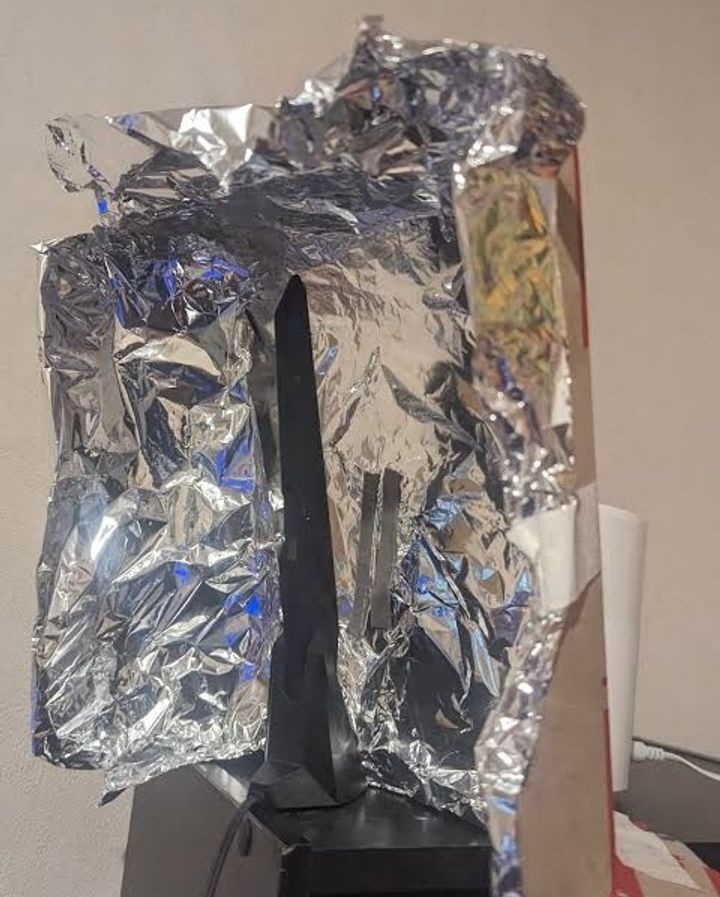
As someone suggested - try powerline adapters, they MIGHT improve the speeds, although results vary massively depending on your wiring, ring main, consumer unit.
Back in the day when we were poor students and wifi wasn’t very advanced, we used to try this trick….
Powerline adapters, one in the house, one in the garage. You can get a WiFi one for the garage and pick them up from argos. It's the cheapest and easiest way.
https://www.argos.co.uk/product/4661847?utm_custom...
https://www.argos.co.uk/product/4661847?utm_custom...
Many thanks for the responses.
I hadn't given powerline adapters a thought - may well be worth a punt at that price.
There is a spare power socket next to my ethernet switch, as well as plenty of sockets in the garage as I fitted a few more over the weekend.
I may well pick some up over Christmas, will keep you posted. Thanks again.
I hadn't given powerline adapters a thought - may well be worth a punt at that price.
There is a spare power socket next to my ethernet switch, as well as plenty of sockets in the garage as I fitted a few more over the weekend.
I may well pick some up over Christmas, will keep you posted. Thanks again.
Was passing Argos this morning - popped in and picked up a powerline kit.
Went for the AV600 Wi-Fi version rather than the AV1000 recommended above as my phone struggled to connect to the house WiFi.
Figured this would probably kill two birds with one stone granted it may not have as much throughput as the AV1000 kit.
Its done the job nicely, by doubling the internet speed on the PC in the garage to the point you wouldn't know unless downloading.
Currently transferring a virtual machine from my NAS, stating an hour to transfer 20GB which is tolerable, won't be frequently doing things like this. but nice to know its possible.
Went for the AV600 Wi-Fi version rather than the AV1000 recommended above as my phone struggled to connect to the house WiFi.
Figured this would probably kill two birds with one stone granted it may not have as much throughput as the AV1000 kit.
Its done the job nicely, by doubling the internet speed on the PC in the garage to the point you wouldn't know unless downloading.
Currently transferring a virtual machine from my NAS, stating an hour to transfer 20GB which is tolerable, won't be frequently doing things like this. but nice to know its possible.
Gassing Station | Computers, Gadgets & Stuff | Top of Page | What's New | My Stuff