
Link alexa to a smart plug, to turn on/off with music?
Discussion


I have a receiver powering speakers, with the aux in from an alexa. It works and sounds good.
I want to link alexa so that when I "alexa play music" the smart plug (and receiver) turn in, and when I "stop music" it turns off.
But for the life of me I can't figure it out, and the alexa help is frankly b ks.
ks.
Any tips?
Thanks
I want to link alexa so that when I "alexa play music" the smart plug (and receiver) turn in, and when I "stop music" it turns off.
But for the life of me I can't figure it out, and the alexa help is frankly b
ks. Any tips?
Thanks
I have the same setup but with Google Chromecast Audios, I have them hooked up to Home Assistant and that can see when they start and stop playing audio. Home Assistant then turns the amp sockets on and off to suit. Don't know enough about Alexa to knowing it can do the control stuff itself, but I presume you can hook up Alexa to Home Assistant if it can't.
Not sure the difficulty here, unless i m missisng something.
Just pair the smart plug with Alexa, then plug your receiver into it. Leave the Receiver powered on so the smart plug does the on / off.
You can now turn on the receiver with a voice command, and play music from Alexa as previous.
I would avoid linking the playing of music voice command to the powering of the device, as you may often want to stop / start playing music without powering off.
Im sure you could set a ‘routine’ in the Alexa app if you really wanted to do it though.
Just pair the smart plug with Alexa, then plug your receiver into it. Leave the Receiver powered on so the smart plug does the on / off.
You can now turn on the receiver with a voice command, and play music from Alexa as previous.
I would avoid linking the playing of music voice command to the powering of the device, as you may often want to stop / start playing music without powering off.
Im sure you could set a ‘routine’ in the Alexa app if you really wanted to do it though.
Yeah, I can do it individually fine... But would far prefer to link them together so it happens seemlessly, especially with kids who won't remember to turn the receiver/smart plug off seperately to stopping the music.
The routines within alexa are not intuitive at how I can make it work. With music being such a large part of alexa, I don't understand why it isn't more central to setting routines. I simply can't find any routines for it, nor build one.
When I build a routine it asks me to do a "when.... Do this...."
So I go: "when..... Play music...." - it says. 'alexa can't execute this response, try another'
So I try "when... Start music..." it then only allows me 'schedule' as an option to "do" after this command.
Edit... Found a way of setting a routine of "start music...." which turns the receiver in, but doesn't play the music.
The routines within alexa are not intuitive at how I can make it work. With music being such a large part of alexa, I don't understand why it isn't more central to setting routines. I simply can't find any routines for it, nor build one.
When I build a routine it asks me to do a "when.... Do this...."
So I go: "when..... Play music...." - it says. 'alexa can't execute this response, try another'
So I try "when... Start music..." it then only allows me 'schedule' as an option to "do" after this command.
Edit... Found a way of setting a routine of "start music...." which turns the receiver in, but doesn't play the music.
Edited by Andeh1 on Wednesday 31st December 06:51
What music do you want it to play when you say play music ?
This routine plays non specific music though seems to be from those I ve played often. Replace TV Light with whatever the name of your smart plug is for your receiver. The Play “Music” bit is populated by selecting Music and Podcasts from the Action list, then just type Music in the Play box at the top.
Obviously this only works if your receiver has a proper on/off button and not a logic button which always requires pressing after power on.
Indicidentally if your smart plug is one of the latest Tapo P110 then you can set a timer so it switches off X minutes after it is switched on - this is in the cog menu - auto-off timer NOT the one off timer in the Tapo main device screen,
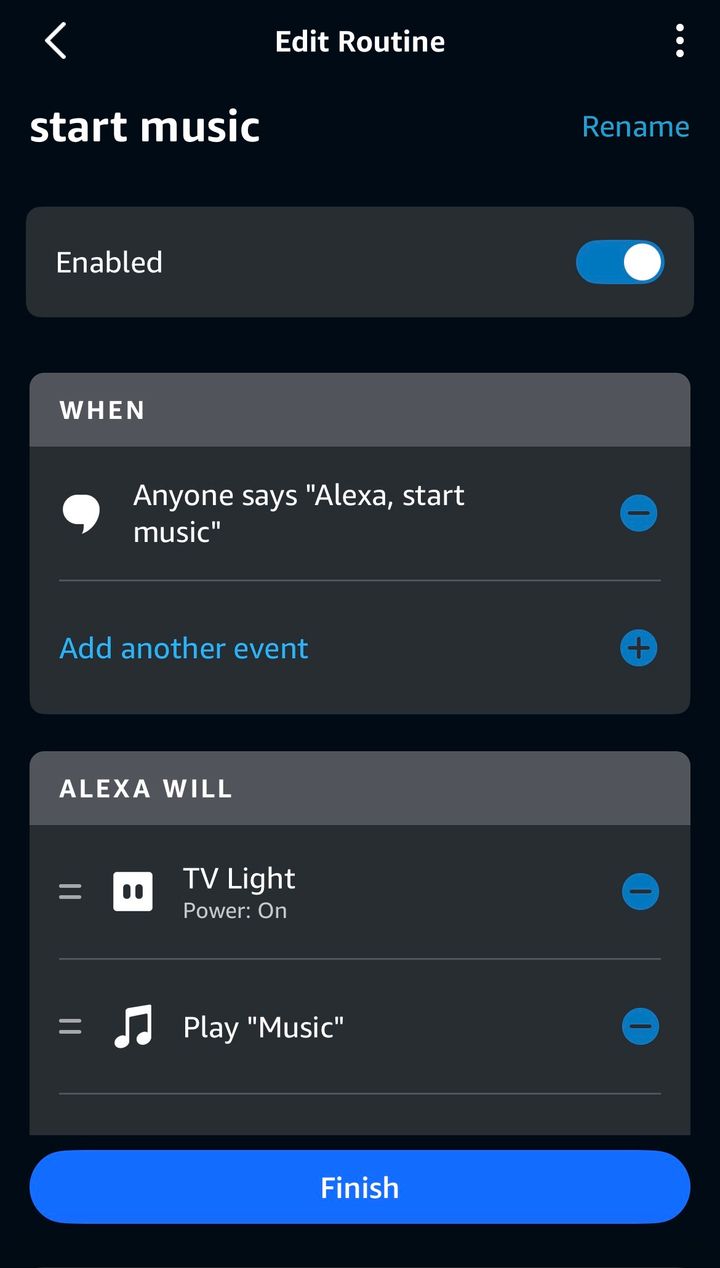
This routine plays non specific music though seems to be from those I ve played often. Replace TV Light with whatever the name of your smart plug is for your receiver. The Play “Music” bit is populated by selecting Music and Podcasts from the Action list, then just type Music in the Play box at the top.
Obviously this only works if your receiver has a proper on/off button and not a logic button which always requires pressing after power on.
Indicidentally if your smart plug is one of the latest Tapo P110 then you can set a timer so it switches off X minutes after it is switched on - this is in the cog menu - auto-off timer NOT the one off timer in the Tapo main device screen,
Edited by Up_North on Tuesday 30th December 19:00
Edited by Up_North on Tuesday 30th December 19:07
There's an app called IFTTT (If this, then that) that allows you to do some programming based on various conditions. I don't have an Alexa to try it with, but you should be able to set it up so that if music is playing, then the smart plug powering the receiver should be on. If you're very clever, you could set it up so that the receiver turns off after music has been stopped for a period of time.
I can't remember the exact programming options you have at your disposal but I think it should so the trick. IFTTT is available for both Android and iOS.
If that doesn't work, you might try using the "shortcuts" app on iOS devices, which allow programming in a similar way. I'm not sdure if it's more powerful than IFTTT, but it is more integrated.
I'm not sure if Alexa can do things like this without a phone.
I can't remember the exact programming options you have at your disposal but I think it should so the trick. IFTTT is available for both Android and iOS.
If that doesn't work, you might try using the "shortcuts" app on iOS devices, which allow programming in a similar way. I'm not sdure if it's more powerful than IFTTT, but it is more integrated.
I'm not sure if Alexa can do things like this without a phone.
Thanks guys, that's helpful.
Copying your setup Up_North works, and the turn off is good. However when I go "start music" alexa hears, but doesn't do anything. But, when I repeat the command a second time it works perfectly.... No rhyme or reason why it doesn't do it the first time!?
Copying your setup Up_North works, and the turn off is good. However when I go "start music" alexa hears, but doesn't do anything. But, when I repeat the command a second time it works perfectly.... No rhyme or reason why it doesn't do it the first time!?
Andeh1 said:
Thanks guys, that's helpful.
Copying your setup Up_North works, and the turn off is good. However when I go "start music" alexa hears, but doesn't do anything. But, when I repeat the command a second time it works perfectly.... No rhyme or reason why it doesn't do it the first time!?
Just a theory may be rubbish. Copying your setup Up_North works, and the turn off is good. However when I go "start music" alexa hears, but doesn't do anything. But, when I repeat the command a second time it works perfectly.... No rhyme or reason why it doesn't do it the first time!?
The command is typed in as “alexa start music’
If alexa is your wake word and alexa hears what follows then it may hear just “start music’ ?
Second time Alexa is awake so hears the entire ‘alexa start music’
To test just say “alexa alexa start music.”
Andeh1 said:
Thanks guys, that's helpful.
Copying your setup Up_North works, and the turn off is good. However when I go "start music" alexa hears, but doesn't do anything. But, when I repeat the command a second time it works perfectly.... No rhyme or reason why it doesn't do it the first time!?
Strange - works fine for me. What happens when you manually run the routine (press the play icon to the right of the routine name)?Copying your setup Up_North works, and the turn off is good. However when I go "start music" alexa hears, but doesn't do anything. But, when I repeat the command a second time it works perfectly.... No rhyme or reason why it doesn't do it the first time!?
Also make sure you have the ‘Play music’ function as the last step in the routine.
Thanks guys, have had to dismantle things until my new receiver arrives on Monday, then will give it another go. Had only set it all up to test it out in advance.
New one is going in the lounge with my old one (15 years old!) will then go back into the kitchen/snug to tie into the alexa & speakers there.
New one is going in the lounge with my old one (15 years old!) will then go back into the kitchen/snug to tie into the alexa & speakers there.
Just coming back to this, so I've got it all working... Alexa, smart plug and my receiver powering 4 speakers.
Alexa will turn on smart plug and play music via a routine "start music".
It works perfectly via the routine in the manual approach in the alexa app, but the voice control is really temperamental.
Some days it will work fine on first go, others take 3 or 4 goes of repeating the command for it all to kick in.
Turning it off via "stop music" works every time.
Any thoughts on this? Very annoying.
Alexa will turn on smart plug and play music via a routine "start music".
It works perfectly via the routine in the manual approach in the alexa app, but the voice control is really temperamental.
Some days it will work fine on first go, others take 3 or 4 goes of repeating the command for it all to kick in.
Turning it off via "stop music" works every time.
Any thoughts on this? Very annoying.
So just to update.... The fault was.... Me! Wife couldn't figure out what the issue was, as it worked much more reliably for her.
If I say alexa start music slow and more deliberately it works every time, not like I have a fick axsent or anyfin, but just a quirk of the phrase "alexa start music" . All our normal stand alone alexa which we use the default "alexa play music" have no issues at all.
If I say alexa start music slow and more deliberately it works every time, not like I have a fick axsent or anyfin, but just a quirk of the phrase "alexa start music" . All our normal stand alone alexa which we use the default "alexa play music" have no issues at all.
Gassing Station | Computers, Gadgets & Stuff | Top of Page | What's New | My Stuff