
New laptop time or fix this one?
Discussion


My current laptop has bit the dust I think, its getting on a bit and now won't charge up. It does charge randomly but more often than not its as dead as a dodo, not even the charge light will come on, its not the power adapter as that works in other things and I've tried a new charge socket itself on the laptop but that's not made any difference.
This is the laptop
https://support.hp.com/bg-en/product/details/hp-15...
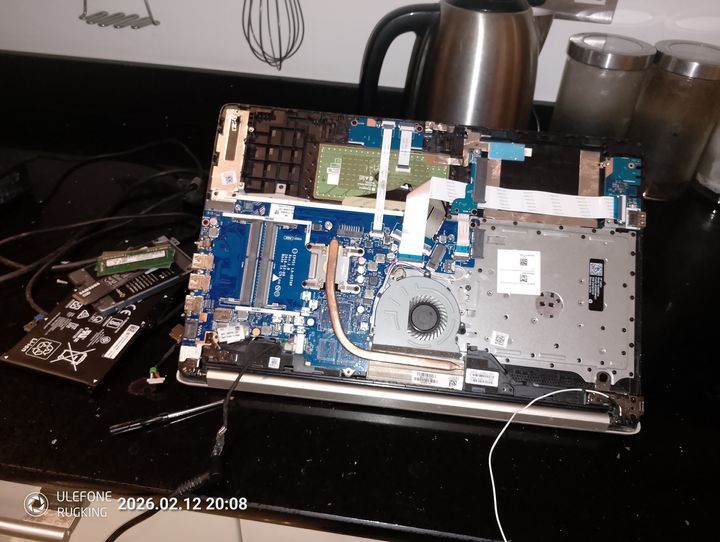
and this is what it currently looks like so I have done some testing, where the lead plugs in should be an orange light if its charging and a white light when its charged but nothing, I've tried it with everything in and out.
What I'm after is a recommendation on a new one with a few caveats, it must have a SATA port and an NVMe port and also slots for the RAM not soldered in chips. The reason is its main use is for diagnostics software and the NVMe drive has W10 with one make software and the SSD has another make running in a virtual drive. The various software took a fair bit of setting up and I was hoping to plug both drives in a new machine and it would just boot up.
Its only other use is a the internet/youtube type of stuff in my repair shed or playing movies when I work away so no intensive stuff at all. Or I've found a second hand identical machine on ebay for £48, should I just buy that.
Just to add, something around the £300 mark.
This is the laptop
https://support.hp.com/bg-en/product/details/hp-15...
and this is what it currently looks like so I have done some testing, where the lead plugs in should be an orange light if its charging and a white light when its charged but nothing, I've tried it with everything in and out.
What I'm after is a recommendation on a new one with a few caveats, it must have a SATA port and an NVMe port and also slots for the RAM not soldered in chips. The reason is its main use is for diagnostics software and the NVMe drive has W10 with one make software and the SSD has another make running in a virtual drive. The various software took a fair bit of setting up and I was hoping to plug both drives in a new machine and it would just boot up.
Its only other use is a the internet/youtube type of stuff in my repair shed or playing movies when I work away so no intensive stuff at all. Or I've found a second hand identical machine on ebay for £48, should I just buy that.
Just to add, something around the £300 mark.
Edited by Frane Selak on Thursday 12th February 20:17
I'm not familiar with the HP range, but I am familiar with the ThinkPad range.
As I suspect you know, needing 2.5" SATA bays, and M.2 Slots is going to limit you to older laptops but then your budget also limits you to older laptops.
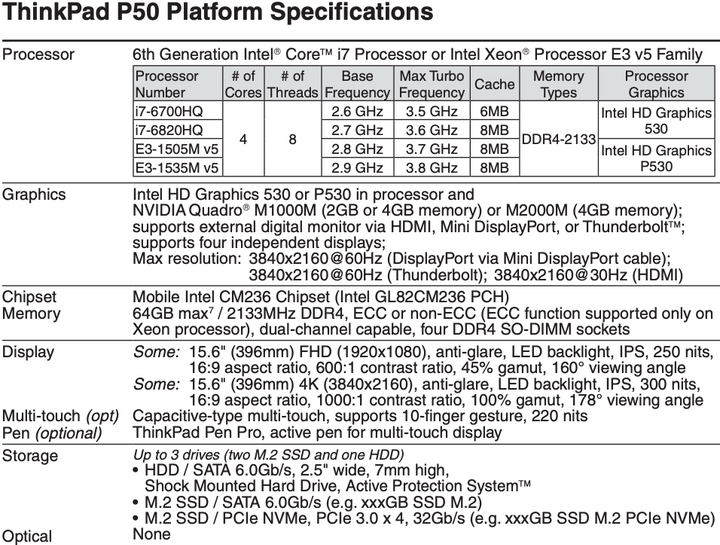
A ThinkPad P50 sounds like it may met you requirements, 2 x M.2 slots and a 2.5" SATA bay, it has 4 DIMM slots with no soldered RAM, and after a quick look on eBay and I found a 6th gen i7/16 GB/ 1 TB/ NVIDIA Quadro M500M for £299.
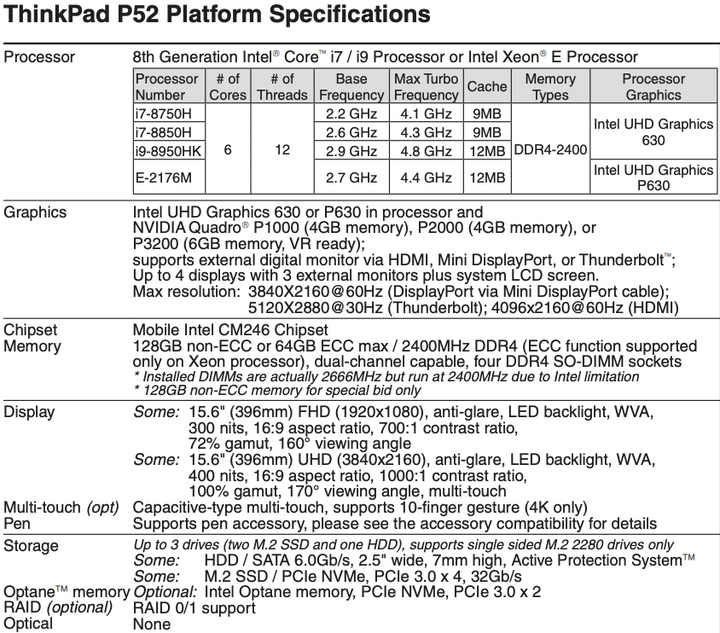
There are also the newer P51 and P52 model, but the PSREFs for the P52 uses some language that suggests only some versions had the SATA HDD option, so tread carefully.
As I suspect you know, needing 2.5" SATA bays, and M.2 Slots is going to limit you to older laptops but then your budget also limits you to older laptops.
A ThinkPad P50 sounds like it may met you requirements, 2 x M.2 slots and a 2.5" SATA bay, it has 4 DIMM slots with no soldered RAM, and after a quick look on eBay and I found a 6th gen i7/16 GB/ 1 TB/ NVIDIA Quadro M500M for £299.
There are also the newer P51 and P52 model, but the PSREFs for the P52 uses some language that suggests only some versions had the SATA HDD option, so tread carefully.
Edited by GoodDoc on Friday 13th February 08:44
Cheers for that, they look fine for what I need, what I've done for now though is bought that identical one of ebay for £40 just to see if I can get it going with my drives. I could always just get a new laptop and re-install everything again but its so time consuming and you have to do a few tricks to get the various software's up and running and I cant really remember what I did now. I know one needed W10 and another 11.
The other thing is it lives in the shed so is prone to damage, it has had various things like sockets and stuff dropped on it before so its not worth putting a £1k machine in there coupled with I hardly ever use it unless I have a problem (like now)
The other thing is it lives in the shed so is prone to damage, it has had various things like sockets and stuff dropped on it before so its not worth putting a £1k machine in there coupled with I hardly ever use it unless I have a problem (like now)
Frane Selak said:
Cheers for that, they look fine for what I need, what I've done for now though is bought that identical one of ebay for £40 just to see if I can get it going with my drives. I could always just get a new laptop and re-install everything again but its so time consuming and you have to do a few tricks to get the various software's up and running and I cant really remember what I did now. I know one needed W10 and another 11.
Makes sense, moving those drives from an HP to a Lenovo was going to lead to fun & games with drivers, assuming it booted successfully, so £40 could be a nice cheap way out.Frane Selak said:
The other thing is it lives in the shed so is prone to damage, it has had various things like sockets and stuff dropped on it before so its not worth putting a £1k machine in there coupled with I hardly ever use it unless I have a problem (like now)
As much as I like my Macs, my £260 eBay ThinkPad gets a lot of usage and adding 'slow' DIMM based RAM was £29 for an extra 16 GB (before AI screwed up prices) rather than the £200 Apple want for an extra 8 GB of on-package RAM (although the AI price spike hasn't affected Apple yet so their RAM prices don't seem quite as bad, yet).JoshSm said:
If it does charge sometimes I wouldn't bet against it just being a broken power socket? Which might be simple to fix depending on the machine.
HP spares are very easy to find.
First thing I tried, got a new one of ebay, the loom was a bit short as it was obviously off a different model but still plugged into the motherboard and it made no difference at all, sometimes works, sometimes doesn't. HP spares are very easy to find.

Battery is replaceable, even the CPU is I think, I was quite surprised looking at new laptops that nothing is removeable and soldered in, I would have thought they would have had even more sockets for stuff as technology advances but its like buying a car now where the tyres are part of the vehicle and if you get a puncher the whole car goes in the bin. Crazy.
As for testing I've tried every permutation of various stuff plugged in or not, I'm going to put it all back together and see what happens in a bit, it will probably work for a while until it doesn't.
As said though that one of ebay will hopefully solve my short term problems though.
As for testing I've tried every permutation of various stuff plugged in or not, I'm going to put it all back together and see what happens in a bit, it will probably work for a while until it doesn't.
As said though that one of ebay will hopefully solve my short term problems though.
Try booting with the battery removed and then reconnect the battery while the laptop is running.
Watch you don't short anything out by mistake.
The charging chip logic may have been corrupted.
This gets rewritten or reset when something unusual happens (like a fully charged battery suddenly being detected).
You may net see anything for a few minutes, so reconnect the battery and just leave it a while.
Watch you don't short anything out by mistake.
The charging chip logic may have been corrupted.
This gets rewritten or reset when something unusual happens (like a fully charged battery suddenly being detected).
You may net see anything for a few minutes, so reconnect the battery and just leave it a while.
Well this is strange, the other laptop turned up today and because I'm unlucky even though the model number on the back is identical to mine its totally different, only one slot for the RAM, no M.2 slot, the CPU doesn't even have a fan and its an Intel not AMD like mine. Not to be defeated though the chasis seemed the same so I stripped the motherboard out of mine and fitted it into the new case using everything else from the new laptop and only the motherboard and drives from mine. And it works, it seems to charge ok but time will tell on that one.
The strange bit is though, I thought I'd put the "new" motherboard into my old machine and that works as well, that charges up, both batteries are working fine so its not that either. Maybe it is the charger that's dodgy then but it worked on other HP stuff I had and the other stuff's charger wouldn't charge the laptop at the time.
There wasn't even anything juicy on the new laptops HDD either.
The strange bit is though, I thought I'd put the "new" motherboard into my old machine and that works as well, that charges up, both batteries are working fine so its not that either. Maybe it is the charger that's dodgy then but it worked on other HP stuff I had and the other stuff's charger wouldn't charge the laptop at the time.
There wasn't even anything juicy on the new laptops HDD either.
Just to note that it's not particularly difficult to move data between drives e.g. SATA to M2. So don't feel restricted by the drive "type". Currently M2 drives seem cheaper than SATA!
If you don't want to transfer the data (e.g. using Linux dd) then a local IT place will be able to do it in a few hours.
If you don't want to transfer the data (e.g. using Linux dd) then a local IT place will be able to do it in a few hours.
Gassing Station | Computers, Gadgets & Stuff | Top of Page | What's New | My Stuff