
Recommend me a laptop
Discussion


My partner wants a new laptop to replace an aging Dell.
I'm already lost in a world of jargon and spec sheets that I don't really understand.
Only requirement are that it is Win11 compatible, has at least a 15in screen and is within budget of £350. Secondhand/refurbished is fine.
It'll be used to run accounting software (Xero, QuickBooks, sage), no gaming or video/photo work.
Any hints on what I should be looking at spec-wise?
Is another Dell a good brand? Or should I be looking at other brands?
Any help appreciated, as I'm entirely Mac based, so windows stuff is a bit of a minefield to me
I'm already lost in a world of jargon and spec sheets that I don't really understand.
Only requirement are that it is Win11 compatible, has at least a 15in screen and is within budget of £350. Secondhand/refurbished is fine.
It'll be used to run accounting software (Xero, QuickBooks, sage), no gaming or video/photo work.
Any hints on what I should be looking at spec-wise?
Is another Dell a good brand? Or should I be looking at other brands?
Any help appreciated, as I'm entirely Mac based, so windows stuff is a bit of a minefield to me
New laptops at £350 are pretty much all nasty plastic rubbish. If lucky there might be something on sale that is slightly better. Plenty used business targeted machines to choose from however. Lenovo thinkpad or HP Probook/Elitebook are generally well built and easily repairable if something does go wrong.
Example: https://uk.webuy.com/product-detail?id=SLAPLENT580...
You can get accounting apps on Mac. A 2nd hand M1 MacBook Air might be close to budget as another option. Smaller screen however. Avoid Intel Macs now.
Example: https://uk.webuy.com/product-detail?id=SLAPLENT580...
You can get accounting apps on Mac. A 2nd hand M1 MacBook Air might be close to budget as another option. Smaller screen however. Avoid Intel Macs now.
Edited by colin79666 on Saturday 28th March 19:38
I've just bought two refurb Dells for £330ish. They had 14" screens (so too small), but they do have 11th gen i5, 32G RAM, and 1TB SSD. Win 11 installed, although I reinstalled it on spare SSDs as I would never trust a 3rd party not to put anything untoward on it.
It did have a US keyboard with swapped keycaps on them to make the "UK" layout. I swapped one keyboard with a real UK one; the other is for hosting some VMs, so don't really care about the keyboard.
However, you could easily drop the RAM size, and increase the display size and it'll probably be a similar price.
Was on Amazon. A few scratches, but not trashed.
It did have a US keyboard with swapped keycaps on them to make the "UK" layout. I swapped one keyboard with a real UK one; the other is for hosting some VMs, so don't really care about the keyboard.
However, you could easily drop the RAM size, and increase the display size and it'll probably be a similar price.
Was on Amazon. A few scratches, but not trashed.
Keep an eye out on hotukdeals
https://www.hotukdeals.com/search?q=laptop&sor...
Generally anything with a 200+ heat, is conidered good value.
They had this for £379 a few weeks back, but it is back up to £479 now...
https://www.hotukdeals.com/deals/ideapad-slim-3x-l...
https://www.hotukdeals.com/search?q=laptop&sor...
Generally anything with a 200+ heat, is conidered good value.
They had this for £379 a few weeks back, but it is back up to £479 now...
https://www.hotukdeals.com/deals/ideapad-slim-3x-l...
Here you go.
https://www.dellrefurbished.co.uk/item/dell-latitu...
Small SSD, but it doesn't sound like she needs any more.
Full size keyboard with numberpad for the financial apps.
You can amuse yourself putting in criteria into the dell site for refurbished laptops and see what pops out.
It'll be a bit plastic and flimsy, but it'll be fine as long as you don't abuse it.
https://www.dellrefurbished.co.uk/item/dell-latitu...
Small SSD, but it doesn't sound like she needs any more.
Full size keyboard with numberpad for the financial apps.
You can amuse yourself putting in criteria into the dell site for refurbished laptops and see what pops out.
It'll be a bit plastic and flimsy, but it'll be fine as long as you don't abuse it.
wombleh said:
Fair few Thinkpads on eBay in that price range with win11 installed.
Been using them for decades, the lenovo ones aren t as good as the ibm ones were, but still very decent. Given its been 20 years then I probably need to let that go.
I can't, I still prefer them. 3 of the 4 laptops in the house are Lenovo. Been using them for decades, the lenovo ones aren t as good as the ibm ones were, but still very decent. Given its been 20 years then I probably need to let that go.
jimmyjimjim said:
Here you go.
https://www.dellrefurbished.co.uk/item/dell-latitu...
Small SSD, but it doesn't sound like she needs any more.
Full size keyboard with numberpad for the financial apps.
You can amuse yourself putting in criteria into the dell site for refurbished laptops and see what pops out.
It'll be a bit plastic and flimsy, but it'll be fine as long as you don't abuse it.
SSD is one of the few things you can replace now, but I wouldn't go anywhere near Win11 without a minimum of 16Gb RAM. It's a memory hog.https://www.dellrefurbished.co.uk/item/dell-latitu...
Small SSD, but it doesn't sound like she needs any more.
Full size keyboard with numberpad for the financial apps.
You can amuse yourself putting in criteria into the dell site for refurbished laptops and see what pops out.
It'll be a bit plastic and flimsy, but it'll be fine as long as you don't abuse it.
If the budget is firm, you need to go for a refurb, or some potential restriction (like the Snapdragon processor laptop above). If you want new, that budget is going to have to be upped quite a bit for anything new or recent. Cheers 'slop et al.
jimmyjimjim said:
DukeDickson said:
SSD is one of the few things you can replace now, but I wouldn't go anywhere near Win11 without a minimum of 16Gb RAM. It's a memory hog.
Seconded, that's why the link is for a 16Gb laptop.Road2Ruin said:
jimmyjimjim said:
DukeDickson said:
SSD is one of the few things you can replace now, but I wouldn't go anywhere near Win11 without a minimum of 16Gb RAM. It's a memory hog.
Seconded, that's why the link is for a 16Gb laptop.Windows 11 minimun spec is 4GB, that's before any other applications.
Here's a snip of a machine with 8GB running Outlook and a Youtube Video. Wouldn't want to be running much more on it.
Suspicious_user said:
More RAM is better.
Windows 11 minimun spec is 4GB, that's before any other applications.
Here's a snip of a machine with 8GB running Outlook and a Youtube Video. Wouldn't want to be running much more on it.
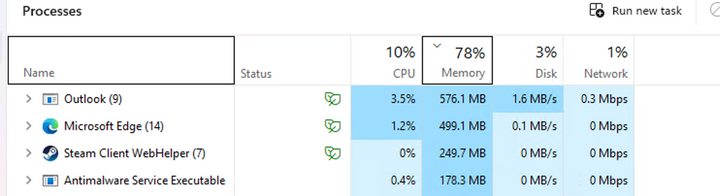
In that clip you also are running Edge and Steam, which between them are 750Mb, so I think there is more to this than you are suggesting. Windows 11 minimun spec is 4GB, that's before any other applications.
Here's a snip of a machine with 8GB running Outlook and a Youtube Video. Wouldn't want to be running much more on it.
Windows 11 is fairly awful but not for the reasons suggested here.
It allocates RAM differently than W10 and the % in the task manager isn't particularly relevant when you consider the cache, ramdisk usage etc.etc.
Basically 16GB is way more than enough for most people, most of the time.
In the case of the OP, 8GB is probably fine for basic office tasks.
Like any other laptop of this type, nearly all performance issues would be overcome with a fresh install of W10 IoT LTSC, but that's probably for another topic..
It allocates RAM differently than W10 and the % in the task manager isn't particularly relevant when you consider the cache, ramdisk usage etc.etc.
Basically 16GB is way more than enough for most people, most of the time.
In the case of the OP, 8GB is probably fine for basic office tasks.
Like any other laptop of this type, nearly all performance issues would be overcome with a fresh install of W10 IoT LTSC, but that's probably for another topic..
Road2Ruin said:
In that clip you also are running Edge and Steam, which between them are 750Mb, so I think there is more to this than you are suggesting.
Youtube was running in Edge, it's the only browser installed on that machine. Edge has 2 tabs open on running a YouTube video the other for a search.Steam was running in the back ground, but I've quit it now. Nothing else really running on the machine.
Feel free to suggest a machine with 8GB - but I think the OP would be better with 16GB.
As for the OP - CEX do used laptops. This one comes with a 5 year warranty.
https://uk.webuy.com/product-detail?id=SLAPLENIP11...
Sat here on a laptop with 32Gb, 49% memory. 14 tabs, Outlook and Kindle open.
While windows tends to use whatever memory is available to it and this use would be fine on a 16Gb machine, my previous win11 laptop had 8Gb and struggled.
8Gb will work, but 16 makes the experience a lot better.
While windows tends to use whatever memory is available to it and this use would be fine on a 16Gb machine, my previous win11 laptop had 8Gb and struggled.
8Gb will work, but 16 makes the experience a lot better.
I have a work Thinkpad with below spec and am looking to buy my own similar spec very shortly when i retire and would like similar.
My question is that on PC Renewed many refer to similar spec ones as Gaming laptops, i assumed mine is just regular - is this relevant or more just a comment on its power ?
Thanks
Processor 11th Gen Intel(R) Core(TM) i7-1185G7 @ 3.00GHz (3.00 GHz)
Installed RAM 32.0 GB (31.7 GB usable)
System type 64-bit operating system, x64-based processor
My question is that on PC Renewed many refer to similar spec ones as Gaming laptops, i assumed mine is just regular - is this relevant or more just a comment on its power ?
Thanks
Processor 11th Gen Intel(R) Core(TM) i7-1185G7 @ 3.00GHz (3.00 GHz)
Installed RAM 32.0 GB (31.7 GB usable)
System type 64-bit operating system, x64-based processor
Gassing Station | Computers, Gadgets & Stuff | Top of Page | What's New | My Stuff