
Meta error flashing up on mobile screen
Discussion


I have an issue with my mobile. Every now and then the attached flashes up on the screen and then disappears. The only way I could get a screenshot of it was to record my screen and then pause the playback. It's there and then gone. Is there an error log which will show me which app is causing it? I'm on Android and it's driving me mad. I could just start uninstalling Meta apps but I'm not going to know when it's gone because it happens randomly. 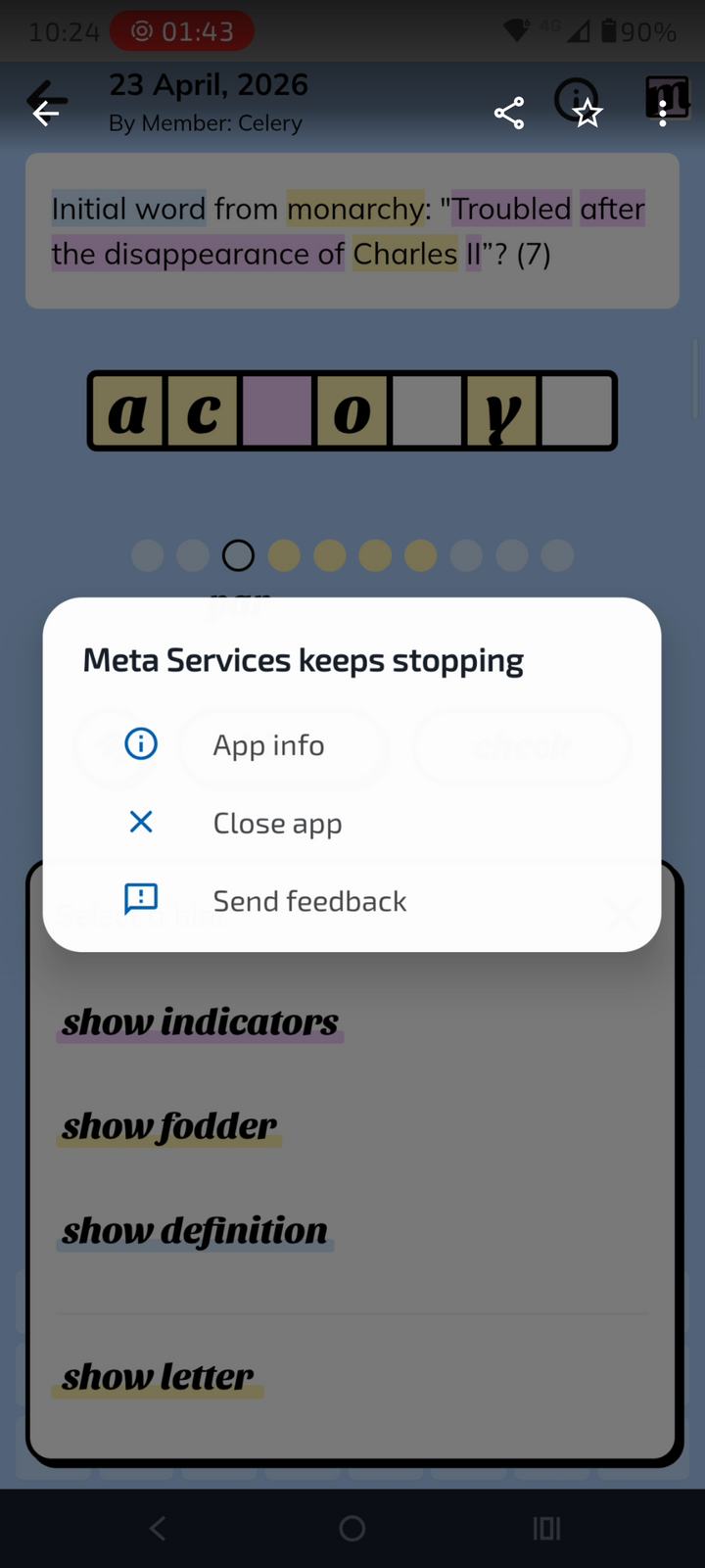
maccboy said:
I have an issue with my mobile. Every now and then the attached flashes up on the screen and then disappears. The only way I could get a screenshot of it was to record my screen and then pause the playback. It's there and then gone. Is there an error log which will show me which app is causing it? I'm on Android and it's driving me mad. I could just start uninstalling Meta apps but I'm not going to know when it's gone because it happens randomly.
Not trying to be smart but have you clicked App Info? 
I am alright Jack said:
Thanks. I'll have a read... AI can be good at making suggestions
From Gemini:
What is "Meta Services"?
On most Android devices, this is a pre-installed system app (often under the package name com.facebook.services). It manages background tasks for Meta apps. When it crashes, it’s usually due to a version mismatch (an update went wrong) or a corrupted cache.
How to find the "Error Log"
Android has a built-in notification history that acts as a log for these types of "disappearing" alerts.
1. Open Settings > Notifications.
2. Tap on Notification history.
3. Toggle it On if it isn't already. (Note: If it was off, it won't show past errors, but it will catch the next one immediately).
4. Look for "Meta Services" or "Android System" entries. This will confirm exactly which component triggered the pop-up.
Steps to Fix the "Keeps Stopping" Error
Since you don't want to uninstall all your apps, try these targeted fixes first:
1. Clear Data for Meta Services
This is the most effective fix. Because it's a system app, it's hidden by default:
• Go to Settings > Apps > See all apps.
• Tap the three dots in the top right and select "Show system".
• Search for Meta Services.
• Tap Storage & cache and select Clear Storage (or Clear Data).
• Repeat this for Meta App Installer and Meta App Manager if you see them.
2. Reset App Preferences
If a background permission was revoked, it can cause the service to loop-crash.
• Go to Settings > Apps > See all apps.
• Tap the three dots (top right) > Reset app preferences.
• Note: This won't delete your data, but it will reset things like default browser choice and background data restrictions.
3. Check for "WebView" Updates
Sometimes these pop-ups are triggered by the Android System WebView, which renders web content inside apps.
• Go to the Google Play Store.
• Search for Android System WebView.
• If an update is available, install it. If it was recently updated, try "Uninstalling updates" to see if a buggy new version is the culprit.
The "Monarchy" Clue
I noticed in your screenshot that you're playing a cryptic crossword or word game (the answer to the clue "Troubled after the disappearance of Charles II" is ACONYTI... actually, it looks like ACORNS or ACORNY). If this pop-up only appears while using that specific game, the game might be trying to call a Meta API (like a "Share to Facebook" feature) that is failing in the background.
Is this happening only when you have specific apps open, or does it occur even when the phone is sitting on the home screen?
From Gemini:
What is "Meta Services"?
On most Android devices, this is a pre-installed system app (often under the package name com.facebook.services). It manages background tasks for Meta apps. When it crashes, it’s usually due to a version mismatch (an update went wrong) or a corrupted cache.
How to find the "Error Log"
Android has a built-in notification history that acts as a log for these types of "disappearing" alerts.
1. Open Settings > Notifications.
2. Tap on Notification history.
3. Toggle it On if it isn't already. (Note: If it was off, it won't show past errors, but it will catch the next one immediately).
4. Look for "Meta Services" or "Android System" entries. This will confirm exactly which component triggered the pop-up.
Steps to Fix the "Keeps Stopping" Error
Since you don't want to uninstall all your apps, try these targeted fixes first:
1. Clear Data for Meta Services
This is the most effective fix. Because it's a system app, it's hidden by default:
• Go to Settings > Apps > See all apps.
• Tap the three dots in the top right and select "Show system".
• Search for Meta Services.
• Tap Storage & cache and select Clear Storage (or Clear Data).
• Repeat this for Meta App Installer and Meta App Manager if you see them.
2. Reset App Preferences
If a background permission was revoked, it can cause the service to loop-crash.
• Go to Settings > Apps > See all apps.
• Tap the three dots (top right) > Reset app preferences.
• Note: This won't delete your data, but it will reset things like default browser choice and background data restrictions.
3. Check for "WebView" Updates
Sometimes these pop-ups are triggered by the Android System WebView, which renders web content inside apps.
• Go to the Google Play Store.
• Search for Android System WebView.
• If an update is available, install it. If it was recently updated, try "Uninstalling updates" to see if a buggy new version is the culprit.
The "Monarchy" Clue
I noticed in your screenshot that you're playing a cryptic crossword or word game (the answer to the clue "Troubled after the disappearance of Charles II" is ACONYTI... actually, it looks like ACORNS or ACORNY). If this pop-up only appears while using that specific game, the game might be trying to call a Meta API (like a "Share to Facebook" feature) that is failing in the background.
Is this happening only when you have specific apps open, or does it occur even when the phone is sitting on the home screen?
vaud said:
AI can be good at making suggestions
From Gemini:
What is "Meta Services"?
On most Android devices, this is a pre-installed system app (often under the package name com.facebook.services). It manages background tasks for Meta apps. When it crashes, it s usually due to a version mismatch (an update went wrong) or a corrupted cache.
How to find the "Error Log"
Android has a built-in notification history that acts as a log for these types of "disappearing" alerts.
1. Open Settings > Notifications.
2. Tap on Notification history.
3. Toggle it On if it isn't already. (Note: If it was off, it won't show past errors, but it will catch the next one immediately).
4. Look for "Meta Services" or "Android System" entries. This will confirm exactly which component triggered the pop-up.
Steps to Fix the "Keeps Stopping" Error
Since you don't want to uninstall all your apps, try these targeted fixes first:
1. Clear Data for Meta Services
This is the most effective fix. Because it's a system app, it's hidden by default:
Go to Settings > Apps > See all apps.
Tap the three dots in the top right and select "Show system".
Search for Meta Services.
Tap Storage & cache and select Clear Storage (or Clear Data).
Repeat this for Meta App Installer and Meta App Manager if you see them.
2. Reset App Preferences
If a background permission was revoked, it can cause the service to loop-crash.
Go to Settings > Apps > See all apps.
Tap the three dots (top right) > Reset app preferences.
Note: This won't delete your data, but it will reset things like default browser choice and background data restrictions.
3. Check for "WebView" Updates
Sometimes these pop-ups are triggered by the Android System WebView, which renders web content inside apps.
Go to the Google Play Store.
Search for Android System WebView.
If an update is available, install it. If it was recently updated, try "Uninstalling updates" to see if a buggy new version is the culprit.
The "Monarchy" Clue
I noticed in your screenshot that you're playing a cryptic crossword or word game (the answer to the clue "Troubled after the disappearance of Charles II" is ACONYTI... actually, it looks like ACORNS or ACORNY). If this pop-up only appears while using that specific game, the game might be trying to call a Meta API (like a "Share to Facebook" feature) that is failing in the background.
Is this happening only when you have specific apps open, or does it occur even when the phone is sitting on the home screen?
Cheers. I have already disabled the Meta App Manager. You mention the app in the background.... I think it's only happened since I installed it so that is a prime candidate. I'll bin that.From Gemini:
What is "Meta Services"?
On most Android devices, this is a pre-installed system app (often under the package name com.facebook.services). It manages background tasks for Meta apps. When it crashes, it s usually due to a version mismatch (an update went wrong) or a corrupted cache.
How to find the "Error Log"
Android has a built-in notification history that acts as a log for these types of "disappearing" alerts.
1. Open Settings > Notifications.
2. Tap on Notification history.
3. Toggle it On if it isn't already. (Note: If it was off, it won't show past errors, but it will catch the next one immediately).
4. Look for "Meta Services" or "Android System" entries. This will confirm exactly which component triggered the pop-up.
Steps to Fix the "Keeps Stopping" Error
Since you don't want to uninstall all your apps, try these targeted fixes first:
1. Clear Data for Meta Services
This is the most effective fix. Because it's a system app, it's hidden by default:
Go to Settings > Apps > See all apps.
Tap the three dots in the top right and select "Show system".
Search for Meta Services.
Tap Storage & cache and select Clear Storage (or Clear Data).
Repeat this for Meta App Installer and Meta App Manager if you see them.
2. Reset App Preferences
If a background permission was revoked, it can cause the service to loop-crash.
Go to Settings > Apps > See all apps.
Tap the three dots (top right) > Reset app preferences.
Note: This won't delete your data, but it will reset things like default browser choice and background data restrictions.
3. Check for "WebView" Updates
Sometimes these pop-ups are triggered by the Android System WebView, which renders web content inside apps.
Go to the Google Play Store.
Search for Android System WebView.
If an update is available, install it. If it was recently updated, try "Uninstalling updates" to see if a buggy new version is the culprit.
The "Monarchy" Clue
I noticed in your screenshot that you're playing a cryptic crossword or word game (the answer to the clue "Troubled after the disappearance of Charles II" is ACONYTI... actually, it looks like ACORNS or ACORNY). If this pop-up only appears while using that specific game, the game might be trying to call a Meta API (like a "Share to Facebook" feature) that is failing in the background.
Is this happening only when you have specific apps open, or does it occur even when the phone is sitting on the home screen?
In case you're interested the answer was ACRONYM! I'm trying to get into cryptic crosswords!
Gassing Station | Computers, Gadgets & Stuff | Top of Page | What's New | My Stuff