
Pop Up nuisance in I-phone
Discussion


I know nothing about I phones, but My neighbour has asked for help.
This is a photo of her screen, This annoying pop up is appearing. I 'think' she's in Instagram.
At least she hasn't clicked on 'repair'
Is it just an ad? or something more sinister? And how does she get rid of it please?
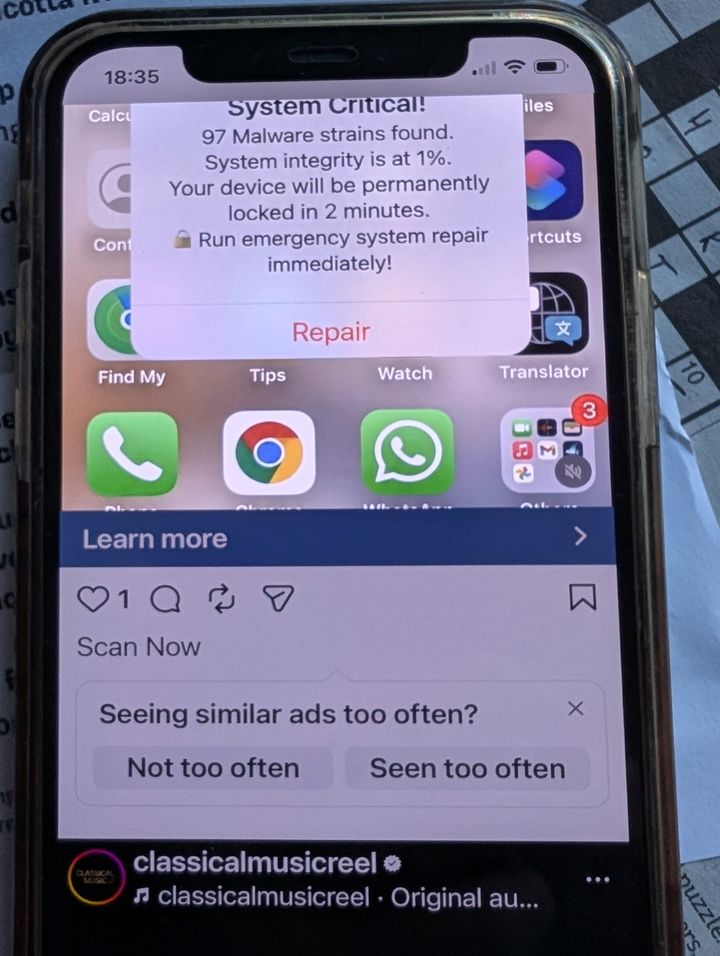
This is a photo of her screen, This annoying pop up is appearing. I 'think' she's in Instagram.
At least she hasn't clicked on 'repair'
Is it just an ad? or something more sinister? And how does she get rid of it please?
I would go further and under 'reset' use 'reset all settings'.
Your neighbour won't lose any data (photos etc). I wouldn't back up from that phone as the malware is possibly in an app.
ETA - can she delete the last few apps she's installed? Or at least have a look at what they are?
It could also be from a dodgy email link.
Reset.
Your neighbour won't lose any data (photos etc). I wouldn't back up from that phone as the malware is possibly in an app.
ETA - can she delete the last few apps she's installed? Or at least have a look at what they are?
It could also be from a dodgy email link.
Reset.
Looks like those increasingly common 'cheap' apps that claim to 'do something' to make it 'faster' or offer a basic function that lots of other apps (or even the phone itself) do, but are just malware/advertising hubs.
You can swipe up from the bottom of the screen to see what apps are running, and swipe each app upwards to close it, until you see the offending item disappear...and then remove/wipe that app (and report it to Apple or on the App Store page).
You can swipe up from the bottom of the screen to see what apps are running, and swipe each app upwards to close it, until you see the offending item disappear...and then remove/wipe that app (and report it to Apple or on the App Store page).
Gassing Station | Computers, Gadgets & Stuff | Top of Page | What's New | My Stuff