
Graphics tablet for PCB design and CAD
Discussion


I've been doing a bit of PCB design and misc. CAD work recently, and at times, finding it a bit tough going using only a mouse.
Does anyone else here do CAD / PCB work, and do you find a drawing / graphics tablet better to use than a mouse?
I'm aware of the Wacom devices, but never used one.
Does anyone else here do CAD / PCB work, and do you find a drawing / graphics tablet better to use than a mouse?
I'm aware of the Wacom devices, but never used one.
It's decades since I did AutoCAD work full time, but I did have access to a really nice A3 sized tablet with puck and pen.
It tended to be used for specific tasks rather than as the primary device - tracing, maybe some artwork, that sort of thing.
I found that for me the key was to maximise the use of the keyboard, including customising the keyboard shortcuts. It is very mouse-intensive, even more so if you're not using the keyboard much.
It tended to be used for specific tasks rather than as the primary device - tracing, maybe some artwork, that sort of thing.
I found that for me the key was to maximise the use of the keyboard, including customising the keyboard shortcuts. It is very mouse-intensive, even more so if you're not using the keyboard much.
Not sure about the needs for PCB design, but a Spacemouse is the typical upgrade for CAD:
https://3dconnexion.com/uk/spacemouse/
It's also worth making sure you have a good quality mouse to get the most out of your basic input
https://3dconnexion.com/uk/spacemouse/
It's also worth making sure you have a good quality mouse to get the most out of your basic input
egomeister said:
Not sure about the needs for PCB design, but a Spacemouse is the typical upgrade for CAD:
https://3dconnexion.com/uk/spacemouse/
It's also worth making sure you have a good quality mouse to get the most out of your basic input
Wow that's a serious bit of kit.https://3dconnexion.com/uk/spacemouse/
It's also worth making sure you have a good quality mouse to get the most out of your basic input
I should have mentioned that I'm doing this at a hobbyist level - so spending £££ on a device is not really in the plan.
What exactly are you finding difficult to do with a mouse? I was surprised to see how cheap used Wacom tablets are these days - there are plenty on ebay for less than £25. Maybe pick up one & try it out & then get a bigger one if it really makes a difference? Just an example:
https://www.ebay.co.uk/itm/327204116473
https://www.ebay.co.uk/itm/327204116473
Full time AutoCAD user here and I don't think I could get on with it not using a mouse. The right click menu and the use of the centre scroll wheel is invaluable.
Try persevering with it.
Try persevering with it.
shtu said:
I found that for me the key was to maximise the use of the keyboard, including customising the keyboard shortcuts. It is very mouse-intensive, even more so if you're not using the keyboard much.
That too. The keyboard shortcuts do make a huge difference if you learn them. I started in college on a DOS based version which meant it was mostly keyboard shortcuts for the commands.Edited by spitfire-ian on Friday 19th June 10:53
spitfire-ian said:
Full time AutoCAD user here and I don't think I could get on with it not using a mouse. The right click menu and the use of the centre scroll wheel is invaluable.
Try persevering with it.
Snap. I use AutoCAD and Solidworks everyday with my job. Couldn't imagine using anything other than a mouse.Try persevering with it.
shtu said:
I found that for me the key was to maximise the use of the keyboard, including customising the keyboard shortcuts. It is very mouse-intensive, even more so if you're not using the keyboard much.
That too. The keyboard shortcuts do make a huge difference if you learn them. I started in college on a DOS based version which meant it was mostly keyboard shortcuts for the commands.Edited by spitfire-ian on Friday 19th June 10:53
I think it can depend what you are trying to do. A mouse can be a bit rubbish for "drawing" with so if the OP is laying out PCB traces then it's not difficult to see how a pen & tablet might be a better interface, particularly for someone who isn't a professional CAD jockey with ingrained muscle memory of where all the menus & shortcuts are.
Having used a mouse since the mid 1980's I find using a graphics tablet a little alien, and whilst I have one I rarely use it.
However for 3D work a Space Mouse is an absolute gamechanger. I have two of the basic wired ones, one at work, one at home - they're not too expensive secondhand.
However for 3D work a Space Mouse is an absolute gamechanger. I have two of the basic wired ones, one at work, one at home - they're not too expensive secondhand.
Mr Pointy said:
I think it can depend what you are trying to do. A mouse can be a bit rubbish for "drawing" with so if the OP is laying out PCB traces then it's not difficult to see how a pen & tablet might be a better interface, particularly for someone who isn't a professional CAD jockey with ingrained muscle memory of where all the menus & shortcuts are.
Yes, it's drawing traces that I find laborious with a mouse.In the PCB package I use (Diptrace), the mouse wheel zooms in an out.
But holding the button down to draw traces is making my wrist hurt.
Given the Wacom is so cheap I might give that a try!
TonyRPH said:
Yes, it's drawing traces that I find laborious with a mouse.
In the PCB package I use (Diptrace), the mouse wheel zooms in an out.
But holding the button down to draw traces is making my wrist hurt.
Given the Wacom is so cheap I might give that a try!
Holding the scroll wheel to draw? (ie, middle button press)In the PCB package I use (Diptrace), the mouse wheel zooms in an out.
But holding the button down to draw traces is making my wrist hurt.
Given the Wacom is so cheap I might give that a try!
https://3dconnexion.com/uk/cadmouse/
Expensive again... but has both a physical middle button and a scroll wheel...
TonyRPH said:
But holding the button down to draw traces is making my wrist hurt.
I don't know the software you use, but that sounds wrong to me, some sort of freehand sketching mode.In CAD you would typically pick a start point <click> and end point <move>,<click>, not hold the button down and draw the line like MS Paint.

Use a gaming mouse and map one of the thumb buttons to do this.
Like this, or there is a wireless version for a bit more ££
https://www.amazon.co.uk/Logitech-Programmable-But...
That one has aiming thumb button which easy to reach and nice and big, you can map to any key press or button or macro and the software lets you define a mapping group for each game or application so it only uses that set when you are running the application.
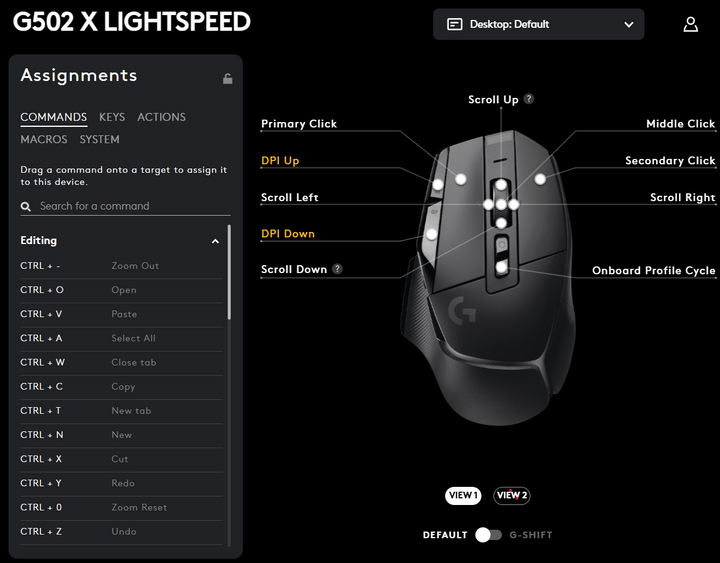
Like this, or there is a wireless version for a bit more ££
https://www.amazon.co.uk/Logitech-Programmable-But...
That one has aiming thumb button which easy to reach and nice and big, you can map to any key press or button or macro and the software lets you define a mapping group for each game or application so it only uses that set when you are running the application.
egomeister said:
TonyRPH said:
Yes, it's drawing traces that I find laborious with a mouse.
In the PCB package I use (Diptrace), the mouse wheel zooms in an out.
But holding the button down to draw traces is making my wrist hurt.
Given the Wacom is so cheap I might give that a try!
Holding the scroll wheel to draw? (ie, middle button press)In the PCB package I use (Diptrace), the mouse wheel zooms in an out.
But holding the button down to draw traces is making my wrist hurt.
Given the Wacom is so cheap I might give that a try!
https://3dconnexion.com/uk/cadmouse/
Expensive again... but has both a physical middle button and a scroll wheel...
Moving parts around is a click and drag process, and I'm finding it difficult to place them exactly where I want them.
I don't use the snap to grid feature, as that invariably puts the part in the wrong place!
I think the crux of the issue is I have large hands - and I;ve tried various sized mice but can never find one that's comfortable to use long term.
I tried a trackball?(where the ball is placed to the side and you rotate it) but that aggravated my thumb (I have some long term issue with my tendon).
.:ian:. said:
Use a gaming mouse and map one of the thumb buttons to do this.
Like this, or there is a wireless version for a bit more ££
https://www.amazon.co.uk/Logitech-Programmable-But...
That one has aiming thumb button which easy to reach and nice and big, you can map to any key press or button or macro and the software lets you define a mapping group for each game or application so it only uses that set when you are running the application.
I have a gaming mouse but as per my post above - I have big hands and find it difficult to use most mice, as my hand tends to cover the entire mouse.Like this, or there is a wireless version for a bit more ££
https://www.amazon.co.uk/Logitech-Programmable-But...
That one has aiming thumb button which easy to reach and nice and big, you can map to any key press or button or macro and the software lets you define a mapping group for each game or application so it only uses that set when you are running the application.
TonyRPH said:
Sorry - badly (very badly!) explained on my part. I can click and then the trace is created and it follows the mouse movement - and then click again to place - however sometimes I have to nudge the traces and that's the part I find awkward.
Moving parts around is a click and drag process, and I'm finding it difficult to place them exactly where I want them.
A quick google says you can move selected elements using the cursor keys.Moving parts around is a click and drag process, and I'm finding it difficult to place them exactly where I want them.
shtu said:
A quick google says you can move selected elements using the cursor keys.
You can yes, but not in fine movements. I've tried shift + arrow (which works in some cad packages) for fine movement - ctrl + arrow etc. to no avail.The parts move in large (relatively speaking) steps.
I just thought I'd update the thread to bring it to a conclusion.
I bought one of these Anker 2.4G Wireless Vertical Ergonomic Optical Mouse, 800/1200 /1600 DPI, 5 Buttons
It only arrived today, so I've used it a great deal yet - but early indications are promising.
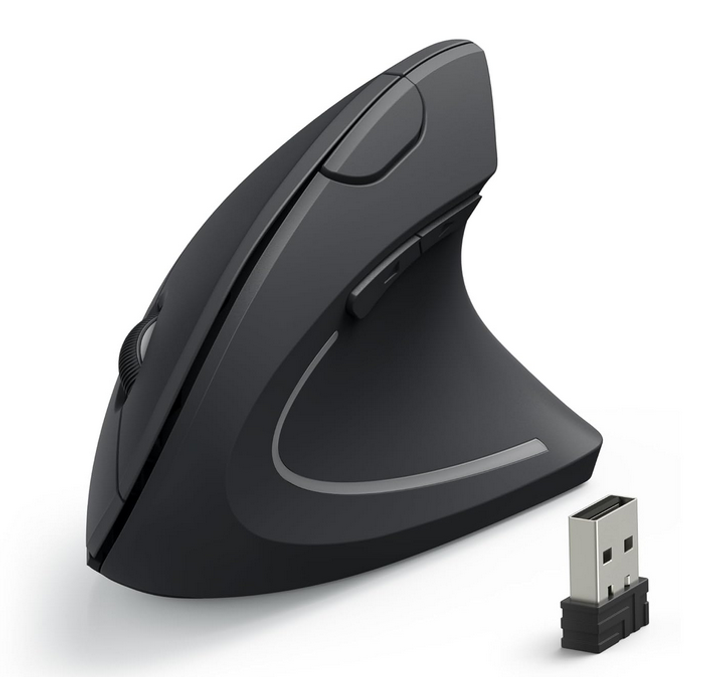
I bought one of these Anker 2.4G Wireless Vertical Ergonomic Optical Mouse, 800/1200 /1600 DPI, 5 Buttons
It only arrived today, so I've used it a great deal yet - but early indications are promising.
A bit late now but I use a Wacom tablet with Vectorworks every day for work. Can’t ever imagine going back a mouse - I’m so slow in comparison drawing with one now. It’s whatever you get used to I suppose but i also have large hands and find mice uncomfortable after a while.
Edited by benny.c on Wednesday 24th June 17:27
TonyRPH said:
Yes, it's drawing traces that I find laborious with a mouse.
In the PCB package I use (Diptrace), the mouse wheel zooms in an out.
But holding the button down to draw traces is making my wrist hurt.
Given the Wacom is so cheap I might give that a try!
I use a Huion tablet for Blender, and a Wacom back in the day for a car wiring diagram. I found them easy to get used to and great for precise work. My Wacom was A6, and my Huion A4. The latter allowed more accurate work and well worth the extra cost, and demand of room. In the PCB package I use (Diptrace), the mouse wheel zooms in an out.
But holding the button down to draw traces is making my wrist hurt.
Given the Wacom is so cheap I might give that a try!
Gassing Station | Computers, Gadgets & Stuff | Top of Page | What's New | My Stuff