
Dual monitor arm
Discussion


I’m thinking of buying this screen to use in my tiny home office.
https://www.currys.co.uk/products/samsung-viewfini...
It’s probably enough on its own. But I thought it would put my existing 25 inch LG ultrawide next to it, but in portrait.
I’m wondering about monitor arms, I’m thinking those with adjustable arms so that I can line the two screens up. Anyone got any recommendations or advice on errors to avoid please?
Thanks in advance.
https://www.currys.co.uk/products/samsung-viewfini...
It’s probably enough on its own. But I thought it would put my existing 25 inch LG ultrawide next to it, but in portrait.
I’m wondering about monitor arms, I’m thinking those with adjustable arms so that I can line the two screens up. Anyone got any recommendations or advice on errors to avoid please?
Thanks in advance.
I bought one a while ago and I couldn't get the arms/ screens close together without them sticking out about 4ft. In the end I gave it to my dad who had the same issue and I ended up binning it from his garage when he passed away.
I'm sure the one that I got was either rubbish or we didn't adjust it properly, I've since moved to a glass desk so not keen to try the clamp types again!
I'm sure the one that I got was either rubbish or we didn't adjust it properly, I've since moved to a glass desk so not keen to try the clamp types again!
I bought a pair of wall mounted arms from a company called Allcam via ebay - they don't have any in stock at the moment, but they've been doing a great job since 2018 if you can find them.
I really came to say (given I can't make an available recommendation) if you are looking at monitor arms, unless your desk is REALLY heavy, not get ones that bolt to the desk - if the desk moves when you bump it, so will the monitors and it's hugely annoying!
I have 2 wall mounted monitors in my home office, and my wife has one in hers - definitely the best way to go if it's feasible!
I really came to say (given I can't make an available recommendation) if you are looking at monitor arms, unless your desk is REALLY heavy, not get ones that bolt to the desk - if the desk moves when you bump it, so will the monitors and it's hugely annoying!
I have 2 wall mounted monitors in my home office, and my wife has one in hers - definitely the best way to go if it's feasible!
Monitor arms are great, but note the comments in the Amazon reviews in the link above about needing space behind the desk for the arms to fold in to (that's not a criticism of that product, it's a common feature of all arms). As some of the reviews point out you might be better off not mounting in the center of the desk but offset it to one side.
Mr Pointy said:
Monitor arms are great, but note the comments in the Amazon reviews in the link above about needing space behind the desk for the arms to fold in to (that's not a criticism of that product, it's a common feature of all arms). As some of the reviews point out you might be better off not mounting in the center of the desk but offset it to one side.
I think this is the issue we had with mine as both our desks sat against the wall so no space out the back for the arms.n3il123 said:
Mr Pointy said:
Monitor arms are great, but note the comments in the Amazon reviews in the link above about needing space behind the desk for the arms to fold in to (that's not a criticism of that product, it's a common feature of all arms). As some of the reviews point out you might be better off not mounting in the center of the desk but offset it to one side.
I think this is the issue we had with mine as both our desks sat against the wall so no space out the back for the arms.https://www.amazon.co.uk/dp/B07PWK4R9S
tomsugden said:
I have the same as this (albeit a different no-name brand) and it does the job OK.I bought the Amazon basics one in the end. It’s a very well made piece of kit for 20 quid.
I’ve stuck the 32 as my main work screen and turned the 25 thru 90 Can’t get it much closer and I think k I will end up putting it landscape.
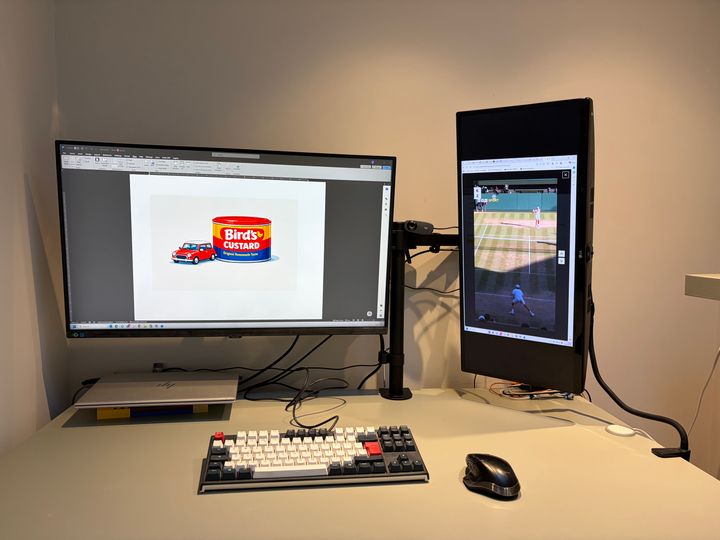
Thanks for everyone’s input. Any other ideas welcomed.
I’ve stuck the 32 as my main work screen and turned the 25 thru 90 Can’t get it much closer and I think k I will end up putting it landscape.
Thanks for everyone’s input. Any other ideas welcomed.
Gassing Station | Computers, Gadgets & Stuff | Top of Page | What's New | My Stuff