
Will I use a 27 Mac from 2009?
Discussion


I still have a 2009 Mac like pictured. Apparently you can change the slow hardrive for SSD. I did upgrade the ram years ago.
But realistically would I ever use it? What can it be used for. I kind of know I’ll never use it as haven’t used it for years but maybe I’m missing something…
Is it time to face facts
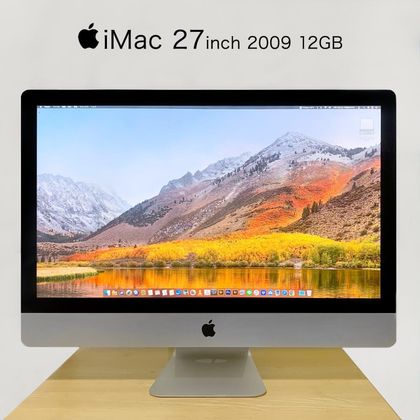
But realistically would I ever use it? What can it be used for. I kind of know I’ll never use it as haven’t used it for years but maybe I’m missing something…
Is it time to face facts
As a main computer it's probably past it now for anything but basic things. The latest Mac OS you can install on it is High Sierra from 2017. If it works and you want to keep it around, you could install a more modern Linux OS on it like Ubuntu https://tjtharrison.medium.com/installing-ubuntu-2.... Does your 27" have a hatch on the back to do upgrades or is it a screen out job?

nyt said:
Is it one of the Macs that can be used as a very decent external monitor?
You can also (our at least used to be able to) get kits that gut the internals and replace them with a monitor control board so that you can keep the shell and the high quality screen and use it as a standard computer monitor, connected to something else. Lots you can do with it, depending on software and time - lots of good "low end Mac" groups on social media.
I've still got my 2010 iMac with a full licensed Adobe Creative Suite, which cost me a small fortune back in the day. I use it a regularly a few times a month for InDesign, Illustrator, Lightroom etc. Works just as well as it always did, not noticeably slower than it did when new, boots up fast and shuts down virtually instantly. It could do with a new internal drive as it's running out of space (chewed up by my SLR's RAW files), but I'm not keen on disturbing such a stable system.
The bonus is that I've not been fleeced for many years subscribing to Creative Cloud. I never connect it to the internet since security patches stopped long ago, but it's simplicity itself to move any files via USB, SD card, or a network if separated from the internet (which I have - iMacs have gigabit ethernet as standard).
I've also got a G4 from 2003 that I use as a dedicated slide scanner, stuffed to the gills with RAM, HDs, SCSI cards, twin DVD burners etc, and that still works flawlessly too. It was my main design workstation until the iMac appeared, only use that a couple of times a year now to scan negatives.
I've still got my 2010 iMac with a full licensed Adobe Creative Suite, which cost me a small fortune back in the day. I use it a regularly a few times a month for InDesign, Illustrator, Lightroom etc. Works just as well as it always did, not noticeably slower than it did when new, boots up fast and shuts down virtually instantly. It could do with a new internal drive as it's running out of space (chewed up by my SLR's RAW files), but I'm not keen on disturbing such a stable system.
The bonus is that I've not been fleeced for many years subscribing to Creative Cloud. I never connect it to the internet since security patches stopped long ago, but it's simplicity itself to move any files via USB, SD card, or a network if separated from the internet (which I have - iMacs have gigabit ethernet as standard).
I've also got a G4 from 2003 that I use as a dedicated slide scanner, stuffed to the gills with RAM, HDs, SCSI cards, twin DVD burners etc, and that still works flawlessly too. It was my main design workstation until the iMac appeared, only use that a couple of times a year now to scan negatives.
I’ve just retired my 2012 macbook pro (the last with a cd drive). I had previously upgraded it to SSD and maxed out the ram (was a very simple job on that machine, just screws!) but it was just past its best usable life.
no harm to it, it lasted pretty well! but its replacement macbook air (m5 15inch) is an awesome machine! even the screen is just so much better.
no harm to it, it lasted pretty well! but its replacement macbook air (m5 15inch) is an awesome machine! even the screen is just so much better.
Recently replaced my iMac. Had a very specced up 2016 version, TB hard drive, some fusion processor and Retina display, 21.5". Great bit of kit, but Apple stopped supporting OS and software upgrades, so I was slowly being squeezed in to it becoming an overly powerful web browser. Gave it to my Mum in the end, and bought a second hand iMac, year old but far small HD - seems they all want us paying for cloud storage these days. . .
ajprice said:
As a main computer it's probably past it now for anything but basic things. The latest Mac OS you can install on it is High Sierra from 2017. If it works and you want to keep it around, you could install a more modern Linux OS on it like Ubuntu https://tjtharrison.medium.com/installing-ubuntu-2.... Does your 27" have a hatch on the back to do upgrades or is it a screen out job?
I've just managed to get Sequoia onto a 2014 (native Big Sur upper limit) iMac pretty easily and I have to admit, it is (surprisingly) perfectly useable, probably a bit snappier than it was on Big Sur, so it is possible to stay within the MacOS family a bit longer than maybe first thought.This is the method.
https://dortania.github.io/OpenCore-Legacy-Patcher...
They state Sequoia is possible on a 2009 machine.
Only you will know if you'll ever use it, do you need or use a desktop computer?
As above OLPC (open legacy core patcher) will run latest MacOS, I was running it on my 2009 iMac, worked perfectly. I gave it to a friend who is still using it.
Edited by megaphone on Saturday 29th August 11:14
MickC said:
Hmmm, ok nice thread. What can I do with my old Powermac 7100??  Circa 1995.
Its currently in the loft with (iirc) dual boot System 7 (internal 80MB disk) and MacLinux (from a 170MB SCSI external). I think i doubled the RAM to 16MB but it could have been 8...
Put a Mac Mini inside it and fool everyone with it's performance? Circa 1995.Its currently in the loft with (iirc) dual boot System 7 (internal 80MB disk) and MacLinux (from a 170MB SCSI external). I think i doubled the RAM to 16MB but it could have been 8...
Give it to a computer museum?
mmm-five said:
MickC said:
Hmmm, ok nice thread. What can I do with my old Powermac 7100?? Circa 1995.
Its currently in the loft with (iirc) dual boot System 7 (internal 80MB disk) and MacLinux (from a 170MB SCSI external). I think i doubled the RAM to 16MB but it could have been 8...
Put a Mac Mini inside it and fool everyone with it's performance? Circa 1995.Its currently in the loft with (iirc) dual boot System 7 (internal 80MB disk) and MacLinux (from a 170MB SCSI external). I think i doubled the RAM to 16MB but it could have been 8...
Give it to a computer museum?
I dont think the IBM PS/2 model 56 sat next to is anywhere near as interesting, but it's still there too. I need a clearout. But I'm keeping my speccy and Amiga 500
Gassing Station | Computers, Gadgets & Stuff | Top of Page | What's New | My Stuff