
One click info
Discussion


I use Apple products.
When I one click to fill in my full info on a form everything is correct.
However if the form only requires name, email and postcode then it inputs a 10 year old postcode. I’ve looked everywhere and can’t find that postcode anywhere so that I can change it.
Any ideas where it will be?
If you're using Safari, then there's an Autofill setting (3rd tab in the Settings window) where you tell it where the info should come from - by default it uses the info in from your Contacts app, so check if something there is incorrect...and check the 'Other forms' item to see if you've given a specific website permission to store its own (possibly incorrect) autofill info.
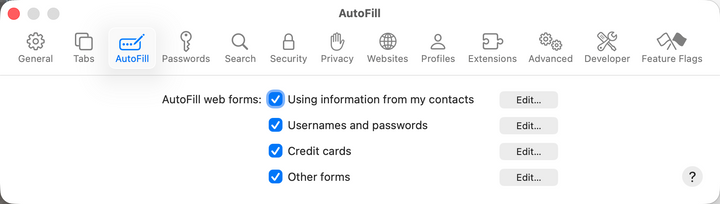
On iOS/iPadOS it is under Settings > Apps > Safari > General > Autofill, but only allows you to select which of your saved contacts you want to use as 'your' info and doesn't offer the site-by-site settings of the desktop version.
If you're using another browser, then the autofill will behave and be configured differently...but mostly under some 'autofill' or 'privacy & security' setting, for example on the MacOS browsers I have access to:
On iOS/iPadOS it is under Settings > Apps > Safari > General > Autofill, but only allows you to select which of your saved contacts you want to use as 'your' info and doesn't offer the site-by-site settings of the desktop version.
If you're using another browser, then the autofill will behave and be configured differently...but mostly under some 'autofill' or 'privacy & security' setting, for example on the MacOS browsers I have access to:
- Brave = Settings > Autofill and Passwords > Addresses and more
- Vivaldi = Settings > Privacy and Security > Addresses and more
- Firefox = Settings > Passwords and Autofill > Addresses and more
- Waterfox = Settings > Passwords and Autofill > Addresses and more
- Edge = Settings > Passwords and Autofill > Addresses and more
- Tor Browser (don't think it offers this function)
Edited by mmm-five on Tuesday 8th September 10:30
Gassing Station | Computers, Gadgets & Stuff | Top of Page | What's New | My Stuff