
BT Broadband problems
Discussion


I've been suffering from intermittent connection problems with my broadband.
The connection drops and it would seem that the connection is only restored when I use the telephone.
The BT Broadband people are useless they don't know anything apart from how to follow a script, they close the call unless chased on a daily basis.
How can I:
a) Get the call elevated to someone with half a brain who speaks English (this is not racism I just want people who I can understand and who are competent to do the job).
b) If I can get no help from BT, is there a way to diagnose the problem myself. I work in IT so I'm not unfamiliar with techy stuff.
Any advice phone numbers appreciated.
The connection drops and it would seem that the connection is only restored when I use the telephone.
The BT Broadband people are useless they don't know anything apart from how to follow a script, they close the call unless chased on a daily basis.
How can I:
a) Get the call elevated to someone with half a brain who speaks English (this is not racism I just want people who I can understand and who are competent to do the job).
b) If I can get no help from BT, is there a way to diagnose the problem myself. I work in IT so I'm not unfamiliar with techy stuff.
Any advice phone numbers appreciated.

I've got a similar problem, there are a couple of things you will have to try for yourself, but the use of the phone is a well known workaround for a possibly poor connection somewhere.. Using the phone increases the power in the line and this allows the signal to bridge a poor connection...
I called Nildram, my ISP. They recommended (of course!) trying different equipment, changing filters
and so on... I did all of this and it seemed to solve the problem.. For a while.. Then the ADSL connection started to drop again... They finally agreed to get a BT engineer out.. He rewired something - I was out at the time and the in-laws had kindly agreed to be there when he came round.. This all seemed to work, although he disabled the two other phone ports in the house... but that was a communication issue... We went away last week and came back - now the connection seems intermittent again - so I've logged another call and we're getting a BT engineer out again...
Ideally you need to do a bit of a Google, but essentially your ISP will want you to check and change the equipment in use, including filters and extension cables..
Scraggles said:
dump any usb modem and get an ethernet based router, install ethernet cards and some wires and makes it easier, no phone line extension cables either
Running an Ethernet router which is a Netgear 834G, there is only one phone connection in the house.
I know that I'm a little way from the exchange, but is has been working for a year OK.
I've swapped the cables, the router with an old BT USB job (worse than before), the microfilter. I don't run Sky or a fax machine.
I was wondering if I could get a line test done myself and look at the stats myself, because clearly I will not get any response until I am able to get the problem referred to the UK.
plasticpig said:
Does your router have a Signal to Noise ratio and line loss statistic? If so that covers some of the tests that BT will do (woosh test).
Pretty sure it does I will check when I get home. I'll try running the diagnostic with and without a connection to see what effect using the telephone has.

Barstewards at BT say they will charge me £150 if they find a problem with my equipment.
Considering that I have spent god knows how many hours troubleshooting the problem with them, I'm considering changing my account on principle. I've taken all reasonable steps to resolve the issue and for them to say that is an absolute shower.
I've:
* Tried the BT ADSL modem
* Swapped my ethernet cable
* Tried with and without an extension
* I've ran Ipconfig /release and renew
* I've re-booted my ADSL router
* I've reset my router to the factory settings and reconfigured it from scratch
A normal non-technical person would not have been able to do these things easily, how can they say they will charge me £150 if they find a fault with my equiptment it's a disgrace.
I will consider taking them to the small claims court on principle.
Anyone recommend a decent ADSL supplier (not BT and preferably one where the support is not outsourced to India).
Considering that I have spent god knows how many hours troubleshooting the problem with them, I'm considering changing my account on principle. I've taken all reasonable steps to resolve the issue and for them to say that is an absolute shower.
I've:
* Tried the BT ADSL modem
* Swapped my ethernet cable
* Tried with and without an extension
* I've ran Ipconfig /release and renew
* I've re-booted my ADSL router
* I've reset my router to the factory settings and reconfigured it from scratch
A normal non-technical person would not have been able to do these things easily, how can they say they will charge me £150 if they find a fault with my equiptment it's a disgrace.
I will consider taking them to the small claims court on principle.
Anyone recommend a decent ADSL supplier (not BT and preferably one where the support is not outsourced to India).
have you tried upgrading the router firmware from the Netgear site?
the thing with ADSL is that its still reliant on the interop between a modem in the exchange and at home (basically) ...BT have made a lot of changes to their network in the last year (moving to BT Max rate adaptive etc) - so if you are not running the latest modem software, and were borderline before, then it could be an issue.
generally CPE vendors and DSLAM vendors/service providers are in a continous cycle of upgrading and you can get mismatches from time to time.
the thing with ADSL is that its still reliant on the interop between a modem in the exchange and at home (basically) ...BT have made a lot of changes to their network in the last year (moving to BT Max rate adaptive etc) - so if you are not running the latest modem software, and were borderline before, then it could be an issue.
generally CPE vendors and DSLAM vendors/service providers are in a continous cycle of upgrading and you can get mismatches from time to time.
bogie said:
have you tried upgrading the router firmware from the Netgear site?
the thing with ADSL is that its still reliant on the interop between a modem in the exchange and at home (basically) ...BT have made a lot of changes to their network in the last year (moving to BT Max rate adaptive etc) - so if you are not running the latest modem software, and were borderline before, then it could be an issue.
generally CPE vendors and DSLAM vendors/service providers are in a continous cycle of upgrading and you can get mismatches from time to time.
the thing with ADSL is that its still reliant on the interop between a modem in the exchange and at home (basically) ...BT have made a lot of changes to their network in the last year (moving to BT Max rate adaptive etc) - so if you are not running the latest modem software, and were borderline before, then it could be an issue.
generally CPE vendors and DSLAM vendors/service providers are in a continous cycle of upgrading and you can get mismatches from time to time.
Firmware is on the latest version. I do have a copy of the firmware downloaded for Vista, but this I'm running XP and have just downloaded that in anticipation of migrating to Vista (or dual boot).
I also swapped out the netgear router for the BT USB modem I was given originally, and found the results were worse.
Any idea where I can get statistics for what figures I should be looking for i.e. optimum line attenuation figures etc? I'm technical but comms is not my specialism
Odd thing is that sometimes it is OK and then suddenly the line drops, and will not connect (stats according to the router are zero).
PS I received a call to say that someone will be coming to my property, which I'm happy about but not the threat of £150 charge if they say the problem is with my kit.
smithsi said:
Anyone recommend a decent ADSL supplier (not BT and preferably one where the support is not outsourced to India).
www.merula.net is current isp, they actually had a bt engineer out to my house to check the line and at no charge to me
 they also own the pipes and dont resell
I've done a lot of work on broadband issues etc, as I was an engineer involved in the design of Access equipment, for the provision of broadband services.
Your ADSL service is provided by equipment, which is nearly almost set to adapt at startup. Another words the equipment in the telephone exchange performs analysis of the telephone line and then attempts to reach the maximum line rate which can be obtained based on the signal to noise ratio etc and transmission qualities associated with your line.
Both the exchange and your modem will perform this negotiation and the line rate will be reached. The line rate will either be set at max rate i.e. 8 Mbits/sec ADSL (24 Mbits/sec ADSL2/+). Unless your line rate has been predefined as a set service i.e. 1Mbit/sec or 2 Mbit/sec service etc.
The most common factors in poor service caused by home users are generally poor extension wiring, this causes attenuation on the line and drop-outs of service.
To rule out your home wiring is to take your adsl modem and connect it directly to your BT master socket, if you look at the socket closely you will see a small face plate (lower half of the socket). Unscrew this and take it off, any extension wiring is normally connected to this front face plate. You will then have a normal telephone jack socket in the remaining plate, plug your modem directly into this, don't bother with the microfilter as you just want to test your broadband service.
If you still have poor service at this point, then find someone else who has a known working modem and try their modem in your socket and connect to your broadband service using their modem.
If you still have poor service at this point then you have a line fault, and don't worry BT will not charge you.
If your service is o.k. with your modem, then you have a wiring fault or microfilter fault at some point after the master socket, you have to go through a process of elimination to find the cause.
BT's problem most of the time is that most of the ISP's technical staff have a good knowledge of IP backbone broadband networks, but analogue telephony line systems people are vey hard to find and as a result fault location is difficult, so they rely on BT to identify line faults for them, the majority of which turn out to be 'end user' faults.
Updating firmware of modem's etc will have no bearing on this fault.
Let us know how you get on, if you need more info. then let me know.
Your ADSL service is provided by equipment, which is nearly almost set to adapt at startup. Another words the equipment in the telephone exchange performs analysis of the telephone line and then attempts to reach the maximum line rate which can be obtained based on the signal to noise ratio etc and transmission qualities associated with your line.
Both the exchange and your modem will perform this negotiation and the line rate will be reached. The line rate will either be set at max rate i.e. 8 Mbits/sec ADSL (24 Mbits/sec ADSL2/+). Unless your line rate has been predefined as a set service i.e. 1Mbit/sec or 2 Mbit/sec service etc.
The most common factors in poor service caused by home users are generally poor extension wiring, this causes attenuation on the line and drop-outs of service.
To rule out your home wiring is to take your adsl modem and connect it directly to your BT master socket, if you look at the socket closely you will see a small face plate (lower half of the socket). Unscrew this and take it off, any extension wiring is normally connected to this front face plate. You will then have a normal telephone jack socket in the remaining plate, plug your modem directly into this, don't bother with the microfilter as you just want to test your broadband service.
If you still have poor service at this point, then find someone else who has a known working modem and try their modem in your socket and connect to your broadband service using their modem.
If you still have poor service at this point then you have a line fault, and don't worry BT will not charge you.
If your service is o.k. with your modem, then you have a wiring fault or microfilter fault at some point after the master socket, you have to go through a process of elimination to find the cause.
BT's problem most of the time is that most of the ISP's technical staff have a good knowledge of IP backbone broadband networks, but analogue telephony line systems people are vey hard to find and as a result fault location is difficult, so they rely on BT to identify line faults for them, the majority of which turn out to be 'end user' faults.
Updating firmware of modem's etc will have no bearing on this fault.
Let us know how you get on, if you need more info. then let me know.
One thing you can do is to download (it doesn't need installation) the DSL Modem Tool (DMT) from http://dmt.mhilfe.de/
Unfortunately the page is in German but the software has an English setup option. I think Version 8.05 is suitable for yours, but it is best to check yourself. Note: Don't just go for the highest number like I did to start with. The major version number is different for each modem type.
It should display an analysis something like this:
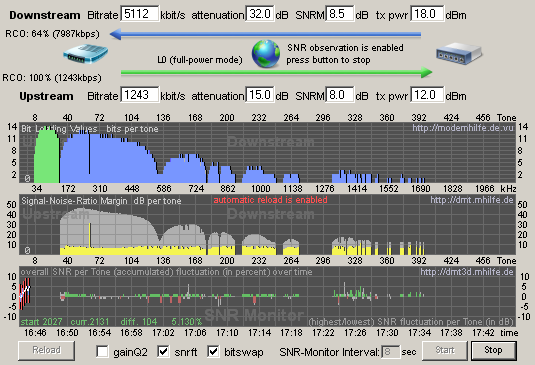
This is my ADSL2+ profile, and it sucks somewhat. My new ISP (BeThere) are being very communicative but I strongly suspect the issue is with the BT line. A 32dB attenuation on a 1 mile cable length should give a 10-12Mbit connection. Disconnecting all extensions and connecting (via microfilter) to the test connector gives a slightly worse response than the built in splitter faceplate. Not shown on there, but visible on the window, are error stats and general modem info. These can help build up a picture of what is going wrong.
Unfortunately the page is in German but the software has an English setup option. I think Version 8.05 is suitable for yours, but it is best to check yourself. Note: Don't just go for the highest number like I did to start with. The major version number is different for each modem type.
It should display an analysis something like this:
This is my ADSL2+ profile, and it sucks somewhat. My new ISP (BeThere) are being very communicative but I strongly suspect the issue is with the BT line. A 32dB attenuation on a 1 mile cable length should give a 10-12Mbit connection. Disconnecting all extensions and connecting (via microfilter) to the test connector gives a slightly worse response than the built in splitter faceplate. Not shown on there, but visible on the window, are error stats and general modem info. These can help build up a picture of what is going wrong.
Thanks TVRWhoa for the advice and Zad for the link on the ADSL settings tool.
I'm going to try it with and without connecting to the master socket and get the stats, the annoying thing is the problem is intermittant, so sods law says that the BT engineer will come when it's working.
When it works I'm getting
Downstream UpStream
Speed 2272kbps 288Kbps
Line Attenuation: 54db 15.5db
Noise Margin: 12db 9db
At the moment I can't log in with the software that Zad recommended it's not talking with my router, but I'll get there? I can log in successfully but the UNIX command that the software is firing are not recognised, I'll do some hacking...
PS TVRWhoa Love the Cerb hopefully I will be allowed to get another one one day, after my first one went up in flames!
I'm going to try it with and without connecting to the master socket and get the stats, the annoying thing is the problem is intermittant, so sods law says that the BT engineer will come when it's working.
When it works I'm getting
Downstream UpStream
Speed 2272kbps 288Kbps
Line Attenuation: 54db 15.5db
Noise Margin: 12db 9db
At the moment I can't log in with the software that Zad recommended it's not talking with my router, but I'll get there? I can log in successfully but the UNIX command that the software is firing are not recognised, I'll do some hacking...
PS TVRWhoa Love the Cerb hopefully I will be allowed to get another one one day, after my first one went up in flames!
Edited by smithsi on Saturday 17th March 08:30
I've found that the ZMT software is not working with my router, telnetting the router shows that the command adslctl is not supported. I managed to find some other software that has been configured for my router and I'll wait on the results.
I now appear to have a consistent connection for 24 hours so perhaps it was a BT cock up, which has been fixed.
PS Alternative software is called RouterStats [url]www.vwlowen.co.uk/internet/files.htm[/url]
I now appear to have a consistent connection for 24 hours so perhaps it was a BT cock up, which has been fixed.
PS Alternative software is called RouterStats [url]www.vwlowen.co.uk/internet/files.htm[/url]
Edited by smithsi on Saturday 17th March 09:20
I haven't seen that software before, so I'll have a play with that software myself.
Your line attenuation is pretty high, I'm surprised you are getting the speeds that you are. I had a bit of trouble configuring DMT too, it turned out the default Telnet Prompt String was totally wrong, and I had to set it to "{Administrator}=>".
Your line attenuation is pretty high, I'm surprised you are getting the speeds that you are. I had a bit of trouble configuring DMT too, it turned out the default Telnet Prompt String was totally wrong, and I had to set it to "{Administrator}=>".
Gassing Station | Computers, Gadgets & Stuff | Top of Page | What's New | My Stuff