
How to extract BIN files
Discussion


A BIN file is a disc image file. All you need is a CD writing app something like Nero to burn it to a CD (or DVD) it will self extract itself into all the files during the burn.
Or you could get hold of ISOBuster and do the same thing but unpack it to a folder on your hard drive.
Or you could get hold of ISOBuster and do the same thing but unpack it to a folder on your hard drive.
Edited by FourWheelDrift on Thursday 4th October 10:54
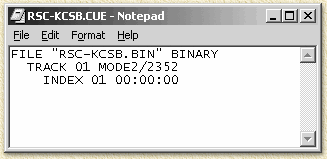
Bin files are usually partnered with a .cue file
The cue file stores info about the actual disc image and when burning\mounting this image, the .cue is the file you would aim for.
see link below for an example...
http://www.weethet.nl/images/nero/notepad_cuefile....
Dan
The cue file stores info about the actual disc image and when burning\mounting this image, the .cue is the file you would aim for.
see link below for an example...
http://www.weethet.nl/images/nero/notepad_cuefile....
Dan
If it's just a movie that you've 'acquired', then you can watch the .bin file directly with VLC media player www.videolan.org/vlc/
Very handy!
Gassing Station | Computers, Gadgets & Stuff | Top of Page | What's New | My Stuff