Excel equation dilema???
Author
Discussion

ItsTony

Original Poster:

960 posts

237 months

Wednesday 3rd February 2010
quotequote all


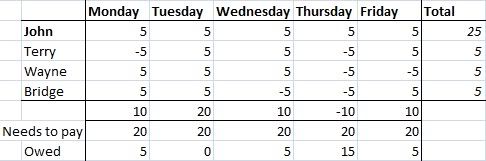
Hi, Just wanted to ask if anyone else knows an easy way to get the above table to do what I want.
I've inputted the data as positive if they've paid and negative if they haven't paid. Only problem is when I try and total up what they've actually paid, a negative figure is just going to balance out with the positive figures so the figure is incorrect.

Is there another way for me to easily show that a figure is still owed (hasn't been paid) without me putting a '0'.

Thanx

marctwo

3,666 posts

280 months

Wednesday 3rd February 2010
quotequote all
Sounds like you need to use SUMIF rather than SUM.

=SUMIF(A1:A4, ">0")

would add all cells in A1 to A4 that have a positive value. If you want to sum the negatives then it would be =SUMIF(A1:A4, "<0"). You get the idea.

TonyHetherington

32,091 posts

270 months

Wednesday 3rd February 2010
quotequote all
That's exactly what I suggested in his other thread, Marc yes - use SUMIF and use the IF as >0. Great minds, as they say smile

ItsTony

Original Poster:

960 posts

237 months

Wednesday 3rd February 2010
quotequote all
Thank you, thank you wink

The office is amazed that I've gone to Pistonheads to ask for help, lol.

marctwo

3,666 posts

280 months

Wednesday 3rd February 2010
quotequote all
First the car, now this. I am starting to think you are stalking me.

Know anywhere where I can get some drum lessons? biggrin

TonyHetherington

32,091 posts

270 months

Wednesday 3rd February 2010
quotequote all
By the way, Marc, that blue jumper looks great on you hehe