
Why doesn't my computer screen fit my TV screen?
Discussion


I bought a cable to connect my MacBook Pro to my Sony Bravia 40 inch LCD TV and have been successful in getting the computer screen to appear on the TV. However, there's a thick black bar down the left side of the screen on the TV and the picture appears to be slightly squashed in terms of width. How can I stretch the image to its correct proportions to fit the TV screen?
I've got the "VGA Display" settings in "System Preferences>Displays" set to "1920 x 1080 60Hz". The pixel dimensions are correct according to the manual for the TV, though it says 50Hz, not 60 but there's no 50Hz option in the display settings on the Mac so I can't do anything about that. Is that the problem or is it something else?
Here's a picture to illustrate what I mean...
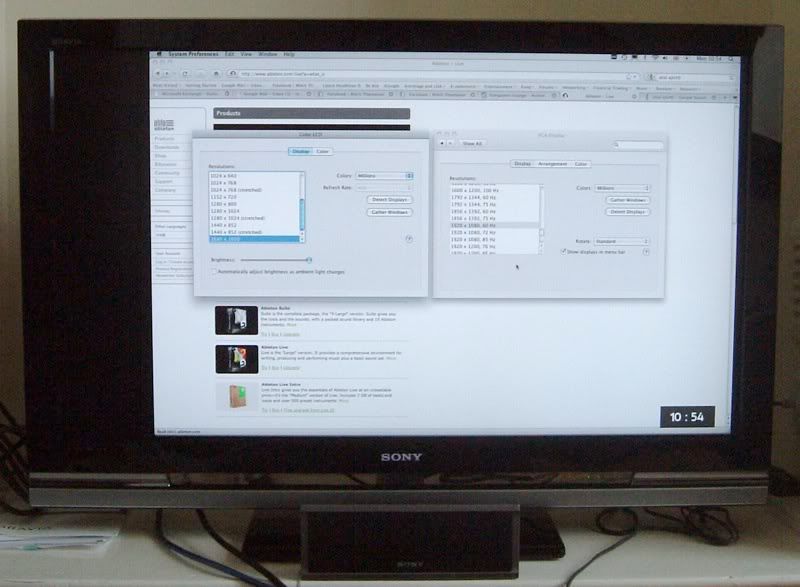
I've got the "VGA Display" settings in "System Preferences>Displays" set to "1920 x 1080 60Hz". The pixel dimensions are correct according to the manual for the TV, though it says 50Hz, not 60 but there's no 50Hz option in the display settings on the Mac so I can't do anything about that. Is that the problem or is it something else?
Here's a picture to illustrate what I mean...
Re the 50hz/60hz. I think this relates to the screen refresh rate, so this won't be it.
Re the squashed up text. The laptop must be set up on a 4:3 size rather than widescreen 16:9 I am guessing this is the problem. However, I wouldn't know how to sort it on a mac.
Someone will be along soon to advise I'm sure
Re the squashed up text. The laptop must be set up on a 4:3 size rather than widescreen 16:9 I am guessing this is the problem. However, I wouldn't know how to sort it on a mac.
Someone will be along soon to advise I'm sure
I had all sorts of issues with my 32" Toshiba LCD. I couldn't output my media pc in native resolution (720p) as it turned out the stupid TV just wouldn't accept it. I ended up with just 'best fit'.
My friend had the same issue on his 40" Pana plasma.
So don't take it for granted that you can display native resolution.
My friend had the same issue on his 40" Pana plasma.
So don't take it for granted that you can display native resolution.
Edited by rsv gone! on Monday 5th April 12:40
audi321 said:
The laptop must be set up on a 4:3 size rather than widescreen 16:9 I am guessing this is the problem. However, I wouldn't know how to sort it on a mac.
I don't think you can change it. There are different pixel dimensions that you can select for the screen, that's all.Ross1988 said:
Are you sure you have the ouput on your mac set to 1920 x 1080? Or whatever it is?
Yes.Ross1988 said:
Try messing about with the screen zoom functions on your TV.
Can't seem to find any!Ross1988 said:
Also what model TV is it? Are you a 100% sure it can handle 1920 x 1080?
Those are the pixel dimensions given for the TV screen in its manual. It's a Sony Bravia KDL-40W4000.Edited by MitchT on Monday 5th April 13:10
Plotloss said:
Set the output res on the mac to 1280 x 1024
Even worse - big black bar down both sides!Plotloss said:
As I have a sneaking suspicion that that is the max res that those Sonys will accept over the PC input...
It will take 1920 x 2080, it just squashes the image width-wise for some daft reason. You can tell by the shape that circles become that the image would be "right" if it filled the whole screen.MitchT said:
audi321 said:
The laptop must be set up on a 4:3 size rather than widescreen 16:9 I am guessing this is the problem. However, I wouldn't know how to sort it on a mac.
I don't think you can change it. There are different pixel dimensions that you can select for the screen, that's all.Ross1988 said:
Are you sure you have the ouput on your mac set to 1920 x 1080? Or whatever it is?
Yes.Ross1988 said:
Try messing about with the screen zoom functions on your TV.
Can't seem to find any!Ross1988 said:
Also what model TV is it? Are you a 100% sure it can handle 1920 x 1080?
Those are the pixel dimensions given for the TV screen in its manual. It's a Sony Bravia KDL-40W4000.Edited by MitchT on Monday 5th April 13:10
Have you tried a dvi output? What other puts do you have? HDMI?

Definitely try using a DVI-HDMI cable, I had the same issues when using my PC with my TV.
Also, if your TV has a '1:1 pixel mapping','Just scan' or similar type mode, turn it on. This usually disables all the processing and the scaling done by the TV, and just displays exactly what the PC is outputting.
I am running my PC at 1920X1080 on a 32" LCD screen and the picture is now superb.
Also, if your TV has a '1:1 pixel mapping','Just scan' or similar type mode, turn it on. This usually disables all the processing and the scaling done by the TV, and just displays exactly what the PC is outputting.
I am running my PC at 1920X1080 on a 32" LCD screen and the picture is now superb.
You will need this - http://store.apple.com/uk/product/MB570 - before you can connect a DVI-HDMI cable up to the TV.
As I suspect, the VGA input doesn't accept 1920x1080 - don't always assume the owners manual is factually correct, as most are direct translations of their JDM counterparts, and not all features are retained in European sets!
That said however, I'm of the opinion Apple's Graphics chipset doesn't employ HDCP, so the HDMI option (for me) is a non-starter.
Therefore, I believe irrespective of what the manual says, 1920x1080 is not actually displayable, even if that's what the output is set to.
Probably to do with not allowing HDCP material circumvention, and that most TV manufacturers don't give a toss about what consumers want in relation to the PC input, so you get the least amount of money spent on that aspect of the TV.
It's probably only in the current generation, and even then the higher end models, where you will get the full functionality you expect should be there.
If the TV has a DVI option along side the VGA, then a straight DVI-DVI cable on the end of the mini-Display Port may just work.
I also wonder if the high refresh rate is problematic, if not the actual cause, since if the TV can't hack 60Hz at the native resolution (due to being designed with PAL's 50Hz in mind) then it's dropping the screen size down to what it can handle at 60Hz.
That'd be something you'd need to feedback to Apple, since they control the drivers, more or less.
Can you borrow a similar GPU'd Windows based PC, to test if it can make the TV display full screen?
As I suspect, the VGA input doesn't accept 1920x1080 - don't always assume the owners manual is factually correct, as most are direct translations of their JDM counterparts, and not all features are retained in European sets!
That said however, I'm of the opinion Apple's Graphics chipset doesn't employ HDCP, so the HDMI option (for me) is a non-starter.
Therefore, I believe irrespective of what the manual says, 1920x1080 is not actually displayable, even if that's what the output is set to.
Probably to do with not allowing HDCP material circumvention, and that most TV manufacturers don't give a toss about what consumers want in relation to the PC input, so you get the least amount of money spent on that aspect of the TV.
It's probably only in the current generation, and even then the higher end models, where you will get the full functionality you expect should be there.
If the TV has a DVI option along side the VGA, then a straight DVI-DVI cable on the end of the mini-Display Port may just work.
I also wonder if the high refresh rate is problematic, if not the actual cause, since if the TV can't hack 60Hz at the native resolution (due to being designed with PAL's 50Hz in mind) then it's dropping the screen size down to what it can handle at 60Hz.
That'd be something you'd need to feedback to Apple, since they control the drivers, more or less.
Can you borrow a similar GPU'd Windows based PC, to test if it can make the TV display full screen?
blank said:
Have you tried it with an HDMI cable?
Just been trying this with a smaller Bravia.
Anything larger than 1280x768 and it says out of range through the VGA input.
HDMI is good up to 1080 - definitely the one to use if you can.
Wot he said. Use HDMI to fix (had same problem here) Just been trying this with a smaller Bravia.
Anything larger than 1280x768 and it says out of range through the VGA input.
HDMI is good up to 1080 - definitely the one to use if you can.
Edited by blank on Monday 5th April 16:41
PJ S said:
You will need this - http://store.apple.com/uk/product/MB570 - before you can connect a DVI-HDMI cable up to the TV.
As I suspect, the VGA input doesn't accept 1920x1080 - don't always assume the owners manual is factually correct, as most are direct translations of their JDM counterparts, and not all features are retained in European sets!
That said however, I'm of the opinion Apple's Graphics chipset doesn't employ HDCP, so the HDMI option (for me) is a non-starter.
Therefore, I believe irrespective of what the manual says, 1920x1080 is not actually displayable, even if that's what the output is set to.
Probably to do with not allowing HDCP material circumvention, and that most TV manufacturers don't give a toss about what consumers want in relation to the PC input, so you get the least amount of money spent on that aspect of the TV.
It's probably only in the current generation, and even then the higher end models, where you will get the full functionality you expect should be there.
If the TV has a DVI option along side the VGA, then a straight DVI-DVI cable on the end of the mini-Display Port may just work.
I also wonder if the high refresh rate is problematic, if not the actual cause, since if the TV can't hack 60Hz at the native resolution (due to being designed with PAL's 50Hz in mind) then it's dropping the screen size down to what it can handle at 60Hz.
That'd be something you'd need to feedback to Apple, since they control the drivers, more or less.
Can you borrow a similar GPU'd Windows based PC, to test if it can make the TV display full screen?
With regards to the refresh rate.As I suspect, the VGA input doesn't accept 1920x1080 - don't always assume the owners manual is factually correct, as most are direct translations of their JDM counterparts, and not all features are retained in European sets!
That said however, I'm of the opinion Apple's Graphics chipset doesn't employ HDCP, so the HDMI option (for me) is a non-starter.
Therefore, I believe irrespective of what the manual says, 1920x1080 is not actually displayable, even if that's what the output is set to.
Probably to do with not allowing HDCP material circumvention, and that most TV manufacturers don't give a toss about what consumers want in relation to the PC input, so you get the least amount of money spent on that aspect of the TV.
It's probably only in the current generation, and even then the higher end models, where you will get the full functionality you expect should be there.
If the TV has a DVI option along side the VGA, then a straight DVI-DVI cable on the end of the mini-Display Port may just work.
I also wonder if the high refresh rate is problematic, if not the actual cause, since if the TV can't hack 60Hz at the native resolution (due to being designed with PAL's 50Hz in mind) then it's dropping the screen size down to what it can handle at 60Hz.
That'd be something you'd need to feedback to Apple, since they control the drivers, more or less.
Can you borrow a similar GPU'd Windows based PC, to test if it can make the TV display full screen?
Any modern, flat screen, TFT/LCD based TV should be able to handle 60Hz fine. PC monitors run at 60Hz and they're basically the same.
I'm not an expert on monitors/TVs, however it would seem to me that this should be correct. And a bloke in our local Dixons said this too (this isn't my entire reasoning, just extra verification,
 ).
).TVs are different from dedicated monitors - that's where the problems arise, as a lot still only offer a token gesture of a monitor capability via the PC input, citing claims of "legacy" equipment or budget/shared GPU's, with limited output resolutions.
It's ballcocks, and it's plain and simple penny pinching by using a chipset which only supports 1280x1024 or 1024x768, depending on whether it's Full HD or HD Ready native resolution screens employed.
It's ballcocks, and it's plain and simple penny pinching by using a chipset which only supports 1280x1024 or 1024x768, depending on whether it's Full HD or HD Ready native resolution screens employed.
PJ S said:
That said however, I'm of the opinion Apple's Graphics chipset doesn't employ HDCP, so the HDMI option (for me) is a non-starter.
Therefore, I believe irrespective of what the manual says, 1920x1080 is not actually displayable, even if that's what the output is set to.
Probably to do with not allowing HDCP material circumvention, and that most TV manufacturers don't give a toss about what consumers want in relation to the PC input, so you get the least amount of money spent on that aspect of the TV.
You don't need HDCP to display at 1920, you only need it if displaying encrypted content. It'll be fine!Therefore, I believe irrespective of what the manual says, 1920x1080 is not actually displayable, even if that's what the output is set to.
Probably to do with not allowing HDCP material circumvention, and that most TV manufacturers don't give a toss about what consumers want in relation to the PC input, so you get the least amount of money spent on that aspect of the TV.
Gassing Station | Computers, Gadgets & Stuff | Top of Page | What's New | My Stuff