
Help me get the best out of my 1000d canon
Discussion


Right, bought my first camera a while back, Canon 1000D Eos DSLR, got used to snapping now, love taking pictures and love following the Random photos thread on the forum, my next step is' as i know there are alot of amazing Photographers on here is' can some please post up a great custom setting too use to get the most out of the camera for the following shots.
Portrait
landscape
close up
sport
im still using the 18-55m Lens that came with the camera as it does me for now!
also will be great to see the comparison between the same style shots with custom settings and pre loaded settings
Portrait
landscape
close up
sport
im still using the 18-55m Lens that came with the camera as it does me for now!
also will be great to see the comparison between the same style shots with custom settings and pre loaded settings
As a general rule, you need narrow depth of field (aperture with a low number, or a fast shutter speed) for portraits, and a deep depth of field (aperture with a higher number, or a slower shutter speed) for landscapes.
This is the first thing to get sorted when you come out of point and shoot mode
Sod all depth

Lots of depth
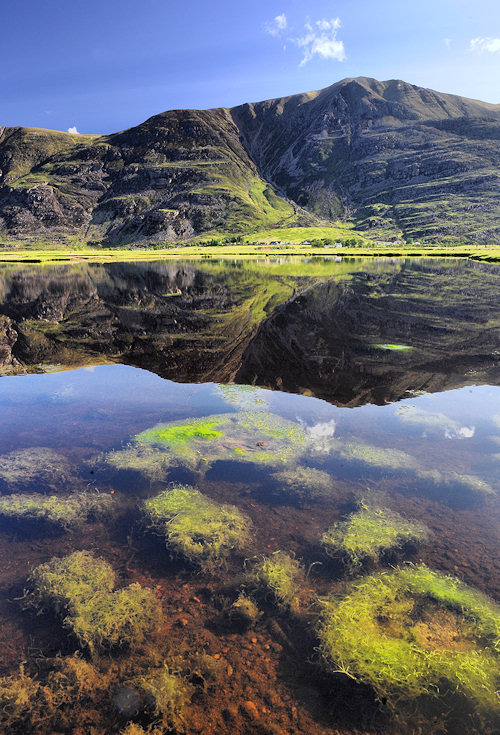
Edited to add more relevant first pic
This is the first thing to get sorted when you come out of point and shoot mode
Sod all depth
Lots of depth
Edited to add more relevant first pic
Edited by GetCarter on Saturday 16th July 10:29
A good place to start would be to buy this, http://www.amazon.co.uk/Understanding-Exposure-3rd... which is superb.
Then go and take photos! Take photos of anything you find interesting, always have the camera in the car, if you see a nice sunset or something get out and have a go.
Also have a look on flickr, you can search by keyword.
Click on the title of this shot below and it will take you to the image on flickr. Now click the camera link at the top right where it says "This photo was taken on June 26, 2011 in Raithwaite, England, GB, using a Canon EOS-1DS. " This will display the exif data which shows how the shot was taken, I find it invaluable, I look at shots I like from other photographers and then have a look how they did it.

Like Pebbles On The Beach by mark_mullen, on Flickr
In this case the most important information is this:
Exposure 0.05 sec (1/20)
Aperture f/22.0
Focal Length 24 mm
ISO Speed 100
Exposure Program Aperture-priority AE
This gives you an idea how the shot was taken.
Then go and take photos! Take photos of anything you find interesting, always have the camera in the car, if you see a nice sunset or something get out and have a go.
Also have a look on flickr, you can search by keyword.
Click on the title of this shot below and it will take you to the image on flickr. Now click the camera link at the top right where it says "This photo was taken on June 26, 2011 in Raithwaite, England, GB, using a Canon EOS-1DS. " This will display the exif data which shows how the shot was taken, I find it invaluable, I look at shots I like from other photographers and then have a look how they did it.
Like Pebbles On The Beach by mark_mullen, on Flickr
In this case the most important information is this:
Exposure 0.05 sec (1/20)
Aperture f/22.0
Focal Length 24 mm
ISO Speed 100
Exposure Program Aperture-priority AE
This gives you an idea how the shot was taken.

Simpo Two said:
Those sound suspiciously like 'modes' (little icons on a dial) - or do you mean them as general descriptions?
they are the modes, and the ones ive been using, but wondered if some one could post a custom setting to use instead of these modes, i mean like 1 custom setting too use to take close up, another to use for a landscape shot and so on
markmullen said:
A good place to start would be to buy this, http://www.amazon.co.uk/Understanding-Exposure-3rd... which is superb.
Then go and take photos! Take photos of anything you find interesting, always have the camera in the car, if you see a nice sunset or something get out and have a go.
Also have a look on flickr, you can search by keyword.
Click on the title of this shot below and it will take you to the image on flickr. Now click the camera link at the top right where it says "This photo was taken on June 26, 2011 in Raithwaite, England, GB, using a Canon EOS-1DS. " This will display the exif data which shows how the shot was taken, I find it invaluable, I look at shots I like from other photographers and then have a look how they did it.
Like Pebbles On The Beach by mark_mullen, on Flickr
In this case the most important information is this:
Exposure 0.05 sec (1/20)
Aperture f/22.0
Focal Length 24 mm
ISO Speed 100
Exposure Program Aperture-priority AE
This gives you an idea how the shot was taken.
didnt know that, wow great startThen go and take photos! Take photos of anything you find interesting, always have the camera in the car, if you see a nice sunset or something get out and have a go.
Also have a look on flickr, you can search by keyword.
Click on the title of this shot below and it will take you to the image on flickr. Now click the camera link at the top right where it says "This photo was taken on June 26, 2011 in Raithwaite, England, GB, using a Canon EOS-1DS. " This will display the exif data which shows how the shot was taken, I find it invaluable, I look at shots I like from other photographers and then have a look how they did it.
Like Pebbles On The Beach by mark_mullen, on Flickr
In this case the most important information is this:
Exposure 0.05 sec (1/20)
Aperture f/22.0
Focal Length 24 mm
ISO Speed 100
Exposure Program Aperture-priority AE
This gives you an idea how the shot was taken.
paul26982 said:
Simpo Two said:
Those sound suspiciously like 'modes' (little icons on a dial) - or do you mean them as general descriptions?
they are the modes, and the ones ive been using, but wondered if some one could post a custom setting to use instead of these modes, i mean like 1 custom setting too use to take close up, another to use for a landscape shot and so on
ie. what do you think you are trying to achieve by asking for custom settings?
Comacchio said:
I would imagine it was understanding he is after. Once you understand WHY the settings work, you are set for any situation rather than relying on the computer inside the camera (which can trip up on difficult circumstances).
yeah this, and also got the impression you can get a better picture with using none auto modes, so am i wrongpaul26982 said:
Comacchio said:
I would imagine it was understanding he is after. Once you understand WHY the settings work, you are set for any situation rather than relying on the computer inside the camera (which can trip up on difficult circumstances).
yeah this, and also got the impression you can get a better picture with using none auto modes, so am i wrongI'd suggest you spend a bit of time reading up on the basics of photography, then you're in a better position to understand why the camera chooses what it chooses when you select one of the modes, and make your own mind up about when you want to choose your own, and what settings you choose. There's a great book by Bryan Peterson called "Understanding Exposure" which explains the basics and shows different scenarios with photos and what settings he chose and why. I've found it very useful, I'd recommend it.
Edited by mattdaniels on Saturday 16th July 17:34


mattdaniels said:
Not wrong at all. It's just that asking for a "great custom setting" for you to use is an impossible question to answer, because as soon as you take the camera out of auto mode you have to make one or more decisions about aperture, shutter speed, ISO, white balance and the chosen settings depend entirely on the type of picture you're trying to take, the ambient light, the subject and so on.
I'd suggest you spend a bit of time reading up on the basics of photography, then you're in a better position to understand why the camera chooses what it chooses when you select one of the modes, and make your own mind up about when you want to choose your own, and what settings you choose. There's a great book by Bryan Peterson called "Understanding Exposure" which explains the basics and shows different scenarios with photos and what settings he chose and why. I've found it very useful, I'd recommend it.
thanks great post, the book you recomend then will help me understand quite well and is a good base for starting to learn, think ill purchase, thanks very much.I'd suggest you spend a bit of time reading up on the basics of photography, then you're in a better position to understand why the camera chooses what it chooses when you select one of the modes, and make your own mind up about when you want to choose your own, and what settings you choose. There's a great book by Bryan Peterson called "Understanding Exposure" which explains the basics and shows different scenarios with photos and what settings he chose and why. I've found it very useful, I'd recommend it.
Edited by mattdaniels on Saturday 16th July 17:34
seems theres two books too, A 3rd edition and How too shoot
Edited by paul26982 on Saturday 16th July 20:58
paul26982 said:
Simpo Two said:
Those sound suspiciously like 'modes' (little icons on a dial) - or do you mean them as general descriptions?
they are the modes, and the ones ive been using, but wondered if some one could post a custom setting to use instead of these modes, i mean like 1 custom setting too use to take close up, another to use for a landscape shot and so on
Landscape: Depends what things are important to you.
I think you're looking for magic when none exists.
Aperture
Shutter speed
Focal length
- are the main things you need to grasp; what they are and the effect they have. No modes, no custom settings, no black magic.
Theres 2 sides to taking a photograph.
The mechanics and the art.
The mechanics can be learned fairly quickly and even ignored somewhat if you want to, just use the auto modes on the camera and it will figure out what to do (tho you give some of the control of the art side of things away here).
The art is much more important.
Comes down to things like framing, subject, light, position etc.
Framing - we have some useful 'rules' to help, rule of 3rds, spiral, triangles etc well worth looking into these but always feel you can break them if you need to. Typicaly if you have a subject central erc it will likely look wrong.
Try and look all round the viewfinder, identify what your actualy shooting (its rarely just all of it) and make sure theres nothing in there you dont want to be, distractions & clutter, lamposts out of peoples heads etc.
And in the end your capturing light. So always look for 'good' light, this is usually soft light or focused light etc, for landscapes this means hardly ever middle of the day. Also what you see with your eyes is not what the camera will record, it sees things quite differently , it will exagerate dynamic range, flatten images etc where what you see is something else almost entirely, theres some techniques you can use to correct for this (filters,processing hdr etc).
The mechanics and the art.
The mechanics can be learned fairly quickly and even ignored somewhat if you want to, just use the auto modes on the camera and it will figure out what to do (tho you give some of the control of the art side of things away here).
The art is much more important.
Comes down to things like framing, subject, light, position etc.
Framing - we have some useful 'rules' to help, rule of 3rds, spiral, triangles etc well worth looking into these but always feel you can break them if you need to. Typicaly if you have a subject central erc it will likely look wrong.
Try and look all round the viewfinder, identify what your actualy shooting (its rarely just all of it) and make sure theres nothing in there you dont want to be, distractions & clutter, lamposts out of peoples heads etc.
And in the end your capturing light. So always look for 'good' light, this is usually soft light or focused light etc, for landscapes this means hardly ever middle of the day. Also what you see with your eyes is not what the camera will record, it sees things quite differently , it will exagerate dynamic range, flatten images etc where what you see is something else almost entirely, theres some techniques you can use to correct for this (filters,processing hdr etc).
Gassing Station | Photography & Video | Top of Page | What's New | My Stuff