
Photoshop question.
Discussion


A complete novice with PS here, but recently took a picture of my car which I'd like to have printed. However, the edges of the tyres have a slightly brown tinge (I think I drove through some mud) which I'd like to blacken. What's the easiest way to do this?
Here is the photo so you can see;
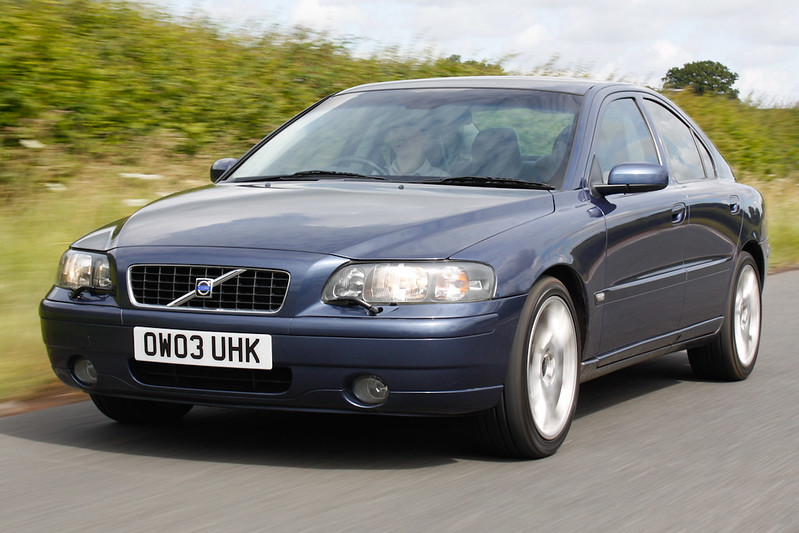
S60 tracking 1 by jlewisbarned, on Flickr
Here is the photo so you can see;
S60 tracking 1 by jlewisbarned, on Flickr
I had a bash for you.
I selected the whole front wheel and tyre using the Polygonal Lasso Tool, then copied and pasted onto a new layer. I then used the Elliptical Marquee Tool to select the wheel and cut it from the wheel and tyre layer. I repeated that process for the rear. Converted both to black and white using maximum black setting and tweaked the levels a little to make them a little darker.
I also took the liberty of cleaning the mud from the sill of the car, the side and the inner arch.

volvo by Murray 1986, on Flickr
I selected the whole front wheel and tyre using the Polygonal Lasso Tool, then copied and pasted onto a new layer. I then used the Elliptical Marquee Tool to select the wheel and cut it from the wheel and tyre layer. I repeated that process for the rear. Converted both to black and white using maximum black setting and tweaked the levels a little to make them a little darker.
I also took the liberty of cleaning the mud from the sill of the car, the side and the inner arch.
volvo by Murray 1986, on Flickr

Gassing Station | Photography & Video | Top of Page | What's New | My Stuff