
So, those who PP images... how often do you use Layers?
Discussion


Yep, for plenty. I was a relative latecomer to PP and particularly PhotoShop so I've taught myself what I know- but it's not necessarily the right or quickest way.
The shot below is fairly typical for a lightpainted car and consists several lighting frames as individual layers (ambient; side of car; front of car; interior; headlights) plus layer/ masks for localised colour balancing, background saturation saturation, a colour fill (for the slightly cyan background) and a final layer for sharpening.
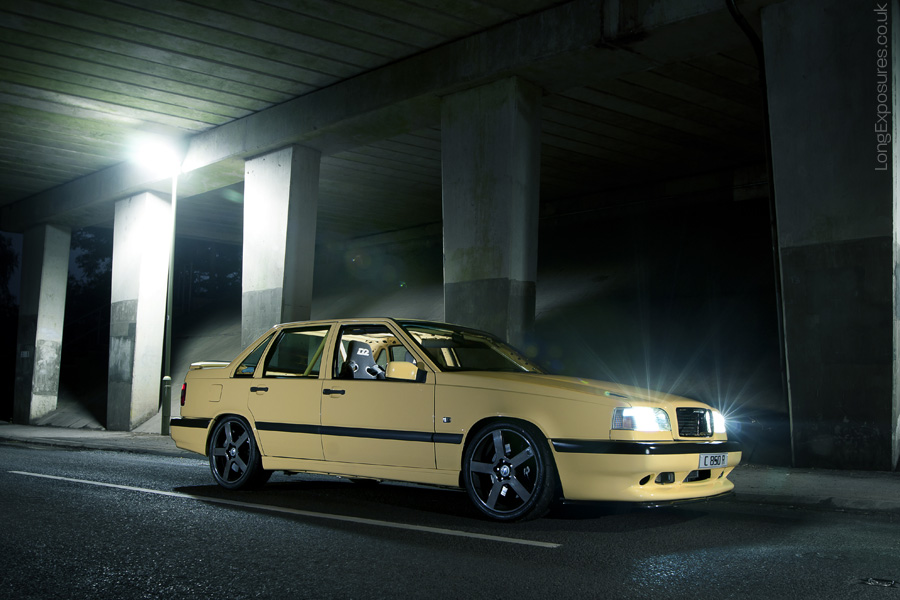
Volvo 850 T5-R
My personal preference is to apply universal tonal/ curve adjustments in Camera Raw to keep a consistent overall feel to any shot but I can see how localised adjustments would appeal for other subjects.
The shot below is fairly typical for a lightpainted car and consists several lighting frames as individual layers (ambient; side of car; front of car; interior; headlights) plus layer/ masks for localised colour balancing, background saturation saturation, a colour fill (for the slightly cyan background) and a final layer for sharpening.
Volvo 850 T5-R
My personal preference is to apply universal tonal/ curve adjustments in Camera Raw to keep a consistent overall feel to any shot but I can see how localised adjustments would appeal for other subjects.
As a next question, how long does it take people to do this?
I've looked at some of the tutorials on it, and they always seem to make it so simple, but then they use sample images which have really clear delineation between the areas of the image you want to break out into layers.
Of course, whenever it comes to trying something on an image of my own, I don't get this easy delineation, and generally end up spending a couple of hours getting more and more frustrated with the abortion evolving before me on the screen before giving it all up and going to shout at the kids.
I've looked at some of the tutorials on it, and they always seem to make it so simple, but then they use sample images which have really clear delineation between the areas of the image you want to break out into layers.
Of course, whenever it comes to trying something on an image of my own, I don't get this easy delineation, and generally end up spending a couple of hours getting more and more frustrated with the abortion evolving before me on the screen before giving it all up and going to shout at the kids.

Every shot I take gets some adjustments in Lightroom. After that, anything that needs to to be done in Photoshop will be done with layers. I keep the original image as the layer at the bottom of the stack and won't change anything on that one while editing.
It's definitely worth persevering and getting your mind around layers, they're a really powerful editing tool. With the ability to vary the opacity of an adjustment layer you can over do the change and then back it off to find exactly the right amount required. Another example is when cloning, by doing it on a separate layer you have no worries about making an unnoticed error, running out of history undo steps and then having to start the whole edit from scratch.
If editing photos from a wedding I usually spend less than 2 mins per shot in PS, 5 minutes would be a big edit for one of those. For my other work, it could be much longer...
It's definitely worth persevering and getting your mind around layers, they're a really powerful editing tool. With the ability to vary the opacity of an adjustment layer you can over do the change and then back it off to find exactly the right amount required. Another example is when cloning, by doing it on a separate layer you have no worries about making an unnoticed error, running out of history undo steps and then having to start the whole edit from scratch.
If editing photos from a wedding I usually spend less than 2 mins per shot in PS, 5 minutes would be a big edit for one of those. For my other work, it could be much longer...
I'm sure there are some good free ones out there, but lynda.com are worth taking a look at. A couple of years back I got a free month's subscription to them from Adobe and did some of their PS courses, which were really good. I see they do Elements specific courses too and would expect them to be as good as the PS ones. It's around $25 per month to subscribe, no commitment so just join up for month and cram in as many courses as you can/have time for...
Layers are the absolute basis of Photoshop. I don't see how Photoshop could be used WITHOUT using layers.
Content and adjustment layers just give massive flexibility when used with layer masks, and of course thay are your get out of jail card.
Also, quite surprised when I read these threads, the amount of people who rely on the quick magic wand mask.
If it works for you great, but chaps, get cutting those PATHS and you will never look back.
PP.

Content and adjustment layers just give massive flexibility when used with layer masks, and of course thay are your get out of jail card.
Also, quite surprised when I read these threads, the amount of people who rely on the quick magic wand mask.
If it works for you great, but chaps, get cutting those PATHS and you will never look back.
PP.
Pixel Pusher said:
Layers are the absolute basis of Photoshop. I don't see how Photoshop could be used WITHOUT using layers.
Content and adjustment layers just give massive flexibility when used with layer masks, and of course thay are your get out of jail card.
Also, quite surprised when I read these threads, the amount of people who rely on the quick magic wand mask.
If it works for you great, but chaps, get cutting those PATHS and you will never look back.
PP.
I love path's and absolutely cant stand the magic wand tool.Content and adjustment layers just give massive flexibility when used with layer masks, and of course thay are your get out of jail card.
Also, quite surprised when I read these threads, the amount of people who rely on the quick magic wand mask.
If it works for you great, but chaps, get cutting those PATHS and you will never look back.
PP.
Although i've been using Illustrator as well as Photoshop for years so that may make me biased towards them.
DibblyDobbler said:
Pixel Pusher said:
I don't see how Photoshop could be used WITHOUT using layers.
Taking better photographs in the first place might help you with that  , however it only really applies to certain syles and subject matter. For example, landscapes and portraits / reportage can in theory be left pretty much as is with minor tweaks if at all.
The flip side, and a great example of this would be the recent set GFWilliams did of that yellow 458. They could simply not be done without Photoshop layers.
Most of what we do here is based on the assembly of photographic "toolkits" which are supplied to us from photographers who light specific areas to promote them.
We've just finished a campaign for a well known Whisky and EACH bottle utilised about 12 - 15 separate exposures.

Kermit power said:
Are there any decent video tutorials out there, ideally which start with a real world photo rather than one taken purely for the purposes of the video tutorial?
Also, ideally which show what can be done with Elements rather than full blown PS?
check out Deke here http://www.deke.com/ and Lynda.com for tutorialsAlso, ideally which show what can be done with Elements rather than full blown PS?
Gassing Station | Photography & Video | Top of Page | What's New | My Stuff