
Brand new Canon 7D problem - please help!
Discussion


Got my brand new 7D today from Panamoz however there seems to be a problem
When I shoot in live mode I see the image I've taken show up on the display however when shooting in 'non live mode' IE through the shutter the picture that displays on the screen is totally black.
update on the above, full auto, shutter priority and aperture priority are all stuck at 1/4000th and F22 or similar, it's as if the camera thinks its looking at something really bright however this is in my living room with not a huge amount of natural light, certainly not enough light to be shooting at 1/8000th.
Full manual mode eliminates the problem completely.
Seems I've got a duff one?!
Any ideas? Absolutely gutted to be honest as its brand new!
When I shoot in live mode I see the image I've taken show up on the display however when shooting in 'non live mode' IE through the shutter the picture that displays on the screen is totally black.
update on the above, full auto, shutter priority and aperture priority are all stuck at 1/4000th and F22 or similar, it's as if the camera thinks its looking at something really bright however this is in my living room with not a huge amount of natural light, certainly not enough light to be shooting at 1/8000th.
Full manual mode eliminates the problem completely.
Seems I've got a duff one?!
Any ideas? Absolutely gutted to be honest as its brand new!
What lens are you using ? the 15-85 that came with it ? This is a long shot as there may be incompatibility with some 3rd party lenses (Sigma for example). If you can, try another lens anyway. Other than that it may well be faulty 
If you take a picture in manual mode that is roughly correct exposure, where is the exposure indicator ? (the collection of dots/lines with a little arrow that moves along) ? If its at either end of the scale I'd say there is a metering problem - can you check what metering mode its in ? first button on the left on the top of the camera - put it in evaluative if it isn't already.
The rear screen will be blank when shooting, it does that. If you press INFO button to the left of the screen it should cycle through a screen with the usual display on like this:
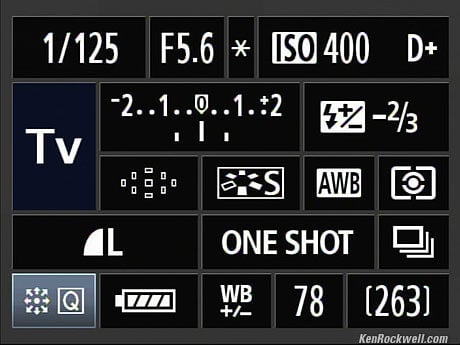
and the level screen like this (animated):

The image you are shooting will not appear on the back screen unless in live view mode.
If you take a picture in manual mode that is roughly correct exposure, where is the exposure indicator ? (the collection of dots/lines with a little arrow that moves along) ? If its at either end of the scale I'd say there is a metering problem - can you check what metering mode its in ? first button on the left on the top of the camera - put it in evaluative if it isn't already.
The rear screen will be blank when shooting, it does that. If you press INFO button to the left of the screen it should cycle through a screen with the usual display on like this:
and the level screen like this (animated):
The image you are shooting will not appear on the back screen unless in live view mode.
Edited by Crafty_ on Tuesday 25th December 18:25
Gassing Station | Photography & Video | Top of Page | What's New | My Stuff