
Video burn to DVD on Mac...
Discussion


So I create a really classy movie, add music, and it looks great. But as soon as I use iDVD to burn it to disk (to run on domestic DVD players) it compresses the s t out of it (even with all settings at max), and the resultant quality is about 40% of what it was.
Is there a prog out there that will make the DVD that doesn't muller my movie? I understand that it knocks it down to standard TV def, but it still doesn't look anything like as good as a std def DVD I can buy in the shops.
I've tried a few progs I found online but none are any better than iDVD. Perhaps there is a pro lab somewhere I can send the footage to and get them to create a master DVD? (ready for duplication?) I don't want to spend shed loads on posh software and spend months learning how to use it if the are people set up to do this sort of thing.
Any ideas?
TIA
Sleepless in Shieldaig
Quick ETA I've found a company down in Englandshire that might be able to do it... but if anyone else knows of others.... Ta.
t out of it (even with all settings at max), and the resultant quality is about 40% of what it was.Is there a prog out there that will make the DVD that doesn't muller my movie? I understand that it knocks it down to standard TV def, but it still doesn't look anything like as good as a std def DVD I can buy in the shops.
I've tried a few progs I found online but none are any better than iDVD. Perhaps there is a pro lab somewhere I can send the footage to and get them to create a master DVD? (ready for duplication?) I don't want to spend shed loads on posh software and spend months learning how to use it if the are people set up to do this sort of thing.
Any ideas?
TIA
Sleepless in Shieldaig
Quick ETA I've found a company down in Englandshire that might be able to do it... but if anyone else knows of others.... Ta.
Edited by GetCarter on Saturday 27th April 09:17
Tis only 15 mins...
But it looks fine until I burn the DVD - and have tried four different 'pro' programmes, and all are pretty crap.
Anyway... may have a result. I'm sending the uncompressed file to a company daan saaf, who reckon they can send a master back in decent form... for £20! If they do I shall be very impressed and pleased, as the cheapest decent looking software to do it myself looks like $300.
But it looks fine until I burn the DVD - and have tried four different 'pro' programmes, and all are pretty crap.
Anyway... may have a result. I'm sending the uncompressed file to a company daan saaf, who reckon they can send a master back in decent form... for £20! If they do I shall be very impressed and pleased, as the cheapest decent looking software to do it myself looks like $300.
If all else fails, i can have a go if you like
at work we've got dvd studio pro and adobe encore that we use for producing dvds on the odd occasion- (and work have just made me head of post-production, so at least in theory, i ought to know i'm doing)
DVDs generally do look pants these days. dont forget, movies tend to look pretty good on dvd as they've started with such a high quality source in the first place. Also they use hardware encoders designed just for encoding to mpeg2 for dvd - and these often do better job than software encoders.
What is it about your dvdd that aren't coming out right? Is there macro-blocking? a general softness? interlacing issues? juddering on movement in shots?
Fordo said:
If all else fails, i can have a go if you like
at work we've got dvd studio pro and adobe encore that we use for producing dvds on the odd occasion- (and work have just made me head of post-production, so at least in theory, i ought to know i'm doing)
DVDs generally do look pants these days. dont forget, movies tend to look pretty good on dvd as they've started with such a high quality source in the first place. Also they use hardware encoders designed just for encoding to mpeg2 for dvd - and these often do better job than software encoders.
What is it about your dvdd that aren't coming out right? Is there macro-blocking? a general softness? interlacing issues? juddering on movement in shots?
Cheers... I'll let you know id the chap can't improve. at work we've got dvd studio pro and adobe encore that we use for producing dvds on the odd occasion- (and work have just made me head of post-production, so at least in theory, i ought to know i'm doing)
DVDs generally do look pants these days. dont forget, movies tend to look pretty good on dvd as they've started with such a high quality source in the first place. Also they use hardware encoders designed just for encoding to mpeg2 for dvd - and these often do better job than software encoders.
What is it about your dvdd that aren't coming out right? Is there macro-blocking? a general softness? interlacing issues? juddering on movement in shots?
Pics that look lovely in .mov or .avi just turn out really soft once on the DVD (even if played on a 'puter). Encore was one of the things I was looking at, but I'd have to buy and then learn!
You might be wise to consider investing in Final Cut Pro X, and Compressor, if you're likely to create DVDs or BRs somewhat regularly.
That said, what was the footage shot on, camera wise?
What format is it?
When you pics, do you mean still shots you've added?
Is is those that's not looking great on the telly?
That said, what was the footage shot on, camera wise?
What format is it?
When you pics, do you mean still shots you've added?
Is is those that's not looking great on the telly?
PJ S said:
You might be wise to consider investing in Final Cut Pro X, and Compressor, if you're likely to create DVDs or BRs somewhat regularly.
That said, what was the footage shot on, camera wise?
What format is it?
It's just a slide show of photos of the area with music, that I sell in local retail outlets. They sell like a train, but I'd like better quality. Never had a complaint, but I'd wish for better.That said, what was the footage shot on, camera wise?
What format is it?
I've done this with images on a slide show for the waiting room at work a few years ago.
The results were not great. DVD res is pretty poor compared with monitor res and images did not show well on the TV screens. I suspect you'll just have to accept the poor quality.
I suspect it would be much better with a HDTV and blueray.
The results were not great. DVD res is pretty poor compared with monitor res and images did not show well on the TV screens. I suspect you'll just have to accept the poor quality.
I suspect it would be much better with a HDTV and blueray.
TheHeretic said:
Depending on format, just burn the file to the DVD and depending on the format, and DVD player it should be able to play it. The stuff like iDVD, etc, are really there for adding menu's, and making it look like a proper DVD.
I can get them to play (I've sold over 650 copies), but I'm trying to lose less quality in the transfer to DVD. Pointless going to Blu-Ray as so few people have the tech, just need to keep as much quality as I can.As mentioned, There is a DVD specialist company in England that is going to have a go, see if they can get better results.
ETA... this is them:
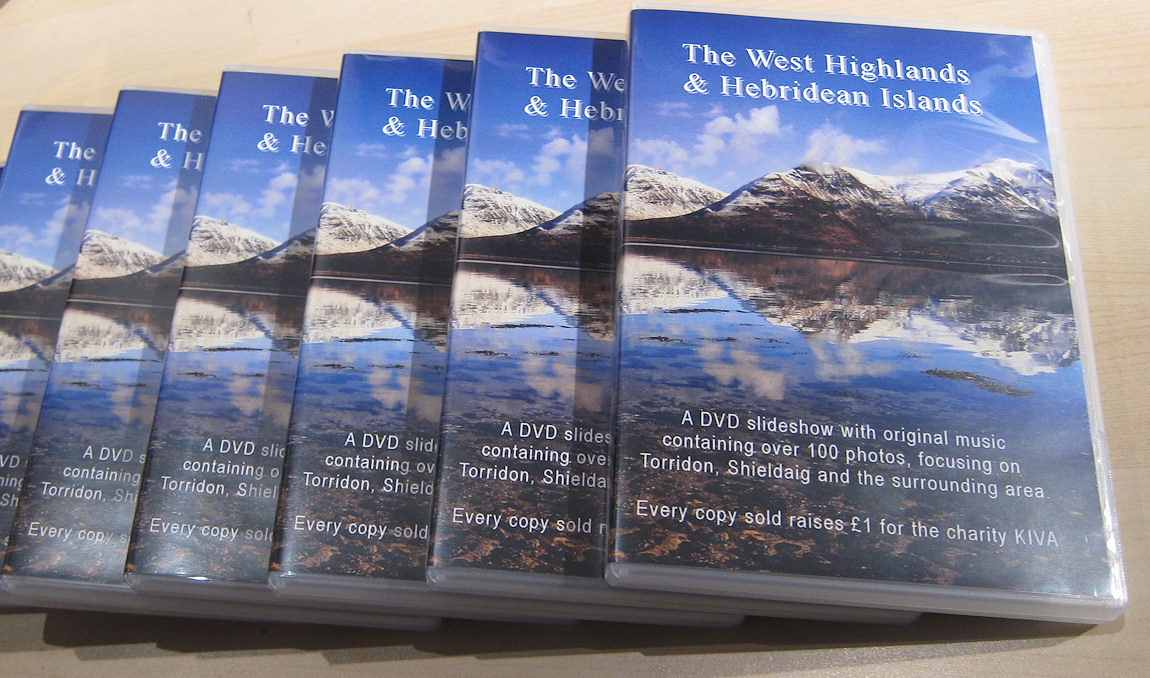
GetCarter said:
I can get them to play (I've sold over 650 copies), but I'm trying to lose less quality in the transfer to DVD. Pointless going to Blu-Ray as so few people have the tech, just need to keep as much quality as I can.
As mentioned, There is a DVD specialist company in England that is going to have a go, see if they can get better results.
Why not get branded USB sticks with the media onboard? As mentioned, There is a DVD specialist company in England that is going to have a go, see if they can get better results.

I have this problem. I understand that the quality will suffer converting to DVD, but the loss in quality is tremendous. DVD's produced with imovie and idvd using my old standard def camera looked a lot better than the HD camera. I have given up and put everything on a USB stick now. Spent hours messing with settings and downloading bit of software but nothing seemed to work.
I have this problem. I understand that the quality will suffer converting to DVD, but the loss in quality is tremendous. DVD's produced with imovie and idvd using my old standard def camera looked a lot better than the HD camera. I have given up and put everything on a USB stick now. Spent hours messing with settings and downloading bit of software but nothing seemed to work.
I have this problem. I understand that the quality will suffer converting to DVD, but the loss in quality is tremendous. DVD's produced with imovie and idvd using my old standard def camera looked a lot better than the HD camera. I have given up and put everything on a USB stick now. Spent hours messing with settings and downloading bit of software but nothing seemed to work.

Gassing Station | Photography & Video | Top of Page | What's New | My Stuff