Laptop ECU Readout
Laptop ECU Readout
Author
Discussion

LazyRoss18

Original Poster:

423 posts

164 months

Sunday 10th November 2013
quotequote all
I am having trouble getting the Noble software to find the ECU on my 3R. I have one of the SBD USB to serial leads so it shouldn't be the lead. Does anyone have any other ideas? Can someone confirm the correct plug in location also? Tearing my hair out as usual!!!

Zoobeef

6,004 posts

181 months

Sunday 10th November 2013
quotequote all
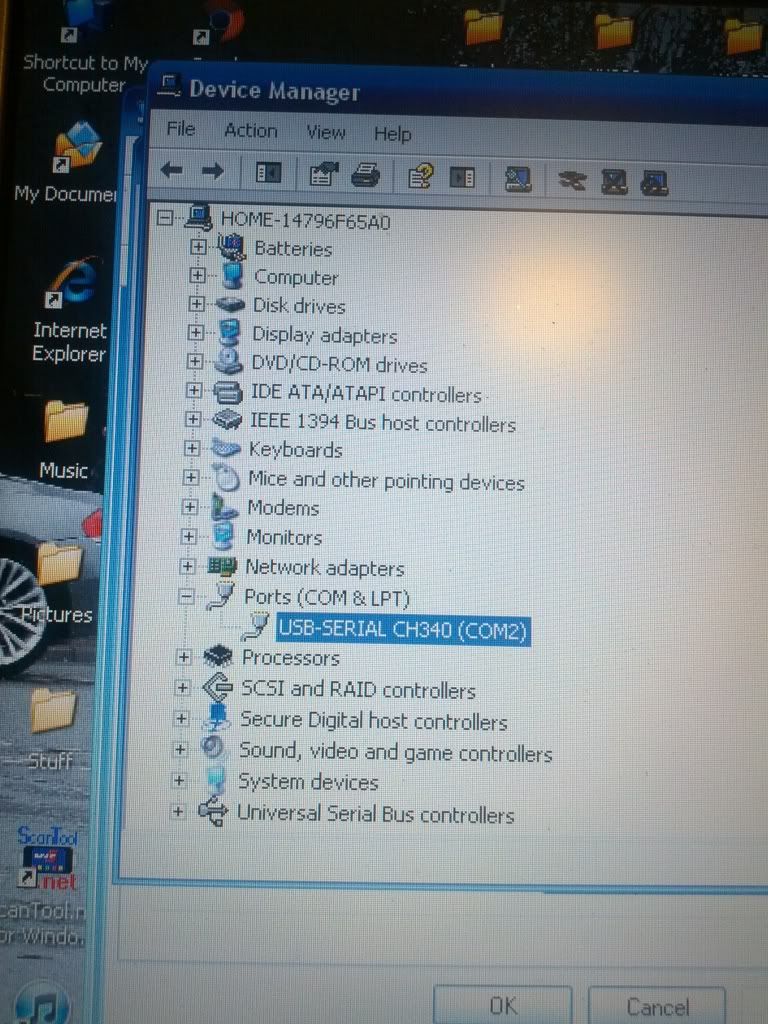
You probably need to go in my devices and make sure the cable in the USB your using is allocated COM 1 or 2 or one whatever the ones the program looks for. If its set at COM 15 or something it won't find it.

2.5bluenob

1,620 posts

199 months

Sunday 10th November 2013
quotequote all
have you tried turning the ignition on ?

LazyRoss18

Original Poster:

423 posts

164 months

Sunday 10th November 2013
quotequote all
2.5bluenob said:
have you tried turning the ignition on ?
Yup ignition on and also engine running!

daddysumo

2,545 posts

236 months

Sunday 10th November 2013
quotequote all
what software are you using and what version of windows ?

LazyRoss18

Original Poster:

423 posts

164 months

Monday 11th November 2013
quotequote all
Software is V1.3 and using windows vista?

Davie M12

194 posts

156 months

Monday 11th November 2013
quotequote all
I had same problem when using USB cable and tried everything with no success!
Ended up getting an old laptop with a 9 pin serial port and it runs fine on that!

Zoobeef

6,004 posts

181 months

Monday 11th November 2013
quotequote all
Plug the USB in and look here and see what com port its using


daddysumo

2,545 posts

236 months

Tuesday 12th November 2013
quotequote all
Ah the Noble software... thought you meant Easimap...
The noble software usually connects up easily, as previously suggested it probably is either
the wrong com port or the wrong baud rate id your using an USB adapter...

LazyRoss18

Original Poster:

423 posts

164 months

Tuesday 12th November 2013
quotequote all
Going to give it another go tonight lads, will let you know how I get on!! smile

LazyRoss18

Original Poster:

423 posts

164 months

Tuesday 12th November 2013
quotequote all
Ok so I did what Zoobeef said and checked device manager, the USB was using COM port 4 so set the Noble software to COM port 4 but still nothing??