
Wiring house for satelite/freeview
Discussion


I am having some building work done which will give me some opportunity to put wiring into every room.
I have a SKY mini dish and a normal TV aerial.
My plan is that I will take 8 feeds from the SKY dish to my 'central point' (under the stairs or in the loft). I will also take my TV aerial to the central point (I believe it has a booster of some sort to allow it to be split).
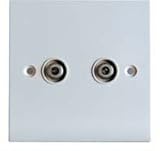
Idea is that from the central point I will then take 2 wires to every room and end at a faceplate like this.
I am planning on using WF100 cable which is good enough for satelite and TV.
This then means that every room could have 2 TV feeds/2 satelite feeds or one of each.
Am I right in thinking then if I just use the F Type satelite face plate if I want a normal TV feed then I just make a new cable with F conenctor on one side and standard TV conenctor on the other? My theory is to use the better quality cable that can be used for satelite and then I have maxmimum flexibility.
My central poitn is where the wires will join - so for now only my living room and 1 bedroom have a TV so I only need to connect the incoming wires to the faceplates - in future I can just connect as I go.
I understand I can get 8 feeds out of the SKY dish - if I want to use multiple ones with SKY I have to pay for it but I could dedicate 2 to SKY and then use Freesat boxes/TVs on the other 6?
Any flaws in my plan?
I have a SKY mini dish and a normal TV aerial.
My plan is that I will take 8 feeds from the SKY dish to my 'central point' (under the stairs or in the loft). I will also take my TV aerial to the central point (I believe it has a booster of some sort to allow it to be split).
Idea is that from the central point I will then take 2 wires to every room and end at a faceplate like this.
I am planning on using WF100 cable which is good enough for satelite and TV.
This then means that every room could have 2 TV feeds/2 satelite feeds or one of each.
Am I right in thinking then if I just use the F Type satelite face plate if I want a normal TV feed then I just make a new cable with F conenctor on one side and standard TV conenctor on the other? My theory is to use the better quality cable that can be used for satelite and then I have maxmimum flexibility.
My central poitn is where the wires will join - so for now only my living room and 1 bedroom have a TV so I only need to connect the incoming wires to the faceplates - in future I can just connect as I go.
I understand I can get 8 feeds out of the SKY dish - if I want to use multiple ones with SKY I have to pay for it but I could dedicate 2 to SKY and then use Freesat boxes/TVs on the other 6?
Any flaws in my plan?
Nope, no flaws in your plan.
Yes, you can make up F Type to TV leads just as you would F to F or TV to TV.
One other consideration, Wired Networking, get at least one if not two CAT5 or CAT6 leads in to the TV points as well, then you are covered in the future for streaming services and are not reliant on Wifi.
V.
Yes, you can make up F Type to TV leads just as you would F to F or TV to TV.
One other consideration, Wired Networking, get at least one if not two CAT5 or CAT6 leads in to the TV points as well, then you are covered in the future for streaming services and are not reliant on Wifi.
V.
I did the same using a multiswitch. The multiswitch takes 4 inputs from the satellite dish and 1 from the TV aerial and distributes them to how ever many outputs you need, I have 12 for example. The satellite and TV signals are multiplexed over a single cable with special (read a bit more expensive) faceplates used to de-multiplex the signals. I used the Triax multiswitch from these guys: http://www.satellitesuperstore.com/multiswitch.htm
I'm going through a similar thing at the moment with some great help and advice and kit supplied by Vex. Couple of pieces of advice I can give are - make sure the cable runs to your back boxes use flexible cable and make sure you use deep back boxes as things can get fiddly.
This is the guest bedroom at the moment. The left hand single face plate has twin F plugs on it and I've patched one of those feeds to my satellite dish via my "comms cupboard" which I've then fed straight up in to the Smart TV which has a freesat decoder in it.
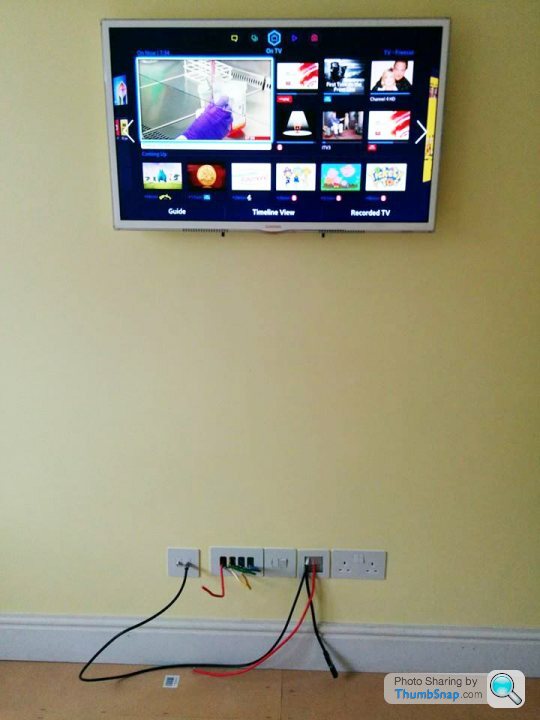
This is the guest bedroom at the moment. The left hand single face plate has twin F plugs on it and I've patched one of those feeds to my satellite dish via my "comms cupboard" which I've then fed straight up in to the Smart TV which has a freesat decoder in it.
OP. I would take three WF100 to each position, two satellite and one aerial. That will allow full Sky+ and Freeview. I would also have a fourth WF100 'return' from the main Sky position to the 'hub' just incase you want to send Sky to other rooms that don't have multi-room. It's the old way of doing it but still useful.
Also echo others, at least two CAT5 to each position.
Also echo others, at least two CAT5 to each position.
Gassing Station | Home Cinema & Hi-Fi | Top of Page | What's New | My Stuff