
Depth of field . . . .
Discussion


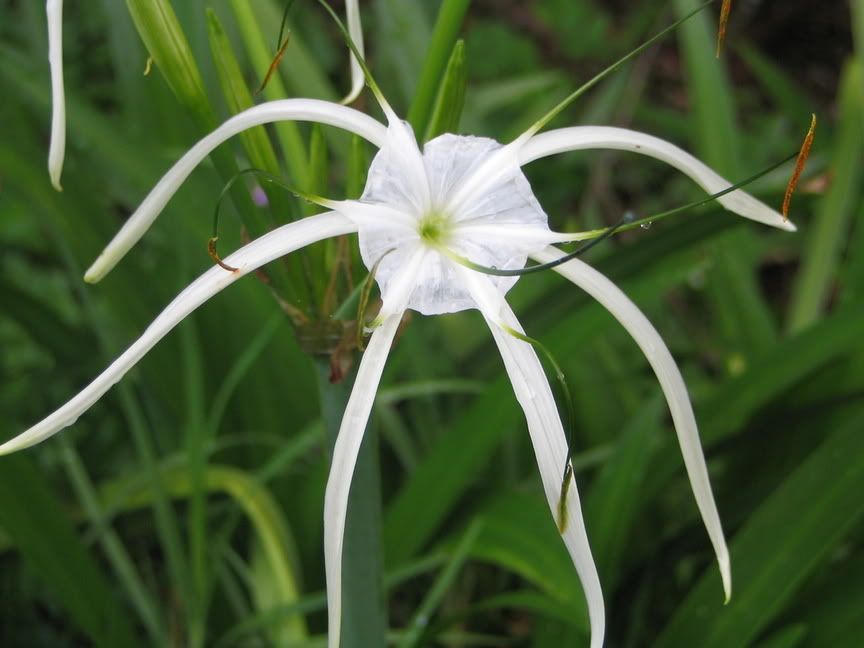

Cracking shot. Not much could be done unless you zoomed in on the center of the flower more (hence decreasing the DOF).
In my (limited) experience, the only way to get a drastic effect (ie very focused subject, blurred background) is to either use a largeish zoom or ensure the foreground and background are far enough (subjective) part.
In my (limited) experience, the only way to get a drastic effect (ie very focused subject, blurred background) is to either use a largeish zoom or ensure the foreground and background are far enough (subjective) part.
Decreased DoF would help a little, putting the background more out of focus. It usualy means having a fast lens though, what did you use?
Using DoF mode on your camera can help too, if you have it. You half press the shutter on the point you want as the nearest point of focus, repeat with the thing you want sharp which is farthest away from you, then frame the shot and "click".
Martin.
Using DoF mode on your camera can help too, if you have it. You half press the shutter on the point you want as the nearest point of focus, repeat with the thing you want sharp which is farthest away from you, then frame the shot and "click".
Martin.

V6GTO said:
Decreased DoF would help a little, putting the background more out of focus. It usualy means having a fast lens though, what did you use?
Using DoF mode on your camera can help too, if you have it. You half press the shutter on the point you want as the nearest point of focus, repeat with the thing you want sharp which is farthest away from you, then frame the shot and "click".
Martin.
I used my Canon S1 iS.
I have no idea if it has a DoF mode.
Back to the instruction manual . . .
Thanks for the comments.
'DoF mode' sounds like a peculiarity of your camera Martin; sounds useful but it's not a true function like Aperture Priority Mode. I've never had a camera with anything called 'DOF Mode'.
In fact, these blasted modes the marketing depts keep inventing to 'simplify' things often confuse beginners more than if they just stuck to S and A!
In fact, these blasted modes the marketing depts keep inventing to 'simplify' things often confuse beginners more than if they just stuck to S and A!
A lot of digital cameras (the compact type), dont have a DoF mode. To get a shorter DoF, if you can set the apature to the largest opening (f2.8 and less), then this will reduce the DoF. May have to set the camera to 'sport' mode, whereby you are selecting a larger f stop, but faster shutter speed. This will have the same effect.
simpo two said:
'DoF mode' sounds like a peculiarity of your camera Martin; sounds useful but it's not a true function like Aperture Priority Mode. I've never had a camera with anything called 'DOF Mode'.
In fact, these blasted modes the marketing depts keep inventing to 'simplify' things often confuse beginners more than if they just stuck to S and A!
It's not really a mode. You can press a button on the EOS's that set the aperture to the metered value so you can see the effect through the view finder. Keeps the view as bright as possible the rest of the time.
ThatPhilBrettGuy said:
'DoF mode' sounds like a peculiarity of your camera Martin; sounds useful but it's not a true function like Aperture Priority Mode. I've never had a camera with anything called 'DOF Mode'.
In fact, these blasted modes the marketing depts keep inventing to 'simplify' things often confuse beginners more than if they just stuck to S and A!
It's not really a mode. You can press a button on the EOS's that set the aperture to the metered value so you can see the effect through the view finder. Keeps the view as bright as possible the rest of the time.
Mmmm...just read my D20 manual and Phil is right, it's not how I described
 , that is just how the EOS1n DoF mode works. The D20 works as Phil said.
 Martin.
V6GTO said:
I've got DoF mode on my EOS1n as well as the EOS D20, I just assumed all good cameras had them. 

Martin.
I guess the key word here is 'good'. That'll rule mine out then.
I tried taking a pic of the Audi rings on the back of the car today. The idea being to focus on one or two of the 4 rings from an angle (either closet or furthest).
This is what happened:
1st 1/125 f2.8 iso50
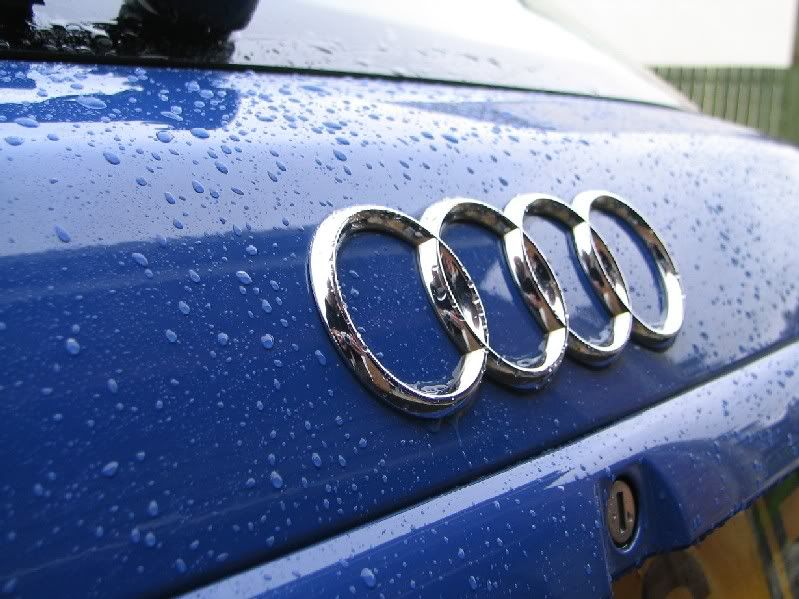
2nd 1/200 f2.8 iso50
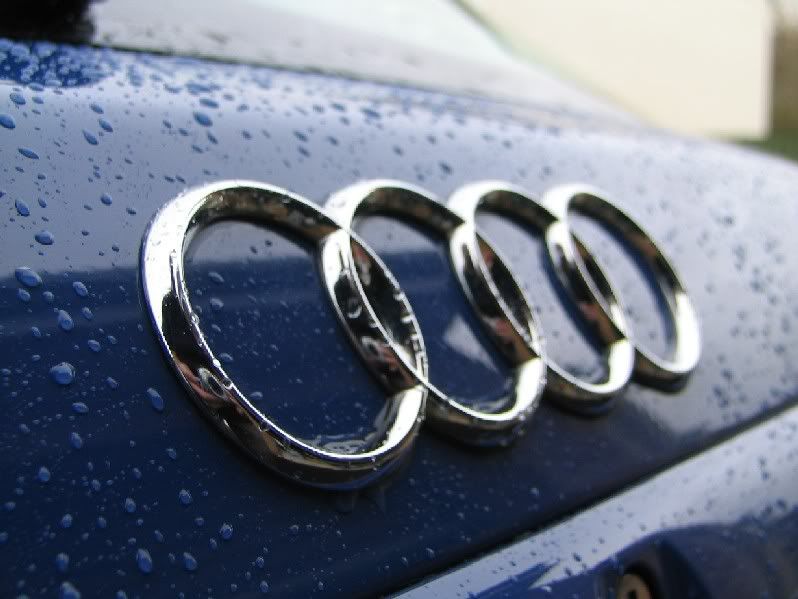
3rd 1/200 f2.8 iso50
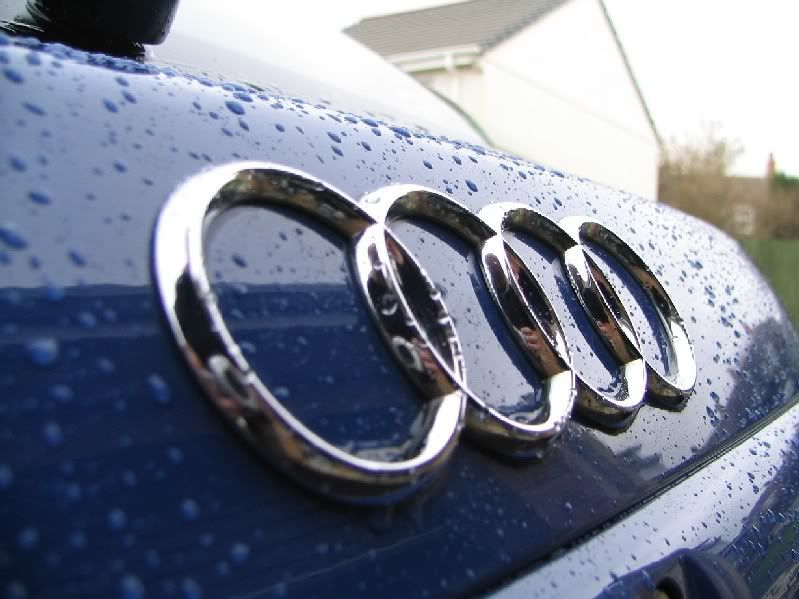
I know they are not very good photos (for one you can see me in the reflection), but all I am bothered about is learning about depth of field.
Reading what has been posted here, should I have increased the shutter speed to shorten the depth of field and therefore blur one end of the rings?

Good demonstration there
if you shorten the shutter time, then you need a larger aperture to allow the same light through for correct exposure, so if you have shutter priority control this is the way to do it, then the camera will alter the aperture appropriately for you.
Depth of field isn't really about sharp and blurred, strictly speaking anything that isn't pin sharp bang on the focus distance will be blurred, it's about the *circles of confusion* ie at what point the circles caused by out of focus pin-points affect their clarity .. as the circles get larger and overlap more so the image gets more blurred .. only those objects on the exact sharp-focus distance have light points which are sharp in the end image.
If you want to increase the effect of blurring through depth of field, choose large apertures and short focussing distances (ie get close to your subject) as objects further away then become proportionately even further away from you compared to the sharp-focus distance than had you been far away from the sharp-focus object yourself, if you see what I mean ..
Getting close on portraits tho has it's own problems with unflattering distortions, on 35mm film focal lengths around 80mm work well for portraits, so that rather limits the position and distance you can adopt .. however don't be afraid to break rules if it gets you the result you're after
Shooting on low speed high quality film also increases dof impact, if you shoot on high speed film you sometimes struggle for large enough apertures on bright days, and the grain of the film takes away the definition between focussed and out of focus parts of the image.
I hope that's helped ..
if you shorten the shutter time, then you need a larger aperture to allow the same light through for correct exposure, so if you have shutter priority control this is the way to do it, then the camera will alter the aperture appropriately for you.
Depth of field isn't really about sharp and blurred, strictly speaking anything that isn't pin sharp bang on the focus distance will be blurred, it's about the *circles of confusion* ie at what point the circles caused by out of focus pin-points affect their clarity .. as the circles get larger and overlap more so the image gets more blurred .. only those objects on the exact sharp-focus distance have light points which are sharp in the end image.
If you want to increase the effect of blurring through depth of field, choose large apertures and short focussing distances (ie get close to your subject) as objects further away then become proportionately even further away from you compared to the sharp-focus distance than had you been far away from the sharp-focus object yourself, if you see what I mean ..
Getting close on portraits tho has it's own problems with unflattering distortions, on 35mm film focal lengths around 80mm work well for portraits, so that rather limits the position and distance you can adopt .. however don't be afraid to break rules if it gets you the result you're after
Shooting on low speed high quality film also increases dof impact, if you shoot on high speed film you sometimes struggle for large enough apertures on bright days, and the grain of the film takes away the definition between focussed and out of focus parts of the image.
I hope that's helped ..
ThatPhilBrettGuy said:
It's not really a mode. You can press a button on the EOS's that set the aperture to the metered value so you can see the effect through the view finder. Keeps the view as bright as possible the rest of the time.
That's DOF preview. Martin was talking about something different I think, where you tell the camera the min and max focus distances and it chooses an aperture to suit.
Ex-Biker, in your test you changed shutter speed but kept the aperture at f2.8. To see different DOFs you need to change the aperture.
Exposure is a function of aperture AND shutter speed: if you change one, you need to change the other also.
For example, to get better DOF (see all rings sharply) you need a smaller aperture such as f16. But that doesn't let so much light in, so you need to decrease shutter speed accordingly.
>> Edited by simpo two on Sunday 5th December 20:05
simpo two said:
ThatPhilBrettGuy said:
It's not really a mode. You can press a button on the EOS's that set the aperture to the metered value so you can see the effect through the view finder. Keeps the view as bright as possible the rest of the time.
That's DOF preview. Martin was talking about something different I think, where you tell the camera the min and max focus distances and it chooses an aperture to suit.
Simpo, you are correct for the EOS1n.
Phil, the A-DEP program on the D20 is for obtaining a wide DoF automatically between a near subject and a far subject. When you half press the shutter release all the points of the 9 point focus matrix that light up will be in focus. This mode attempts to give you as many of those in focus points as possible.
Martin.
>> Edited by V6GTO on Sunday 5th December 21:11
>> Edited by V6GTO on Sunday 5th December 21:19
simpo two said:
Ex-Biker, in your test you changed shutter speed but kept the aperture at f2.8. To see different DOFs you need to change the aperture.
Exposure is a function of aperture AND shutter speed: if you change one, you need to change the other also.
For example, to get better DOF (see all rings sharply) you need a smaller aperture such as f16. But that doesn't let so much light in, so you need to decrease shutter speed accordingly.
I did all the shots in manual mode. Reading what was posted here it seemed to me that to get good (narrow) depth of focus I needed a low aperture number ie f2.8.
If a pro (or good amateur) were to take a similar pic and focus on the first ring, what settings would they suggest?
I just realised by my 'narrow' comment that I may have given the wrong impression. The camera has very little problem focusing on the whole picture. What I want to be able to do is focus on certain points only.
V6GTO said:
Phil, the A-DEP program on the D20 is for obtaining a wide DoF automatically between a near subject and a far subject. When you half press the shutter release all the points of the 9 point focus matrix that light up will be in focus. This mode attempts to give you as many of those in focus points as possible.
Cheers Martin.
I think
 and
and  for me! Shows how much I look at that end of the program dial! It's the same on the 10D.
 Lucky I don't have a job controlling 100's of billions of pounds a day or a powerful car eh? Ooo hang on...

On my Canon, there is a Depth of Field mode, where you press the shutter twice to focus on two different points that you want to be in focus, and the camera then calculates what aperture to use for this to happen.
Also, if you want an area between two points to be in focus, it's best to focus on a point 1/3 of the distance between the nearest point and the furthest, rather than 1/2 way between which is the logical place to focus.
Also, if you want an area between two points to be in focus, it's best to focus on a point 1/3 of the distance between the nearest point and the furthest, rather than 1/2 way between which is the logical place to focus.
Ex-biker said:
I did all the shots in manual mode. Reading what was posted here it seemed to me that to get good (narrow) depth of focus I needed a low aperture number ie f2.8.
If a pro (or good amateur) were to take a similar pic and focus on the first ring, what settings would they suggest?
I just realised by my 'narrow' comment that I may have given the wrong impression. The camera has very little problem focusing on the whole picture. What I want to be able to do is focus on certain points only.
OK, I thought you wanted to try different DOFs to see the effect. If you just wanted the shallowest, then set it to AP and choose the biggest aperture. Then focus on the part you want to be sharp. If that's not in the centre of the screen, you can select a different focus area - or the quickest answer is simply to place the target area in the middle, half-depress the shutter release, then reframe as required and shoot (or use manual focus).
If you want even less DOF, use a telphoto and stand further away - the extra magnification does the trick

>> Edited by simpo two on Monday 6th December 09:42
Simpo two
Now that's what I'm trying to do!
AP mode. Aperture Priority? On a Canon?
Sound like an SLR function to me. Anyone know if this is possible on a Canon S1 iS?
I will experiment with manual focus.
Now that's what I'm trying to do!
AP mode. Aperture Priority? On a Canon?
simpo two said:
. . . or the quickest answer is simply to place the target area in the middle, half-depress the shutter release, then reframe as required and shoot (or use manual focus).
Sound like an SLR function to me. Anyone know if this is possible on a Canon S1 iS?
I will experiment with manual focus.
On SLR lenses, it'll tell you the DoF ranges on the lens body, for each f stop. See below:-
www.ephotozine.com/techniques/viewtechnique.cfm?recid=63
Also, there is a website to calculate the DoF. See below:-
www.silverlight.co.uk/resources/dof_calc.html
www.ephotozine.com/techniques/viewtechnique.cfm?recid=63
Also, there is a website to calculate the DoF. See below:-
www.silverlight.co.uk/resources/dof_calc.html
Gassing Station | Photography & Video | Top of Page | What's New | My Stuff