
How do I post Flickr photos from an iPad?
Discussion


As above, I'm using the Flickr app on an iPad and when I choose "share" it gives me the option to copy the URL but it doesn't end in .jpg so when I try to post an image on here using the [img] tags it won't work. What option should I be choosing because looking at them all, none are obvious?
Thanks.
Thanks.
Thanks but I don't want to post from iPad photos to Flickr I want to share my already uploaded Flickr photos to PH using the Flickr app. Am I right in thinking I have to use the Flickr website in Safari to copy the huge url then paste it into PH and there's no way of doing this straight from the app?
Does it have a 'BBcode' option as well as a URL option when you hit 'share'? The way it does when sharing from a photo on the flickr website. You don't need to put the [img] tags around it as they're included in the share formatting.
From the flickr website you just hit the share arrow to bring up this box, then hit 'BBCode', copy whats in the box and paste into your PH post.
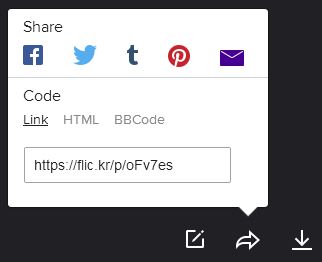
From the flickr website you just hit the share arrow to bring up this box, then hit 'BBCode', copy whats in the box and paste into your PH post.
Edited by GravelBen on Sunday 17th January 06:23
Gassing Station | Photography & Video | Top of Page | What's New | My Stuff