
Chassis scan/3D CAD drawing
Discussion


OK Guys, better late than never.
I was determined to get my chassis scanned before I got it galvanized and starting rebuilding the car. My vision was to have a 3D CAD drawing of the chassis, fully dimensioned so anybody could use that to check their chassis, rebuild, make a jig etc and generally add more knowledge to the Grief/Chimp fraternity.
On spec I rang up a local scanning company Sun Hill Surveying in Aldermaston and spoke to the owner, Pete Coffield. This was a million miles from their normal operations, they do scans for big road works/repairs and that sort of thing but Pete thought this would be a 'bit of fun' and scanned the chassis for me as a freebee.
So here it is:
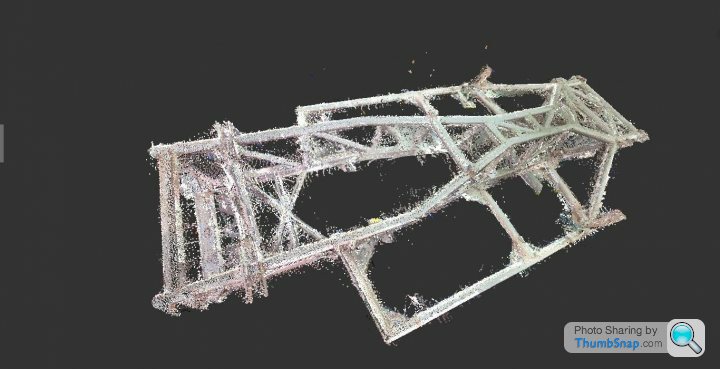
Still looks a bit messy but I am cleaning it up to get rid of the 'noise', including the stand it was sitting on when it was scanned.
So two related questions for you guys out there. Does anyone have the knowledge/software to produce an accurate 3D drawing from the scan? I'm guessing you need something like AutoCAD and a bit of patience together with some accurate dimensions for tubing diameter, which I could give you using a pair of callipers.
Pete has said he would do another scan to see if we could cut out some of the 'noise'. Do any of you have the experience to guide us on how best to go about this to produce an accurate 3D CAD drawing?
Pete
I was determined to get my chassis scanned before I got it galvanized and starting rebuilding the car. My vision was to have a 3D CAD drawing of the chassis, fully dimensioned so anybody could use that to check their chassis, rebuild, make a jig etc and generally add more knowledge to the Grief/Chimp fraternity.
On spec I rang up a local scanning company Sun Hill Surveying in Aldermaston and spoke to the owner, Pete Coffield. This was a million miles from their normal operations, they do scans for big road works/repairs and that sort of thing but Pete thought this would be a 'bit of fun' and scanned the chassis for me as a freebee.
So here it is:
Still looks a bit messy but I am cleaning it up to get rid of the 'noise', including the stand it was sitting on when it was scanned.
So two related questions for you guys out there. Does anyone have the knowledge/software to produce an accurate 3D drawing from the scan? I'm guessing you need something like AutoCAD and a bit of patience together with some accurate dimensions for tubing diameter, which I could give you using a pair of callipers.
Pete has said he would do another scan to see if we could cut out some of the 'noise'. Do any of you have the experience to guide us on how best to go about this to produce an accurate 3D CAD drawing?
Pete
Andy, I'm using something called ReCap from Autodesk, who also produce AutoCAD. It is free and enables me to tidy up the point cloud from the scan.
What I am hoping is that someone out there in one of these venerable forums has some reverse engineering 3D CAD software that can convert the scan into a 3D CAD model, which can be accurately dimensioned. Pete
What I am hoping is that someone out there in one of these venerable forums has some reverse engineering 3D CAD software that can convert the scan into a 3D CAD model, which can be accurately dimensioned. Pete
I use Delcam Powershape 3d CAD software that can model in solids or surfaces. It also has a translator so I can convert files from other systems ie autoCad, ProEngineer etc to work on my system. I am wondering if I imported the file if it would recognise it as a solid model or surfaces so it could then be modified and/or dimensioned as well as removing the spurious 'noise' points.
Difficult to tell from the image but has he supplied you with 'meshed data' or a set of cloud points? It looks like the latter to me.
There are a number of ways to go.
1. Import the point cloud into 3D CAD software such as Powershape (I'm not familiar with that or it's capabilities) or Solidworks etc and use it as a template to build the chassis.
You may need to use something like MeshLab to export the cloud point into a format your software can deal with easily. http://meshlab.sourceforge.net/
2. Alternatively use a program that deals in meshing pointclouds into useable meshes such as Spaceclaim,Reality Capture or others.
Either way you'll need to put a bit of work in.
ETA Just remembered that Meshlab has the ability to take measurements off scans so that actually might be the most straightforward way forward unless you're after a 3D model as well.
There are a number of ways to go.
1. Import the point cloud into 3D CAD software such as Powershape (I'm not familiar with that or it's capabilities) or Solidworks etc and use it as a template to build the chassis.
You may need to use something like MeshLab to export the cloud point into a format your software can deal with easily. http://meshlab.sourceforge.net/
2. Alternatively use a program that deals in meshing pointclouds into useable meshes such as Spaceclaim,Reality Capture or others.
Either way you'll need to put a bit of work in.
ETA Just remembered that Meshlab has the ability to take measurements off scans so that actually might be the most straightforward way forward unless you're after a 3D model as well.
Well Powershape and Powermill are good enough for these guys:
http://www.delcam.com/bloodhound/case-studies/inde...
Maybe I should reserve boasting until they've successfully achieved the record!
Seriously though that Meshlab looks like the right bit of kit for ironing out the noise in the scanned model. This isn't something I've dealt with before so I'd be interested in seeing it in action. It can then be exported as a 3d model to import in to a cad system to modify, dimension etc.
http://www.delcam.com/bloodhound/case-studies/inde...
Maybe I should reserve boasting until they've successfully achieved the record!
Seriously though that Meshlab looks like the right bit of kit for ironing out the noise in the scanned model. This isn't something I've dealt with before so I'd be interested in seeing it in action. It can then be exported as a 3d model to import in to a cad system to modify, dimension etc.
V8 GRF said:
Difficult to tell from the image but has he supplied you with 'meshed data' or a set of cloud points? It looks like the latter to me.
There are a number of ways to go.
1. Import the point cloud into 3D CAD software such as Powershape (I'm not familiar with that or it's capabilities) or Solidworks etc and use it as a template to build the chassis.
You may need to use something like MeshLab to export the cloud point into a format your software can deal with easily. http://meshlab.sourceforge.net/
2. Alternatively use a program that deals in meshing pointclouds into useable meshes such as Spaceclaim,Reality Capture or others.
Either way you'll need to put a bit of work in.
ETA Just remembered that Meshlab has the ability to take measurements off scans so that actually might be the most straightforward way forward unless you're after a 3D model as well.
David, it's a set of cloud points.There are a number of ways to go.
1. Import the point cloud into 3D CAD software such as Powershape (I'm not familiar with that or it's capabilities) or Solidworks etc and use it as a template to build the chassis.
You may need to use something like MeshLab to export the cloud point into a format your software can deal with easily. http://meshlab.sourceforge.net/
2. Alternatively use a program that deals in meshing pointclouds into useable meshes such as Spaceclaim,Reality Capture or others.
Either way you'll need to put a bit of work in.
ETA Just remembered that Meshlab has the ability to take measurements off scans so that actually might be the most straightforward way forward unless you're after a 3D model as well.
I got your e-mail and I will send you the file. The file is 114 Mb. David Harvey from SC Power is also having a go, I sent him the file earlier today. Andy, you are welcome to a copy of the file if you mail me.
This seems to be more work than I expected to be honest but I am not familiar with the process of getting from a scan to a 3D Model, I thought there would be a piece of software out there that did it, clearly not.
Pete Coffley has offered to do another scan to see if he can reduce the 'noise'. Perhaps someone can advise whether that's worthwhile or not and if it is, give some guidance.
To be honest, it seems a good idea to pool resources/knowledge here to see the best way of doing this, providing it is worth the effort - I hope it is.
If anybody wants me to give some tubing diameters then I am happy to do that with my trusty digital callipers.
Pete
Edited by Pete Mac on Tuesday 8th March 18:36
Don't know how long it would take to clean the scan up, but I think it might be quicker to start from scratch in a 3D program and use the scan for dimensions only.
How accurate is the scan?
I could do a 3D SolidWorks model.
Just not right now.
Having had a hernia operation 2 weeks ago means I can only use the laptop in bed at the moment.
Probably another month before I can do any solid computer work.
One question:
What is the purpose of the 3d model? (chassis jig, suspension pickup points, ....)
Fred
How accurate is the scan?
I could do a 3D SolidWorks model.
Just not right now.
Having had a hernia operation 2 weeks ago means I can only use the laptop in bed at the moment.
Probably another month before I can do any solid computer work.
One question:
What is the purpose of the 3d model? (chassis jig, suspension pickup points, ....)
Fred
TaimarTurbo said:
Don't know how long it would take to clean the scan up, but I think it might be quicker to start from scratch in a 3D program and use the scan for dimensions only.
How accurate is the scan?
I could do a 3D SolidWorks model.
Just not right now.
Having had a hernia operation 2 weeks ago means I can only use the laptop in bed at the moment.
Probably another month before I can do any solid computer work.
One question:
What is the purpose of the 3d model? (chassis jig, suspension pickup points, ....)
Fred
Fred, see the Griff forum, it all kicked off from there really. I am not aware of any accurate blueprints for the Griff/Chim chassis so the purpose was partly 'because I can' and so anybody in future could produce an accurate jig, measure accident damage, produce a new chassis whatever....! All for the general knowledge of Griff/Chim owners. How accurate is the scan?
I could do a 3D SolidWorks model.
Just not right now.
Having had a hernia operation 2 weeks ago means I can only use the laptop in bed at the moment.
Probably another month before I can do any solid computer work.
One question:
What is the purpose of the 3d model? (chassis jig, suspension pickup points, ....)
Fred
I have no use for it right now but I might in the future.
I have e-mailed 3 with the point cloud so far, I am happy to send you it but it makes sense to pool resources.
Accuracy, I'm not sure but within 1mm or so I believe. It was a quality scanner but we were a bit restricted in space. May have another go next week depending on advice from you guys. To be honest I have no experience of producing 3D CAD from a point cloud, I thought it would be a simpler process. V8 GRF seems to be pretty experienced in this.
If you want me to send you the file then e-mail me.
Good luck with the recovery. Pete
Hi Pete,
Thanks re the recovery,
I don't have any experience converting point cloud to CAD either, but do have some CAD experience.
If you want to build I jig to do major chassis repair I would build the jig to the chassis.
Building a jig from a CAD file is less accurate if you're DIY'ing IMHO.
For myself, starting from scratch would be much faster than converting the point cloud and editing the jitter out.
Starting from scratch also has the benefit of it being much easier to modify the CAD model and being able to run simulations, eg torsional stiffness.
Fred
Thanks re the recovery,
I don't have any experience converting point cloud to CAD either, but do have some CAD experience.
If you want to build I jig to do major chassis repair I would build the jig to the chassis.
Building a jig from a CAD file is less accurate if you're DIY'ing IMHO.
For myself, starting from scratch would be much faster than converting the point cloud and editing the jitter out.
Starting from scratch also has the benefit of it being much easier to modify the CAD model and being able to run simulations, eg torsional stiffness.
Fred
Gassing Station | Chimaera | Top of Page | What's New | My Stuff