
Discussion


Any body tell me why my computer will not recognise a blank cd in my drive. I am trying to write some files to cd but it says 'no disk in drive e' but there damn well is! I have tried all different types, CD-R, CR-RW, cheap / not so cheap.
Will play music cd's ok, but naff all else.
Somebody help me..............please.
Cheers.
Richard.
Will play music cd's ok, but naff all else.
Somebody help me..............please.
Cheers.
Richard.
I am trying to write to CD using the standard windows based software, which clearly doesn't want to work. Does NERO do it in a different way then?
I have saved things to blank CD's in the past without any problems, how come now?
How do I format a CD when it isn't recognised as being in the drive?
Cheers for the help.
I have saved things to blank CD's in the past without any problems, how come now?
How do I format a CD when it isn't recognised as being in the drive?
Cheers for the help.

richardt said:
So if I need a new one, is this the sort of thing I could do myself or is it a visit to the local computer dude / shop to fix it for me.
You have to bear in mind that I am not a geek!
At worst probably 4 screws, one cable, one jumper
At best one cable and spring clips.
Should be easy.
richardt said:
One jumper?
What about installation software and stuff?
Any recommendations on a good make replacement. Mine is a TEAC and has lived for 3 years, so assume that is not too bad?
Nowt to install - its an IDE device, so just shove it in in place of the old one (after ensuring the jumperss are set the same as on the old one).
As for recommendations, I've not had any of the Phillips drives I've bought over the past year or so fail. About £20+VAT from any reputable online retailer.
On the back of the unit are a series of pins, arranged in pairs. A 'jumper' short circuits one pair of these pins. Depending on which pins the jumper is shorting, the CD drive is viewed by the PC as a Master, Slave, etc.
Just have a look at the jumper setting of the old CD drive and make sure the same pins are shorted on the new drive.
All will become clear when you remove the old drive.
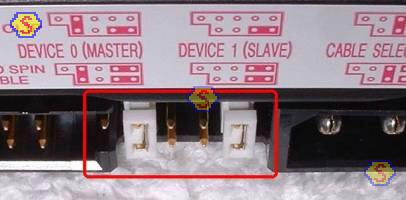
edit to add picture - The white 'blocks' are the jumpers. The pic is actually the back of a hard disk drive but the principle is the same.

>> Edited by SotonS2 on Wednesday 2nd March 08:35
Just have a look at the jumper setting of the old CD drive and make sure the same pins are shorted on the new drive.
All will become clear when you remove the old drive.
edit to add picture - The white 'blocks' are the jumpers. The pic is actually the back of a hard disk drive but the principle is the same.
>> Edited by SotonS2 on Wednesday 2nd March 08:35
Just done something else to see what answer I got. Tried just saving something to 'E' rather than writing to it.
I got the response that i cannot access 'E' and that I need to refer to the Administrator.
Does this mean that the computer is blocking the access or is the thing actually duff.
Somebody suggested that it might have been caused by an XP update, and that a reinstall might cure it. What do I reinstall, I never got any disks with the machine when I bought it.
I got the response that i cannot access 'E' and that I need to refer to the Administrator.
Does this mean that the computer is blocking the access or is the thing actually duff.
Somebody suggested that it might have been caused by an XP update, and that a reinstall might cure it. What do I reinstall, I never got any disks with the machine when I bought it.
Gassing Station | Computers, Gadgets & Stuff | Top of Page | What's New | My Stuff