
windows xp can only get msn homepage on internet?
Discussion


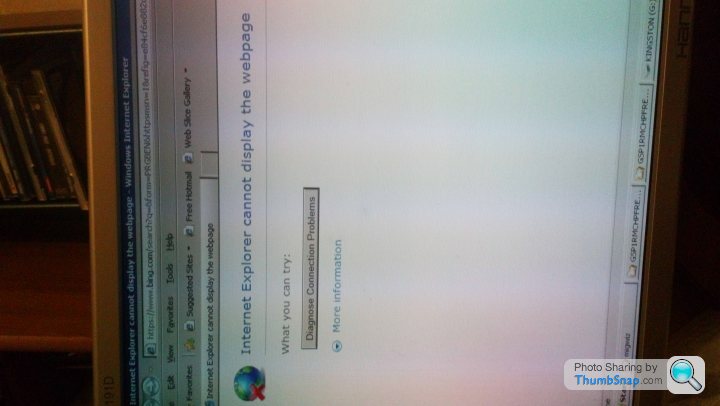
Trying to revive an old pc as a backup incase of emergencies.New install of win xp home,just installed service pack 2 and 3,all went well,was then able to use windows update,'130' updates installed lol,anyway.after all these updates I was expecting the problem I have connecting to websites to resolve itself,but it hasn't,it's really frustrating!
When I connect to the internet I get the MSN home page,default one from a fresh install I think?,and it got the Microsoft site ok,but when I try every other site it won't connect to any??I've tried everything,disabled firewall and tried every other common suggestion given online,anyone any idea???Cheers!
When I connect to the internet I get the MSN home page,default one from a fresh install I think?,and it got the Microsoft site ok,but when I try every other site it won't connect to any??I've tried everything,disabled firewall and tried every other common suggestion given online,anyone any idea???Cheers!

My money would be on IE6 in XP isn't going to support TLS 1.1/1.2, so secure (HTTPS) sites will probably fail.
You could try Firefox 52
https://support.mozilla.org/en-US/kb/end-support-w...
This should be an installer you can download and then move to the XP PC via USB
https://ftp.mozilla.org/pub/firefox/releases/52.0e...
You could try Firefox 52
https://support.mozilla.org/en-US/kb/end-support-w...
This should be an installer you can download and then move to the XP PC via USB
https://ftp.mozilla.org/pub/firefox/releases/52.0e...
Harpoon said:
My money would be on IE6 in XP isn't going to support TLS 1.1/1.2, so secure (HTTPS) sites will probably fail.
You could try Firefox 52
https://support.mozilla.org/en-US/kb/end-support-w...
This should be an installer you can download and then move to the XP PC via USB
https://ftp.mozilla.org/pub/firefox/releases/52.0e...
Very considerate of you to direct me to an executive file! :-) Stuck it on a flash stick, installed it on xp machine and it's working perfectly, thanks! You could try Firefox 52
https://support.mozilla.org/en-US/kb/end-support-w...
This should be an installer you can download and then move to the XP PC via USB
https://ftp.mozilla.org/pub/firefox/releases/52.0e...
I didn't even think of using another browser as I was convinced it was a settings fault somewhere or a registry fault or something.
Depending on what you need to use the PC for can you not use Ubuntu on A N other linux install?
It would be up to date and is inherently safer than windows, Its no where near as geeky as it used to be, and using programs like open office and the Gimp for photos will do most of what you need.
And it's all free!
It would be up to date and is inherently safer than windows, Its no where near as geeky as it used to be, and using programs like open office and the Gimp for photos will do most of what you need.
And it's all free!
Hi I know this is an old post but i have the same problem,
so i have downloaded firefox onto a memory stick,
But when i pop it into my old laptop it can not read the memory stick, i think i need to update the drivers for it somehow.
Not sure how as unable to get internet apart from MSN and laptop will not read memory stick.
The laptop i have is an old ACER travelmate 240. Running on windows xp,
Any help would be appreciated thanks
so i have downloaded firefox onto a memory stick,
But when i pop it into my old laptop it can not read the memory stick, i think i need to update the drivers for it somehow.
Not sure how as unable to get internet apart from MSN and laptop will not read memory stick.
The laptop i have is an old ACER travelmate 240. Running on windows xp,
Any help would be appreciated thanks
Simon-klk6c said:
Hi I know this is an old post but i have the same problem,
so i have downloaded firefox onto a memory stick,
But when i pop it into my old laptop it can not read the memory stick, i think i need to update the drivers for it somehow.
Not sure how as unable to get internet apart from MSN and laptop will not read memory stick.
The laptop i have is an old ACER travelmate 240. Running on windows xp,
Any help would be appreciated thanks
How is the USB stick formatted? It is preferable to be FAT32 which supports up to 32GBso i have downloaded firefox onto a memory stick,
But when i pop it into my old laptop it can not read the memory stick, i think i need to update the drivers for it somehow.
Not sure how as unable to get internet apart from MSN and laptop will not read memory stick.
The laptop i have is an old ACER travelmate 240. Running on windows xp,
Any help would be appreciated thanks
Gassing Station | Computers, Gadgets & Stuff | Top of Page | What's New | My Stuff