
Making a Magic mirror
Discussion


I dont know if any of you guys have seen these Smart mirrors people build online or not, If not then basically what you do is amount a screen behind some two way mirror glass so when the display is off its a normal mirror but when the display is on it shines through. As i managed to aquire a TV that was being thrown out I thought I would give it ago myself
This project is only just starting so its going to be a big wall of text before I get some real updates
Step1 - Get a screen. I had a family member throwing this 32inch TV out as it was only 720p and they had just upgraded. The screen works perfectly so i thought its a shame to see it end up as e-waste.
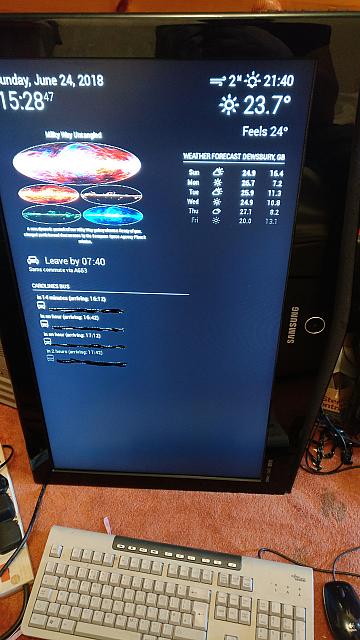
In the picture below I have it connected to the Pi and as you can see the software works, I will have it setup to show me Date/Time, hourly NASA image, when the bus my partner takes to work arrives, when I need to set off to get to work with the latest traffic updates and a weather forecast
Step2 - get the back off the screen and see what we are working with, as this is an older TV it uses cold cathodes to backlight instead of LED's so its not going to be the thinest but the case is massive, Whipping the back off shows me the following
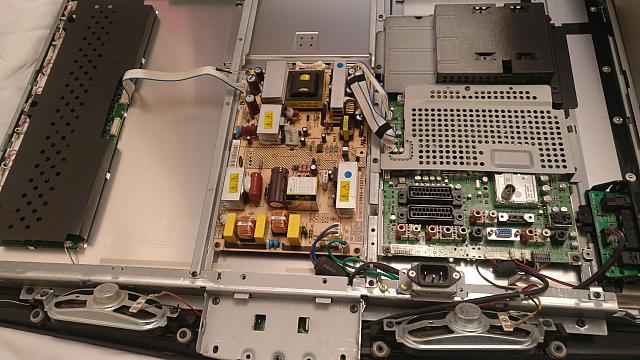
This makes life easy as the driver for the cold cathodes is on the left, power supply is on the right and the actual panel controller and source selector are all on one card with a daughterboard added onto it under the shelding
Step3 - After a bit of time I stripped out what looks like it was was not needed to keep the TV working
-Common interface slot for PPV TV
-Side panel Inputs
-Speakers
-Power switch and function buttons
-Some shielding
-Speakers
-Stand
Now in order to try and thin it down a bit more I need to do something about the power supply board and the control board - as you can see they are sat quite proud from the back of the screen
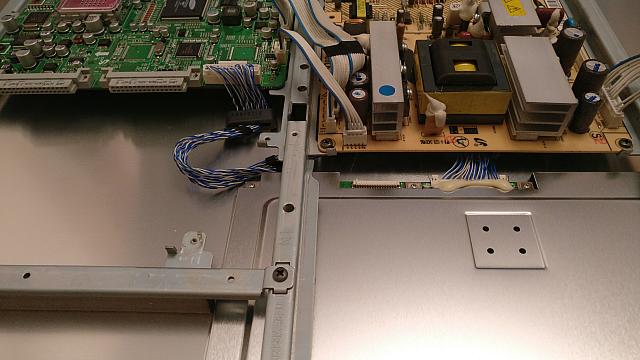
What i am planning to do is 3d print some plastic that has mounts for the holes on it so I can attach the boards directly to the back of the screen - should should give me about 1/2an inch extra room to play with once I have removed the then redundant metal work, I am guessing the reason Samsung didnt do this is heat but as the tv will be on for a max of 5mins i will probably get away with it - Im currently giving it some time before i poke around with it again so that big beefy capacitor can loose any stored charge but licking round the screen it looks like its attached to the front plastic with a metal frame so I should be able to just uplift that out and mount it into a new frame. Im torn on what aesthetic i want to go with, At the moment its either going to smooth and modern or steampunk
So while that is being worked on - The Pi, how did I configure that
The Pi is just a standard Raspberry Pi3b running a standard copy of Raspbian OS
The software for Magicmirror can be found at the following url https:\\magicmirror.builders - This site gives you a single command to install the software, the command is -
Run that from a command line and it will go away and do what it needs to do, when it asks if you want to auto-start magic mirror at this point I would say no as you have extra config that it needs to do
I have added the following extra packages to my install
-MMM Nasa for the space picture
-MMM-Traffic - this allows me to set what time I need to be at work for, where I work and where I live and it will pull the traffic stats from Google and give me a rough time to set off
-MMM-UKLiveBusStopInfo - this is for my parther, it shows when her bus will be arriving at the stop so she knows when she needs to set off.
As time goes on I will probably add more to it
Then if like me you want to run the screen in Portait mode you need to edit /boot/config.txt so it has the following line at the bottom of it
display_rotate=1
Then you need to reboot and the screen will be Portrait
Once this is done you will need to stop the screen saver turning the display off, change the power settings on the WiFi card so it doesnt sleep and auto-hide the mouse
To stop the screensaver kicking in from a command prompt run
sudo apt-get install xscreensaver
This will install the screensaver control panel so you can turn the screen saver off
To hide the mouse at a command prompt type
sudo apt-get install unclutter
Then when it is installed type sudo nano ~/.config/lxsession/LXDE-pi/autostart
That will open the autostart file - at the end of the file enter the following - @unclutter -display :0 -idle 3 -root -noevents
That will hide the cursor after 3seconds of inactivity
Finally to turn the power save mode on the WiFi off enter the following at a command line
cat << EOF | sudo tee /etc/network/if-up.d/off-power-manager
EOF
Then change the permissions and restart networking
sudo chmod 755 /etc/network/if-up.d/off-power-manager
sudo /etc/init.d/networking restart
To control the tv coming on and off I will be using a 240v PIR sensor - the same sort that control lights to make it only power on when it is in use
This project is only just starting so its going to be a big wall of text before I get some real updates
Step1 - Get a screen. I had a family member throwing this 32inch TV out as it was only 720p and they had just upgraded. The screen works perfectly so i thought its a shame to see it end up as e-waste.
In the picture below I have it connected to the Pi and as you can see the software works, I will have it setup to show me Date/Time, hourly NASA image, when the bus my partner takes to work arrives, when I need to set off to get to work with the latest traffic updates and a weather forecast
Step2 - get the back off the screen and see what we are working with, as this is an older TV it uses cold cathodes to backlight instead of LED's so its not going to be the thinest but the case is massive, Whipping the back off shows me the following
This makes life easy as the driver for the cold cathodes is on the left, power supply is on the right and the actual panel controller and source selector are all on one card with a daughterboard added onto it under the shelding
Step3 - After a bit of time I stripped out what looks like it was was not needed to keep the TV working
-Common interface slot for PPV TV
-Side panel Inputs
-Speakers
-Power switch and function buttons
-Some shielding
-Speakers
-Stand
Now in order to try and thin it down a bit more I need to do something about the power supply board and the control board - as you can see they are sat quite proud from the back of the screen
What i am planning to do is 3d print some plastic that has mounts for the holes on it so I can attach the boards directly to the back of the screen - should should give me about 1/2an inch extra room to play with once I have removed the then redundant metal work, I am guessing the reason Samsung didnt do this is heat but as the tv will be on for a max of 5mins i will probably get away with it - Im currently giving it some time before i poke around with it again so that big beefy capacitor can loose any stored charge but licking round the screen it looks like its attached to the front plastic with a metal frame so I should be able to just uplift that out and mount it into a new frame. Im torn on what aesthetic i want to go with, At the moment its either going to smooth and modern or steampunk
So while that is being worked on - The Pi, how did I configure that
The Pi is just a standard Raspberry Pi3b running a standard copy of Raspbian OS
The software for Magicmirror can be found at the following url https:\\magicmirror.builders - This site gives you a single command to install the software, the command is -
Run that from a command line and it will go away and do what it needs to do, when it asks if you want to auto-start magic mirror at this point I would say no as you have extra config that it needs to do
I have added the following extra packages to my install
-MMM Nasa for the space picture
-MMM-Traffic - this allows me to set what time I need to be at work for, where I work and where I live and it will pull the traffic stats from Google and give me a rough time to set off
-MMM-UKLiveBusStopInfo - this is for my parther, it shows when her bus will be arriving at the stop so she knows when she needs to set off.
As time goes on I will probably add more to it
Then if like me you want to run the screen in Portait mode you need to edit /boot/config.txt so it has the following line at the bottom of it
display_rotate=1
Then you need to reboot and the screen will be Portrait
Once this is done you will need to stop the screen saver turning the display off, change the power settings on the WiFi card so it doesnt sleep and auto-hide the mouse
To stop the screensaver kicking in from a command prompt run
sudo apt-get install xscreensaver
This will install the screensaver control panel so you can turn the screen saver off
To hide the mouse at a command prompt type
sudo apt-get install unclutter
Then when it is installed type sudo nano ~/.config/lxsession/LXDE-pi/autostart
That will open the autostart file - at the end of the file enter the following - @unclutter -display :0 -idle 3 -root -noevents
That will hide the cursor after 3seconds of inactivity
Finally to turn the power save mode on the WiFi off enter the following at a command line
cat << EOF | sudo tee /etc/network/if-up.d/off-power-manager
- !/bin/sh
- off-power-manager - Disable the internal power manager of the (built-in) wlan0 device
EOF
Then change the permissions and restart networking
sudo chmod 755 /etc/network/if-up.d/off-power-manager
sudo /etc/init.d/networking restart
To control the tv coming on and off I will be using a 240v PIR sensor - the same sort that control lights to make it only power on when it is in use

Erm.... so am I right in saying that the project is.
1/ Buy a mirrory type thing that reflects light - but also lets light through it.
2/ You have a monitor behind it.
Honestly - this stuff impresses a lot more - and it uses rubber bands.
https://ugearsmodels.com
1/ Buy a mirrory type thing that reflects light - but also lets light through it.
2/ You have a monitor behind it.
Honestly - this stuff impresses a lot more - and it uses rubber bands.
https://ugearsmodels.com
Troubleatmill said:
Erm.... so am I right in saying that the project is.
1/ Buy a mirrory type thing that reflects light - but also lets light through it.
2/ You have a monitor behind it.
Honestly - this stuff impresses a lot more - and it uses rubber bands.
https://ugearsmodels.com
You boring git. Have you never built something just for the fun of seeing if you can it?1/ Buy a mirrory type thing that reflects light - but also lets light through it.
2/ You have a monitor behind it.
Honestly - this stuff impresses a lot more - and it uses rubber bands.
https://ugearsmodels.com
Looks like a great project OP. Will be interested to see the result.
deckster said:
Troubleatmill said:
Erm.... so am I right in saying that the project is.
1/ Buy a mirrory type thing that reflects light - but also lets light through it.
2/ You have a monitor behind it.
Honestly - this stuff impresses a lot more - and it uses rubber bands.
https://ugearsmodels.com
You boring git. Have you never built something just for the fun of seeing if you can it?1/ Buy a mirrory type thing that reflects light - but also lets light through it.
2/ You have a monitor behind it.
Honestly - this stuff impresses a lot more - and it uses rubber bands.
https://ugearsmodels.com
Looks like a great project OP. Will be interested to see the result.

OP - good work, these have always looked to be a nice little project.
Troubleatmill said:
Grumpy man is back. ( ducks for cover )
Actually - above posters are correct.
I just had a horrible day - and lashed out.
That is still not an acceptable excuse though.
( Actually - there is no excuse for me pissing in your beer )
It is however a very sincere apology.
You should be ashamed of yourself, this project is the dogsActually - above posters are correct.
I just had a horrible day - and lashed out.
That is still not an acceptable excuse though.
( Actually - there is no excuse for me pissing in your beer )
It is however a very sincere apology.
Gary29 said:
Cool.
How do you switch the display on and off?
That would be the deal maker or breaker for me, I wouldn't be able to put up with any kind of 'boot up' time for either the screen or the Pi
The OP has that covered. The Pi will be "always on" and the TV will be controlled by a PIR (proximity) sensor, so will power on when movement is detected.How do you switch the display on and off?
That would be the deal maker or breaker for me, I wouldn't be able to put up with any kind of 'boot up' time for either the screen or the Pi
Startup time for the TV should be minimal.
Sounds like a brilliant project!
samuelellis said:
<snip>
To control the tv coming on and off I will be using a 240v PIR sensor - the same sort that control lights to make it only power on when it is in use
<snip>
To control the tv coming on and off I will be using a 240v PIR sensor - the same sort that control lights to make it only power on when it is in use
<snip>
samuelellis said:
To control the tv coming on and off I will be using a 240v PIR sensor - the
same sort that control lights to make it only power on when it is in use
Does this mean that the unit will turn on whenever you stand in front of the mirror? same sort that control lights to make it only power on when it is in use
If so, i don't think that is ideal!
Troubleatmill said:
Grumpy man is back. ( ducks for cover )
Actually - above posters are correct.
I just had a horrible day - and lashed out.
That is still not an acceptable excuse though.
( Actually - there is no excuse for me pissing in your beer )
It is however a very sincere apology.
Dont worry, we all have bad daysActually - above posters are correct.
I just had a horrible day - and lashed out.
That is still not an acceptable excuse though.
( Actually - there is no excuse for me pissing in your beer )
It is however a very sincere apology.
Gary29 said:
Cool.
How do you switch the display on and off?
That would be the deal maker or breaker for me, I wouldn't be able to put up with any kind of 'boot up' time for either the screen or the Pi
The Pi will remain on at all times, i will be using a 240V PIR to power the screen on and off. I have tested this and once power goes to the TV it comes on after about 5 secondsHow do you switch the display on and off?
That would be the deal maker or breaker for me, I wouldn't be able to put up with any kind of 'boot up' time for either the screen or the Pi
Shuvi McTupya said:
samuelellis said:
To control the tv coming on and off I will be using a 240v PIR sensor - the
same sort that control lights to make it only power on when it is in use
Does this mean that the unit will turn on whenever you stand in front of the mirror? same sort that control lights to make it only power on when it is in use
If so, i don't think that is ideal!
I have not had chance to do much more work since the last update - just been playing a bit with the software - I think I have found a way to make the software recognize faces so myself and my other half will get different screens
Gassing Station | Computers, Gadgets & Stuff | Top of Page | What's New | My Stuff