
running a NAS headless without monitor
Discussion


How to do this?
I have a N40L microserver (16BG RAM, WHS 2011, dedicated OS SSD) and no space for the monitors anymore, so would like to play it into the TV, so I suspect something like this is needed?
https://www.amazon.co.uk/Converters-Converter-Fema...
Then afterwards I would just like to remote in using the laptop to check it every now and again, what is the preferred route?
There is no LAN as it was running off a mini usb wifi, but its so close to the router now that I may have a look at hard wiring it into the router or is there a better way, it will be connected to the amazon fire tv next to it to stream my old DVDs/music and photos on it.
(Just come back from Aus and need to recommission my NAS)
Also is there anything I should do as its been turned off for 2 years before I power it on, or is it fine to just boot it?
I have a N40L microserver (16BG RAM, WHS 2011, dedicated OS SSD) and no space for the monitors anymore, so would like to play it into the TV, so I suspect something like this is needed?
https://www.amazon.co.uk/Converters-Converter-Fema...
Then afterwards I would just like to remote in using the laptop to check it every now and again, what is the preferred route?
There is no LAN as it was running off a mini usb wifi, but its so close to the router now that I may have a look at hard wiring it into the router or is there a better way, it will be connected to the amazon fire tv next to it to stream my old DVDs/music and photos on it.
(Just come back from Aus and need to recommission my NAS)
Also is there anything I should do as its been turned off for 2 years before I power it on, or is it fine to just boot it?
pozi said:
Just turn it on, in computer terms it does not really matter if the server has been off two hours or two years apart from it will need to pick up a ton of updates.
Hook the screen up for the first boot, configure it as required and then use remote desktop to manage it afterwards.
Any decent wireless keyboard and touchpads?Hook the screen up for the first boot, configure it as required and then use remote desktop to manage it afterwards.
Im liking the idea of a folding one:
https://www.amazon.co.uk/Bluetooth-Jelly-Comb-Ultr...
I've got 2 headless HP Microservers up in the garage loft - one for CCTV, the other as a media server.
I use Microsoft Remote Desktop when I need to access them for admin/maintenance. Works fine from my iMac. I also have the Remote Desktop client installed on a Mac Mini running Windows 10, so I can use that headless from the iMac.
There's also an Android version of Remote Desktop, which I can use to view the CCTV server. I've found this to be a bit tricky to use, as the Android tablet doesn't have a keyboard.
I use Microsoft Remote Desktop when I need to access them for admin/maintenance. Works fine from my iMac. I also have the Remote Desktop client installed on a Mac Mini running Windows 10, so I can use that headless from the iMac.
There's also an Android version of Remote Desktop, which I can use to view the CCTV server. I've found this to be a bit tricky to use, as the Android tablet doesn't have a keyboard.
My current NAS has a serverboard with IPMI so that is all I need since the IPMI interface gives a virtual console.
However, without that, I would recommend a small 7" monitor like this one:
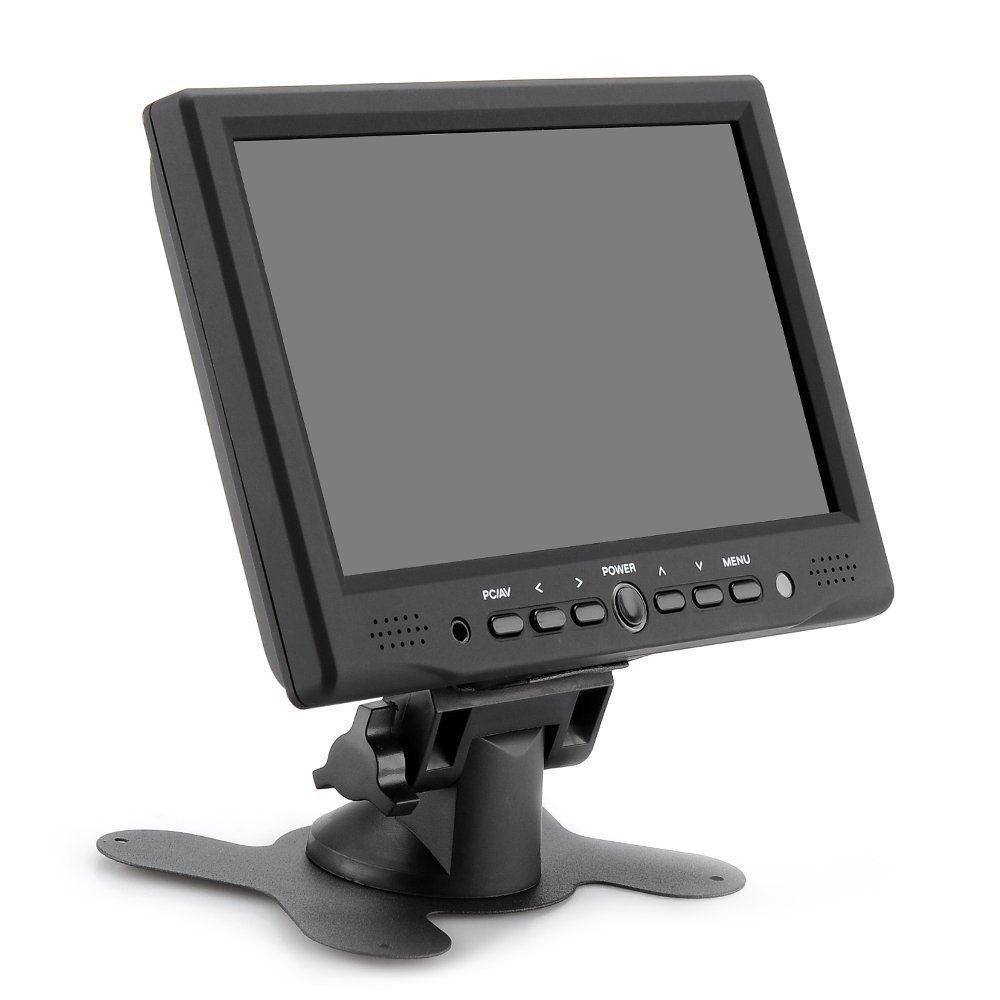
https://www.amazon.co.uk/BW-Resolution-Monitor-Sup...
It has HDMI and VGA input and is so small that it's great for just hooking up temporarily on the rare occasion that I need a monitor on a headless PC.
However, without that, I would recommend a small 7" monitor like this one:
https://www.amazon.co.uk/BW-Resolution-Monitor-Sup...
It has HDMI and VGA input and is so small that it's great for just hooking up temporarily on the rare occasion that I need a monitor on a headless PC.
Clockwork Cupcake said:
My current NAS has a serverboard with IPMI so that is all I need since the IPMI interface gives a virtual console.
However, without that, I would recommend a small 7" monitor like this one:
https://www.amazon.co.uk/BW-Resolution-Monitor-Sup...
It has HDMI and VGA input and is so small that it's great for just hooking up temporarily on the rare occasion that I need a monitor on a headless PC.
wondered when you would appear... that ickle monitor looks the nuts and can possibly do what I want and I can sell the others.However, without that, I would recommend a small 7" monitor like this one:
https://www.amazon.co.uk/BW-Resolution-Monitor-Sup...
It has HDMI and VGA input and is so small that it's great for just hooking up temporarily on the rare occasion that I need a monitor on a headless PC.
Du1point8 said:
wondered when you would appear... that ickle monitor looks the nuts and can possibly do what I want and I can sell the others.
It's great and it's so useful - it's my go-to monitor when building a PC or whenever I need to attach a monitor to a headless PC. I also use it as a liveview monitor for my dSLR with the HDMI interface. It's a great little thing to have, and at under £50 inc VAT it's not going to break the bank either.The power lead is a little short, but I managed to find an extension lead for it which is extra useful.
(That's a lead to extend the DC plug end of the power supply, not the 240v AC end before some smart alec pipes up.)
Clockwork Cupcake said:
Du1point8 said:
wondered when you would appear... that ickle monitor looks the nuts and can possibly do what I want and I can sell the others.
It's great and it's so useful - it's my go-to monitor when building a PC or whenever I need to attach a monitor to a headless PC. I also use it as a liveview monitor for my dSLR with the HDMI interface. It's a great little thing to have, and at under £50 inc VAT it's not going to break the bank either.The power lead is a little short, but I managed to find an extension lead for it which is extra useful.
(That's a lead to extend the DC plug end of the power supply, not the 240v AC end before some smart alec pipes up.)
I have a couple of 24" BenQ widescreen monitors I need to move on...
Du1point8 said:
Need any more monitors?
I have a couple of 24" BenQ widescreen monitors I need to move on...
I have rather a glut of them at present - my main PC has a 3440x1440 centre monitor with a 1600x1200 4:3 monitor in portrait orientation at either side, and my spare PC has a pair of 2650x1440 monitors. So I really don't need any more. I have a couple of 24" BenQ widescreen monitors I need to move on...

You can get laptop-style wired keyboards with an integral laptop-style glidepad. Great for use as a "quickly plug in to a headless PC temporarily" basis.
The one I have is getting a little long in the tooth now as it uses PS/2 style connectors, but still useful with older PCs.
The one I have is getting a little long in the tooth now as it uses PS/2 style connectors, but still useful with older PCs.
Edited by Clockwork Cupcake on Thursday 23 August 14:50
Clockwork Cupcake said:
You can get laptop-style wired keyboards with an integral laptop-style glidepad. Great for use as a "quickly plug in to a headless PC temporarily" basis.
The one I have is getting a little long in the tooth now as it uses PS/2 style connectors, but still useful with older PCs.
I quite like the look of the fold up ones... The one I have is getting a little long in the tooth now as it uses PS/2 style connectors, but still useful with older PCs.
Edited by Clockwork Cupcake on Thursday 23 August 14:50
I had one and it was awesome but the touchpad was on the back of the keypad and as such you couldnt do 2 things at once as you would need to flick between them,
Gassing Station | Computers, Gadgets & Stuff | Top of Page | What's New | My Stuff