
why can't my work get dual monitors working?
Discussion


I have 2 new Hp ProDisplay P232 monitors at work. I need them to be able to show independent documents. My work cannot get the 2nd one to work / show anything at all.
They said / think they need an active cable but I think they've tried one and no joy (not sure exactly what he was trying). They've tried all that 2 > 1 monitor stuff in settings. I believe (?) it doesn't have the old style cable ports any more only hdmi?
I know nothing but just wondering if any pointers. Obvs I can't interfere to much as I'm just the user! but I am curious as I would have thought it is pretty easy these days. the computer is HP ProDesk 400 G3 Desktop Mini PC also new and runs windows 10 'enterprise' (whatever that is)
these are the monitors
https://store.hp.com/UKStore/Merch/Product.aspx?id...
this is the pc
http://www8.hp.com/uk/en/products/desktops/product...
They said / think they need an active cable but I think they've tried one and no joy (not sure exactly what he was trying). They've tried all that 2 > 1 monitor stuff in settings. I believe (?) it doesn't have the old style cable ports any more only hdmi?
I know nothing but just wondering if any pointers. Obvs I can't interfere to much as I'm just the user! but I am curious as I would have thought it is pretty easy these days. the computer is HP ProDesk 400 G3 Desktop Mini PC also new and runs windows 10 'enterprise' (whatever that is)
these are the monitors
https://store.hp.com/UKStore/Merch/Product.aspx?id...
this is the pc
http://www8.hp.com/uk/en/products/desktops/product...
Oakey said:
You should be connecting one monitor via the VGA port and the other via the display port. Then you configure the displays in Windows display settings.
This. I suspect they're trying to "split" the display port signal to both monitors, which will give a sharper display, but I'm not certain will work.On pls keep very simple for me. What cable do I need to buy?
at the moment a cable goes from the left most port on the pc in this pic (I removed it for photo) to the LEFT hand connection on the monitor (that looks like hdmi to me but I don't know). (the BLUE one is currently unused). That is on monitor number 1 that is working.


what is the 2nd cable I need and where will it go to and from? the 2nd monitor has no cable at all at the moment as they took them away.
at the moment a cable goes from the left most port on the pc in this pic (I removed it for photo) to the LEFT hand connection on the monitor (that looks like hdmi to me but I don't know). (the BLUE one is currently unused). That is on monitor number 1 that is working.
what is the 2nd cable I need and where will it go to and from? the 2nd monitor has no cable at all at the moment as they took them away.
Edited by CoolHands on Monday 22 October 14:59

Th left port is a 'Display Port'. see the DP logo. The blue port is a 15pin VGA, that has been the standard analogue port fro years. really they should be going DP -DP. You could use the HDMI output on the PC to the DP on the monitor, use a cable like this
https://www.amazon.co.uk/dp/B01IHFGTOK/ref=asc_df_...
https://www.amazon.co.uk/dp/B01IHFGTOK/ref=asc_df_...
megaphone said:
Th left port is a 'Display Port'. see the DP logo. The blue port is a 15pin VGA, that has been the standard analogue port fro years. really they should be going DP -DP. You could use the HDMI output on the PC to the DP on the monitor, use a cable like this
https://www.amazon.co.uk/dp/B01IHFGTOK/ref=asc_df_...
since both blue connectors on the monitors are unused then can I go dp to dp as you seem to imply is better?https://www.amazon.co.uk/dp/B01IHFGTOK/ref=asc_df_...
https://www.amazon.co.uk/DisplayPort-Benfei-Displa...
megaphone said:
You've only got one DP out on the PC. correct? You'll need to use the HDMI out to DP for the second monitor.
That is an HDMI out on the plate in the middle of the PC??
yes. But I'm pretty sure they tried a cable, as that was the thing they were going on about - that a normal one didn't work so they thought it needed to be 'active'. But after a few weeks to get that cable authorised they tried it and no joy. I'm thinking WTF it's all new, all HP so why is it so difficult.That is an HDMI out on the plate in the middle of the PC??
Mammasaid said:
Weird, new monitors and they've not given you the cables that came in the box?
It's irrelevant, the PC he linked to in the OP has VGA ports but the one he's taken a photo of has HDMI instead so he needs to go to PC Displayport to monitor Display port for the 1st screen and the PC HMDI - monitor Displayport on the 2nd screen (via a HDMI to DP cable). CoolHands said:
megaphone said:
Th left port is a 'Display Port'. see the DP logo. The blue port is a 15pin VGA, that has been the standard analogue port fro years. really they should be going DP -DP. You could use the HDMI output on the PC to the DP on the monitor, use a cable like this
https://www.amazon.co.uk/dp/B01IHFGTOK/ref=asc_df_...
since both blue connectors on the monitors are unused then can I go dp to dp as you seem to imply is better?https://www.amazon.co.uk/dp/B01IHFGTOK/ref=asc_df_...
https://www.amazon.co.uk/DisplayPort-Benfei-Displa...
Oakey said:
Mammasaid said:
Weird, new monitors and they've not given you the cables that came in the box?
It's irrelevant, the PC he linked to in the OP has VGA ports but the one he's taken a photo of has HDMI instead so he needs to go to PC Displayport to monitor Display port for the 1st screen and the PC HMDI - monitor Displayport on the 2nd screen (via a HDMI to DP cable). https://www.amazon.co.uk/DisplayPort-Benfei-Displa...
Your monitors only have Displayport and VGA connectivity and your PC has Displayport and HDMI.
Use that cable to the secondary monitor from the HDMI port on the PC.
Go to display settings on the PC and detect the second monitor when it’s powered up.
Spanna said:
Oakey said:
It's irrelevant, the PC he linked to in the OP has VGA ports but the one he's taken a photo of has HDMI instead so he needs to go to PC Displayport to monitor Display port for the 1st screen and the PC HMDI - monitor Displayport on the 2nd screen (via a HDMI to DP cable).
That should do it based on the pictures. One of these:https://www.amazon.co.uk/DisplayPort-Benfei-Displa...
Your monitors only have Displayport and VGA connectivity and your PC has Displayport and HDMI.
Use that cable to the secondary monitor from the HDMI port on the PC.
Go to display settings on the PC and detect the second monitor when it’s powered up.
 as it looks like I have an unused hdmi in the centre of my pc, and an unused displayport slot on the left (in the pic) of my monitor? (ie the vacant slot next to the blue one)
edit - it looks like that is the one that goes to 1st monitor already.
Edited by CoolHands on Monday 22 October 16:30

Display port to hdmi is compatible with just a cable, but it does not work the opposite way around and that is why you need an adaptor.
Your company is correct in saying you need and active adaptor, something like this should do.
https://www.amazon.co.uk/StarTech-com-HDMI-Display...
Then a display port to display port cable also if you don't have one already.
Another and cheaper option is one of these, i have used plenty before in the past with no issue's, and will be fine at your monitors resolution.
https://www.amazon.co.uk/dp/B01E8DD6J6/ref=asc_df_...
Then use a standard vga cable to link up to the monitor.
Your company is correct in saying you need and active adaptor, something like this should do.
https://www.amazon.co.uk/StarTech-com-HDMI-Display...
Then a display port to display port cable also if you don't have one already.
Another and cheaper option is one of these, i have used plenty before in the past with no issue's, and will be fine at your monitors resolution.
https://www.amazon.co.uk/dp/B01E8DD6J6/ref=asc_df_...
Then use a standard vga cable to link up to the monitor.
Edited by xtruss on Monday 22 October 16:58
Edited by xtruss on Monday 22 October 17:07
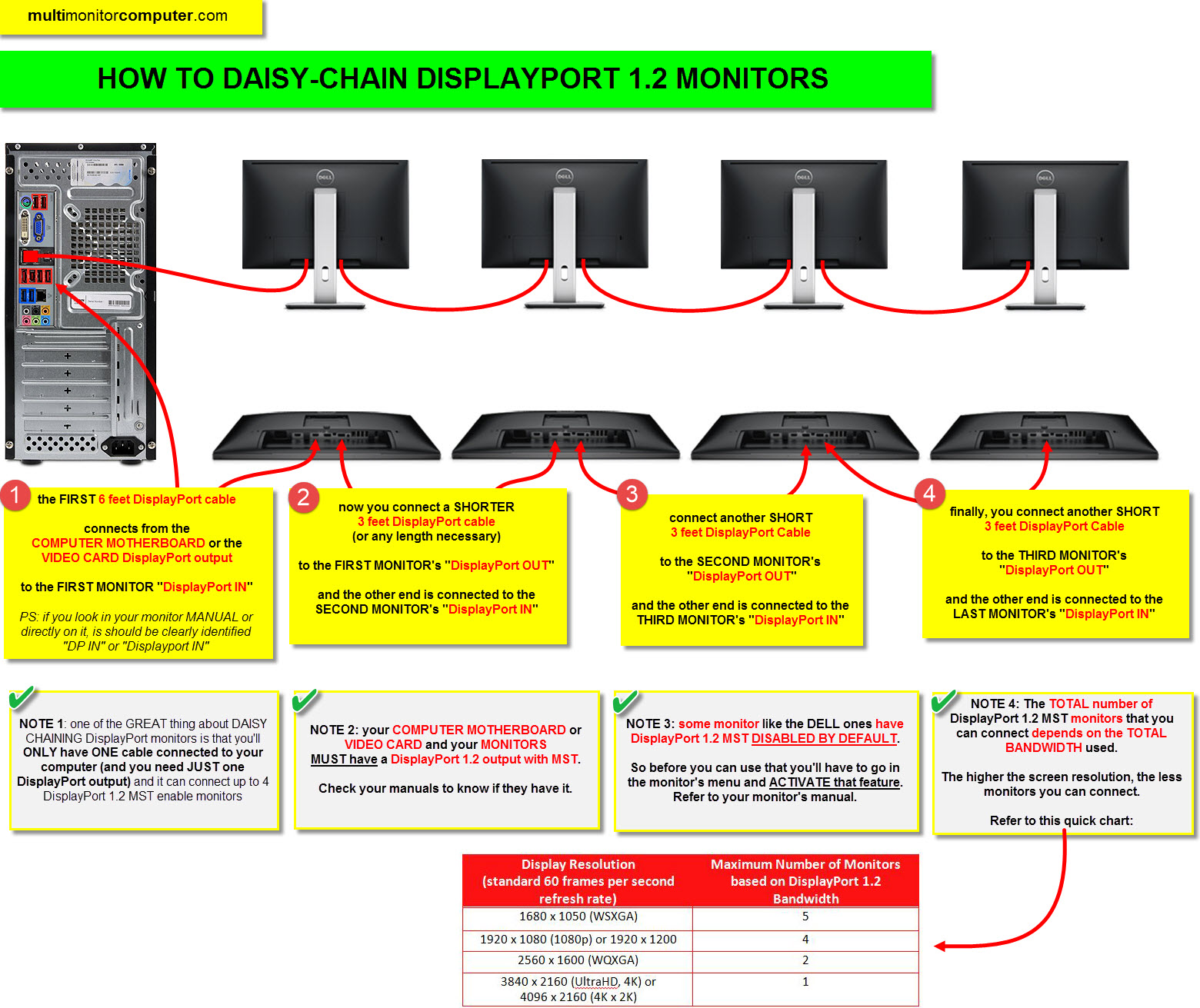
or if you don't want to spend that much you can go this route
https://www.amazon.co.uk/Benfei-Gold-Plated-Projec...
https://www.amazon.co.uk/Benfei-Gold-Plated-Projec...
Gassing Station | Computers, Gadgets & Stuff | Top of Page | What's New | My Stuff