
Discussion


Hi, any networking gurus'?
Background
I currently have Vodafone Broadband and noticed this week my speeds have dropped - currently getting 20mbs instead of (upto 38).
I rang them and they are saying 'internal' (to my home) errors are leading to the router/Dynamic Load Manager throttling/caping my speeds between home and cabinet.
That kind of blows my mind cos how can internal issues cause throttling/capping, but they were very adamant that my home network was the problem and their router cannot handle the load. Which to me seems complete a bit questionable. I might know a bit, but not enough to have an arguement.
The only way to find out is to disconnect internet for 48hrs so the Dynamic Load Manager stops capping. - I told they that was completely unacceptable as my wife and I both work from Home. There is apparently no way they can 'reset' my line to max speed and take it from there.
My home network is largely wired for the main items
- Sonos
- Hive
- main desktop
- laser Printer
- BT Home wifi (mesh)
- 2 x Synology NAS
- 3 x CCTV cameras saving to above NAS
- Inkjet Printer
- there are other bits like TV, DVD player
This is supported by 5 port switch, 8 port switch, and an 8 port half and half POE switch
Then on wifi there are multiple tablets, laptops, phones, etc.
In all about 25-30 devices are 'registered' with the router.
So as you can see its not an office, but I am also not an insignificant user.
Question
- are they talking "b ks" re internal lan issues causing external throttling/capping
- are they talking 'bks' not being able to do a hard reset on the DLM
- I've just bought another BT faceplate and plan to replace the socket to router with new RJ11 cable - just to see if that helps in anyway, as the RJ11 is a bit damaged (wire cover coming off, but wires are not compromised) where the cable does into the plastic RJ11 plug.
- everytime I ring up, their first diagnostic is to get me to remove the BT faceplate and plug in a stand alone filter. \In the past 2 years I've gone thru 1 face plate and 2 filters (now on my 3rd) surely filters should not fail, I thought the BT socket route was better than a separate filter anyway?
- they have suggested I get my own router - would that help?
If there are consistent internal errors that the most likely culprit is the CCTV as that is recording 24/7, but I've no idea how to begin diagnosing LAN issues to even eliminate possible sources. Does anyone know of anything?
Any recommendations on a router/modem or separate router+modem? that can maybe handle the load and errors better. Many of the higher end consumer routers are there to add better wifi, I do not need this as I have the BT mesh, which works brilliantly, If I'm spending I want to get something to do the job its asked and do it well, not pay for a load of kit I don't need.
I know its long and complicated, but your help would be useful.
Background
I currently have Vodafone Broadband and noticed this week my speeds have dropped - currently getting 20mbs instead of (upto 38).
I rang them and they are saying 'internal' (to my home) errors are leading to the router/Dynamic Load Manager throttling/caping my speeds between home and cabinet.
That kind of blows my mind cos how can internal issues cause throttling/capping, but they were very adamant that my home network was the problem and their router cannot handle the load. Which to me seems complete a bit questionable. I might know a bit, but not enough to have an arguement.
The only way to find out is to disconnect internet for 48hrs so the Dynamic Load Manager stops capping. - I told they that was completely unacceptable as my wife and I both work from Home. There is apparently no way they can 'reset' my line to max speed and take it from there.
My home network is largely wired for the main items
- Sonos
- Hive
- main desktop
- laser Printer
- BT Home wifi (mesh)
- 2 x Synology NAS
- 3 x CCTV cameras saving to above NAS
- Inkjet Printer
- there are other bits like TV, DVD player
This is supported by 5 port switch, 8 port switch, and an 8 port half and half POE switch
Then on wifi there are multiple tablets, laptops, phones, etc.
In all about 25-30 devices are 'registered' with the router.
So as you can see its not an office, but I am also not an insignificant user.
Question
- are they talking "b
ks" re internal lan issues causing external throttling/capping- are they talking 'b
ks' not being able to do a hard reset on the DLM- I've just bought another BT faceplate and plan to replace the socket to router with new RJ11 cable - just to see if that helps in anyway, as the RJ11 is a bit damaged (wire cover coming off, but wires are not compromised) where the cable does into the plastic RJ11 plug.
- everytime I ring up, their first diagnostic is to get me to remove the BT faceplate and plug in a stand alone filter. \In the past 2 years I've gone thru 1 face plate and 2 filters (now on my 3rd) surely filters should not fail, I thought the BT socket route was better than a separate filter anyway?
- they have suggested I get my own router - would that help?
If there are consistent internal errors that the most likely culprit is the CCTV as that is recording 24/7, but I've no idea how to begin diagnosing LAN issues to even eliminate possible sources. Does anyone know of anything?
Any recommendations on a router/modem or separate router+modem? that can maybe handle the load and errors better. Many of the higher end consumer routers are there to add better wifi, I do not need this as I have the BT mesh, which works brilliantly, If I'm spending I want to get something to do the job its asked and do it well, not pay for a load of kit I don't need.
I know its long and complicated, but your help would be useful.
The only way I can see internal network causing the router issues is if you're using the router as a switch and putting lots of internal traffic across the switch ports which is stressing the router's resources enough that it can't also process a full speed internet connection. So if you have each switch hanging off an internal port on the router, the switch built into the router is then acting as a core or distribution switch between those other switches. If for example CCTV cameras are on the POE switch and your NAS server is on another, all that internal CCTV traffic has to go via the router even though it's internal traffic.
If not already can you isolate your internal traffic so everything gets from A to B via the other switches leaving only a single uplink connection between one of the standalone switches and your router to ensure the only traffic going through the router is internet traffic and perhaps DHCP broadcasts etc?
Re-using a random diagram I found via Google but you want to aim for something like this, with the router at the top of the tree linked to a single switch and everything else hanging off that.

If not already can you isolate your internal traffic so everything gets from A to B via the other switches leaving only a single uplink connection between one of the standalone switches and your router to ensure the only traffic going through the router is internet traffic and perhaps DHCP broadcasts etc?
Re-using a random diagram I found via Google but you want to aim for something like this, with the router at the top of the tree linked to a single switch and everything else hanging off that.
Edited by LocoBlade on Friday 30th November 14:40
If you're looking for a router the Draytek ones are reliable & powerful, although there is a lot to set up if you want to expolit all they can do. The 2862 range is aimed at SMEs so shoul deasily cope with your setup & they can be had for good money on ebay.
https://www.draytek.co.uk/products/comparison
Here's a basic, non-wifi one for instance.
https://www.ebay.co.uk/itm/Draytek-vigor-2862/1134...
https://www.draytek.co.uk/products/comparison
Here's a basic, non-wifi one for instance.
https://www.ebay.co.uk/itm/Draytek-vigor-2862/1134...
LocoBlade said:
The only way I can see internal network causing the router issues is if you're using the router as a switch and putting lots of internal traffic across the switch ports which is stressing the router's resources enough that it can't also process a full speed internet connection. So if you have each switch hanging off an internal port on the router, the switch built into the router is then acting as a core or distribution switch between those other switches. If for example CCTV cameras are on the POE switch and your NAS server is on another, all that internal CCTV traffic has to go via the router even though it's internal traffic.
If not already can you isolate your internal traffic so everything gets from A to B via the other switches leaving only a single uplink connection between one of the standalone switches and your router to ensure the only traffic going through the router is internet traffic and perhaps DHCP broadcasts etc?
Re-using a random diagram I found via Google but you want to aim for something like this, with the router at the top of the tree linked to a single switch and everything else hanging off that.
Thanks - Yes all 3 switches hang off the Router. I can configure them quite easily to piggyback two off the single switch and have that one linked into the Router.If not already can you isolate your internal traffic so everything gets from A to B via the other switches leaving only a single uplink connection between one of the standalone switches and your router to ensure the only traffic going through the router is internet traffic and perhaps DHCP broadcasts etc?
Re-using a random diagram I found via Google but you want to aim for something like this, with the router at the top of the tree linked to a single switch and everything else hanging off that.
Edited by LocoBlade on Friday 30th November 14:40
I cant separate Internet unfortunately cos my PC is connected to the same switch that controls upstairs. This handles the two NAS's for the CCTV and general data storage, 1 printers and my Desktops network(internet) connection.
I will :-
- leave the 8 port switch directly connected to the Router.
- plug in the 8 port POE CCTV switch to the 8 port above
- plug in the 6 port upstairs switch to the 8 port above.
- the ports currenly used on the 8 port I will plug into the router as they are inconsequential (Hive, Sonos, TV etc)
Will this NOT just overpower the Router, most of the network traffic will now go thru a single port? hence why I spread them around initially. I thought switches were dumb and that the router did all the distribution management - maybe not the case then.
So at the moment the CCTV sends data to the NAS via the Router which makes the 'bridge' between the two 'networks', but if the CCTV switch is connected to the same switch as the NAS, that the router is not involved in anyway? That would kinda make sense.
Cool thanks for that I will look into this option. - Like I said I thought switches were kinda dumb and didn't make any decisions on 'routing'.
Mr Pointy said:
If you're looking for a router the Draytek ones are reliable & powerful, although there is a lot to set up if you want to expolit all they can do. The 2862 range is aimed at SMEs so shoul deasily cope with your setup & they can be had for good money on ebay.
https://www.draytek.co.uk/products/comparison
Here's a basic, non-wifi one for instance.
https://www.ebay.co.uk/itm/Draytek-vigor-2862/1134...
I've used Draytek kit previously before to Fibre, and know about how good they are. I really don't want to become a network engineer, so I'm after something powerful that can handle my needs and possibly increasing needs, but as much plug n play and forget as possible.https://www.draytek.co.uk/products/comparison
Here's a basic, non-wifi one for instance.
https://www.ebay.co.uk/itm/Draytek-vigor-2862/1134...
p.s. feckin Vodafone routers don't even have a 'bridge mode' so I can just use it as a Modem.

Dlm has nothing to do with your lan, they probably were trying to blame your internal telephone extensions from the master socket for reduced snr or signal reflections.
Has anything changed regarding your internal landline sockets?
Broadband support bods tend to not have the first clue what they are talking about, they are just reading a script, so it can very easily turn into chinese whispers when neither party doing the talking has a solid understanding of the underlying technologies.
That is if the problem actually is dlm though.
It could be a broadcast storm caused by sonos, sonos can be very fussy, especially when used in conjunction with wifi range extenders.
Has anything changed regarding your internal landline sockets?
Broadband support bods tend to not have the first clue what they are talking about, they are just reading a script, so it can very easily turn into chinese whispers when neither party doing the talking has a solid understanding of the underlying technologies.
That is if the problem actually is dlm though.
It could be a broadcast storm caused by sonos, sonos can be very fussy, especially when used in conjunction with wifi range extenders.
Edited by OldGermanHeaps on Friday 30th November 20:19
OldGermanHeaps said:
Dlm has nothing to do with your lan, they probably were trying to blame your internal telephone extensions from the master socket for reduced snr or signal reflections.
Has anything changed regarding your internal landline sockets?
Broadband support bods tend to not have the first clue what they are talking about, they are just reading a script, so it can very easily turn into chinese whispers when neither party doing the talking has a solid understanding of the underlying technologies.
That is if the problem actually is dlm though.
It could be a broadcast storm caused by sonos, sonos can be very fussy, especially when used in conjunction with wifi range extenders.
I lost internet a few weeks ago, and they got me to change the filter which sorted things out at the time (as I mentioned 3rd Filter + the BT face plate in about 2-3 years) . Has anything changed regarding your internal landline sockets?
Broadband support bods tend to not have the first clue what they are talking about, they are just reading a script, so it can very easily turn into chinese whispers when neither party doing the talking has a solid understanding of the underlying technologies.
That is if the problem actually is dlm though.
It could be a broadcast storm caused by sonos, sonos can be very fussy, especially when used in conjunction with wifi range extenders.
Edited by OldGermanHeaps on Friday 30th November 20:19
I thought what they were telling me was tosh, it just didn't sound right/make sense admittedly from a very basic level of knowledge/common sense.. I think problems stemmed from then, but I have absolutely no proof. I did notice a few days ago my Torrents were peeking out, but i just assumed I had throttled the torrent myself in BITTorrent to stop it hogging the line. I often do this during the daytime if I know i'm making Skype calls - but checked yesterday and I hadn't, so it must have been capped for a while.
I'll still try the reconfig my internal lan switches so that they are not all hanging out the back of the Router. the first BT in the chain is about 1.5m from the router and other network bits, basically cos its got a long enough power lead to not be stuffed down behind the TV.
Wifi in the house is the BT Home mesh 3 disk system and its the dogs danglies for stability so I'm not using range extenders, The routers Wifi is actually turned off.
Sonos has been running constantly for years, with no issues. I use a wired Sonos hub, then the Sonos Mesh after that. The wired hub is near the router about a foot away. It would be relatively easy to move the Sonos hub upstairs, I have enough Sonos speakers dotted around the house to NOT compromise the Sonos mesh.
I have just installed a Hive plug, a few days ago, and that's the only 'network' related change I've made recently.
sparkyhx said:
Will this NOT just overpower the Router, most of the network traffic will now go thru a single port? hence why I spread them around initially. I thought switches were dumb and that the router did all the distribution management - maybe not the case then.
So at the moment the CCTV sends data to the NAS via the Router which makes the 'bridge' between the two 'networks', but if the CCTV switch is connected to the same switch as the NAS, that the router is not involved in anyway? That would kinda make sense.
Cool thanks for that I will look into this option. - Like I said I thought switches were kinda dumb and didn't make any decisions on 'routing'.
I'll just say that I'm not convinced either that your LAN is causing this issue but to answer the questions, a router only routes traffic from the LAN to the internet and vice versa, there's no internal network routing going on here. Each device on your LAN is (presumably) on the same subnet so at a network level regardless of the number of switches attached it's considered a single "flat" network meaning each device can contact everything else via a switched connection without needing a router to act as a middle man as switches learn the IP addresses and MAC addresses of devices on the same network so know which switch port to send the traffic without needing a router. What you may be thinking of is the router acting as the DNS server maintaining a phone book type database that LAN devices can query to convert device names into IP addresses which is required for one device to communicate with another device when only the name of the device is known. This query generates a small amount of traffic from the source device to/from the router but once the source is told the IP address of the destination, the traffic it needs to send will go from switch port to switch port directly without bothering the router. So at the moment the CCTV sends data to the NAS via the Router which makes the 'bridge' between the two 'networks', but if the CCTV switch is connected to the same switch as the NAS, that the router is not involved in anyway? That would kinda make sense.
Cool thanks for that I will look into this option. - Like I said I thought switches were kinda dumb and didn't make any decisions on 'routing'.
So yes to take load off the router you're be better off putting the CCTV cameras and NAS (plus everything else) on the same switch or on directly linked switches rather than going via the router. The single router connection is fine as when set up like that the only meaningful traffic that will be going across the single port is internet upload/download traffic, and that port will be 100Mbit at least (if not Gigabit), more than twice your internet bandwidth so not a bottleneck.
It sounds like what vodafone are saying is you are overloading the internal switch on the router causing it to reboot dropping the connection regularly causing the dslam to reduce your data rate to try and stabalise your connection.
If vodafone tech support were geneuinly able to diagnose that I would be impressed but I suspect it is a known issue and they have just guessed based on your symptoms and description of what you have on your network.
I've never heard of a big domestic isp recommending you use your own router, if anything they seem more inclined to refuse to support you or even threaten to cut you off for trying.
Maybe look for an isp that can supply a router that is fit for purpose
If vodafone tech support were geneuinly able to diagnose that I would be impressed but I suspect it is a known issue and they have just guessed based on your symptoms and description of what you have on your network.
I've never heard of a big domestic isp recommending you use your own router, if anything they seem more inclined to refuse to support you or even threaten to cut you off for trying.
Maybe look for an isp that can supply a router that is fit for purpose
ging84 said:
It sounds like what vodafone are saying is you are overloading the internal switch on the router causing it to reboot dropping the connection regularly causing the dslam to reduce your data rate to try and stabalise your connection.
If vodafone tech support were geneuinly able to diagnose that I would be impressed but I suspect it is a known issue and they have just guessed based on your symptoms and description of what you have on your network.
I've never heard of a big domestic isp recommending you use your own router, if anything they seem more inclined to refuse to support you or even threaten to cut you off for trying.
Maybe look for an isp that can supply a router that is fit for purpose
I think you probably hit the nail on the head - everything was going thru the Router and it couldn't handle the traffic somehow that resulted in the DLM capping my speed - dont know why, but it kinda makes sense.If vodafone tech support were geneuinly able to diagnose that I would be impressed but I suspect it is a known issue and they have just guessed based on your symptoms and description of what you have on your network.
I've never heard of a big domestic isp recommending you use your own router, if anything they seem more inclined to refuse to support you or even threaten to cut you off for trying.
Maybe look for an isp that can supply a router that is fit for purpose
My thoughts too re 'support' I mentioned my own router to VF and the guy just said 'yes I wouldn't be supported' - lets hope a reconfigure of my switches works, however the VF router is really basic, as I said doesn't even have bridge mode, so going down the own router er............. route might be useful. for the long run.
I get a 'gadget allowance' thru work so none of this really costs me anything, so i'm still contemplating going down the separate modem/router route as well, but there are advantages to just keeping it simple. If the switch reconfigure sorts out the problem then I'll probably leave it alone, and spend my allowance on something else.
Its all switched over now and I've 'rewired' the RJ11 and put another BT dual faceplate on lets see how it goes in the next few days.
Thanks for everyones help.
It all sounds like tosh to me.
DLM monitors send and receive errors over your WAN port. When there sufficient errors, it slows down the speed a bit until things stabalise. The WAN port is seperate from your LAN ports. The LAN ports are merely a switch, which required very little processing power to run at full tilt. Hence you can buy 4 port switches for under a tenner that perform just the same as more expensive ones.
Perhaps your router simply has a fault? If it was a common fault to that specific router the interwebs would be full of people moaning about it.
I use the router's built in ports to the max as it's a direct route to the internet and cuts out hops - so my PC, Raid NAS, and other important bits hang off the router, and always have, using many routers over the years. Never had any performance issue with the LAN ports nor the WAN port (phone socket in reality). It runs at such a slow speed compared to the LAN ports it would be the last thing to be effected.
Mind you, not all ISPs operate the same. With Vodafone, I have to cap my upload speed on my router, or I saturate the link when uploading and then no downloading (browing) happens at all. That's just poor network management on their part. Never had to do it with any other ISP, and I've used the same router with 2 different ISPs (other was Plusnet). Only had to manage my upload bandwidth with Voda.
DLM monitors send and receive errors over your WAN port. When there sufficient errors, it slows down the speed a bit until things stabalise. The WAN port is seperate from your LAN ports. The LAN ports are merely a switch, which required very little processing power to run at full tilt. Hence you can buy 4 port switches for under a tenner that perform just the same as more expensive ones.
Perhaps your router simply has a fault? If it was a common fault to that specific router the interwebs would be full of people moaning about it.
I use the router's built in ports to the max as it's a direct route to the internet and cuts out hops - so my PC, Raid NAS, and other important bits hang off the router, and always have, using many routers over the years. Never had any performance issue with the LAN ports nor the WAN port (phone socket in reality). It runs at such a slow speed compared to the LAN ports it would be the last thing to be effected.
Mind you, not all ISPs operate the same. With Vodafone, I have to cap my upload speed on my router, or I saturate the link when uploading and then no downloading (browing) happens at all. That's just poor network management on their part. Never had to do it with any other ISP, and I've used the same router with 2 different ISPs (other was Plusnet). Only had to manage my upload bandwidth with Voda.
The bulk of my network traffic is internal, with the Cctv and NAS. I'M NOT A HUGE Streamer and certainly don't do a lot of uploading unless one drive sync is doing more than it should. I do do quite a lot of torrent downloads, but that tends to be in short bursts, (few hrs once a week). As I've said above I've redone the WAN today, new rj11 cable and bt face plate.
If there is a poor connection internally, but the traffic is entirely internal, does the router see any of it? VF said they could see router was doing lots of 'error correction'. Like I've said I'll give it a few days and ring back with what I have learnt from you guys
If there is a poor connection internally, but the traffic is entirely internal, does the router see any of it? VF said they could see router was doing lots of 'error correction'. Like I've said I'll give it a few days and ring back with what I have learnt from you guys
If they have access to your router logs, the errors they can see are VDSL connection stats, not your LAN stats. I've not used an ADSL or VDSL router yet that shows LAN activity in any detail.
In all likelyhood you have VDSL errors and the tech is clutching at straws as to why. Almost always they blame internal wiring, and by that I mean phone line, extensions, and sockets. Never LAN .
I torrent as well. Doesn't affect my link, but.... If you don't throttle the upload speed it will saturate your link and this might be giving the errors they are seeing on the link.
In all likelyhood you have VDSL errors and the tech is clutching at straws as to why. Almost always they blame internal wiring, and by that I mean phone line, extensions, and sockets. Never LAN .
I torrent as well. Doesn't affect my link, but.... If you don't throttle the upload speed it will saturate your link and this might be giving the errors they are seeing on the link.
I recently moved to Vodafone from Sky, and have also seen a drop in performance, before I have around 12Mbs with Sky, but with VF I struggle to get over 7.8Mbs.
Spoken to VF, who say that as I'm above the guaranteed minimum speed of 6.8Mbs, that they will not investigate further.
I replaced the VF modem with a Billion 8800NL which show an attainable sync rate of around 10Mbs, in the hope this would solve the issue, but 18 days on and no improvement.
2 utilities that I've used to monitor my connection are;
https://www.thinkbroadband.com/broadband/monitorin...

and
http://dslstats.me.uk/
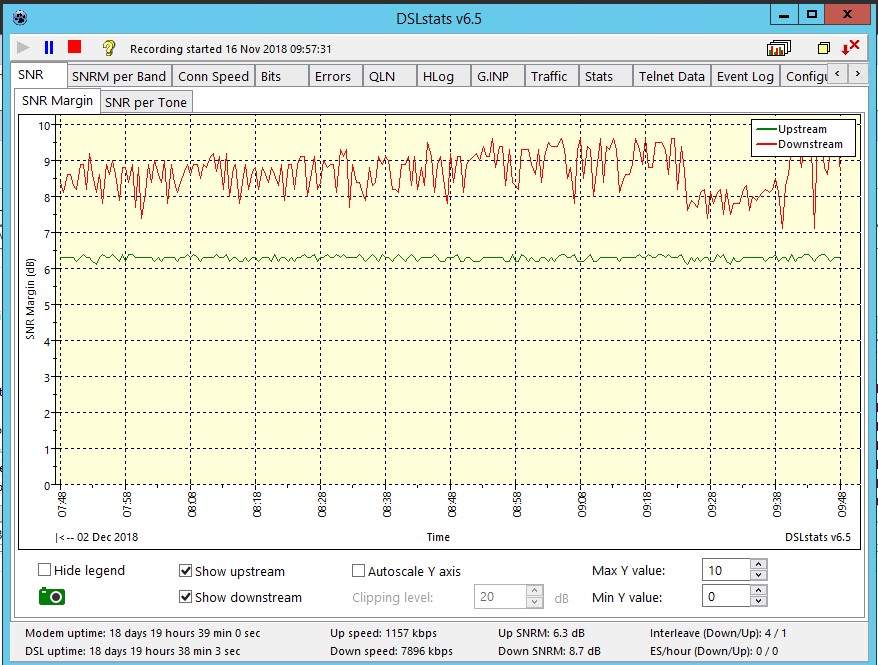
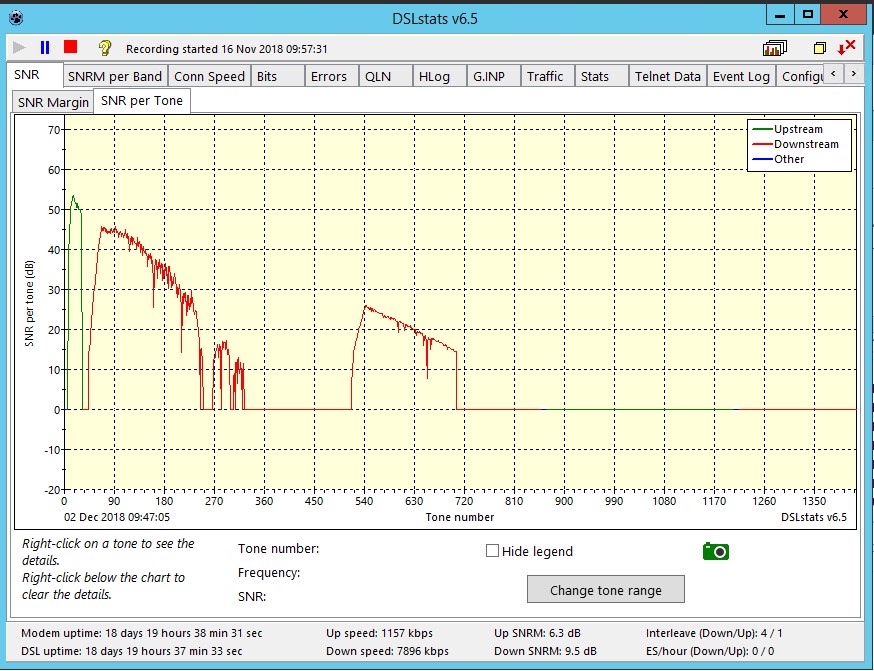
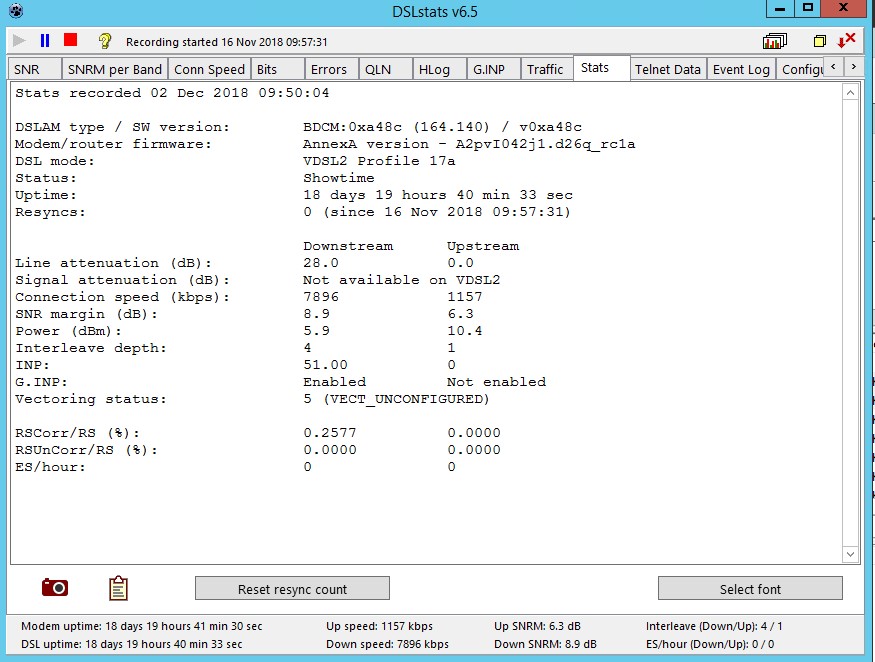
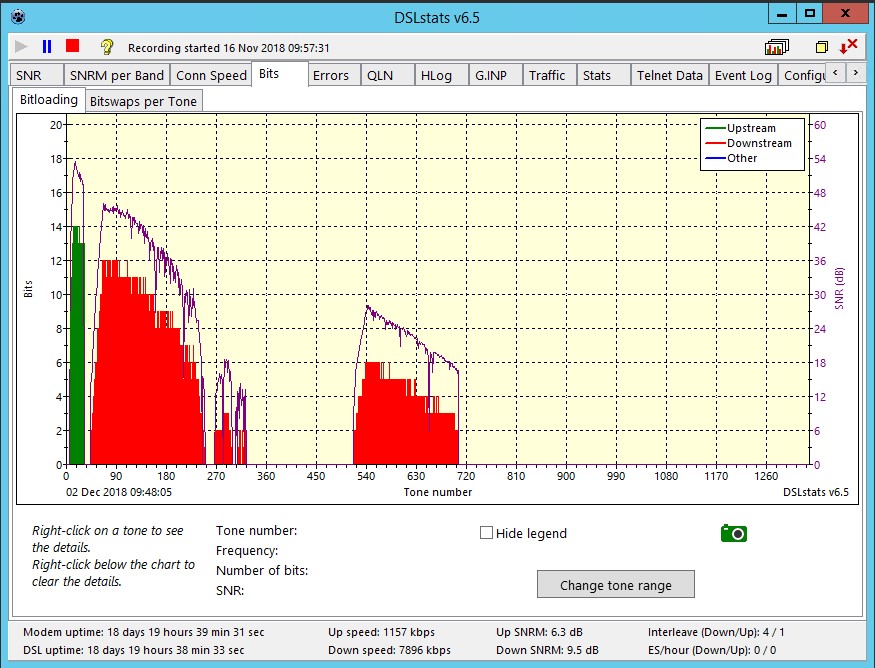
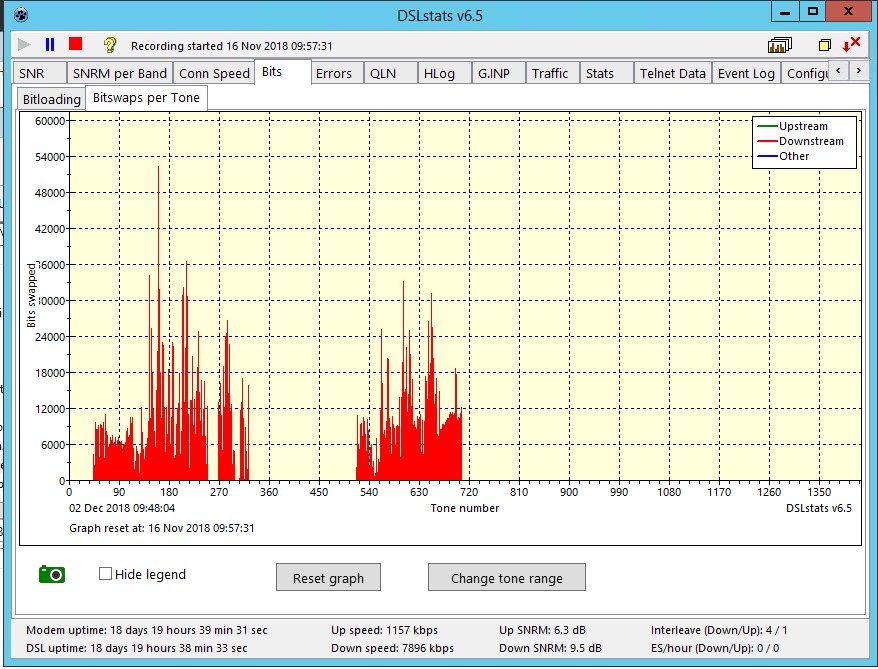
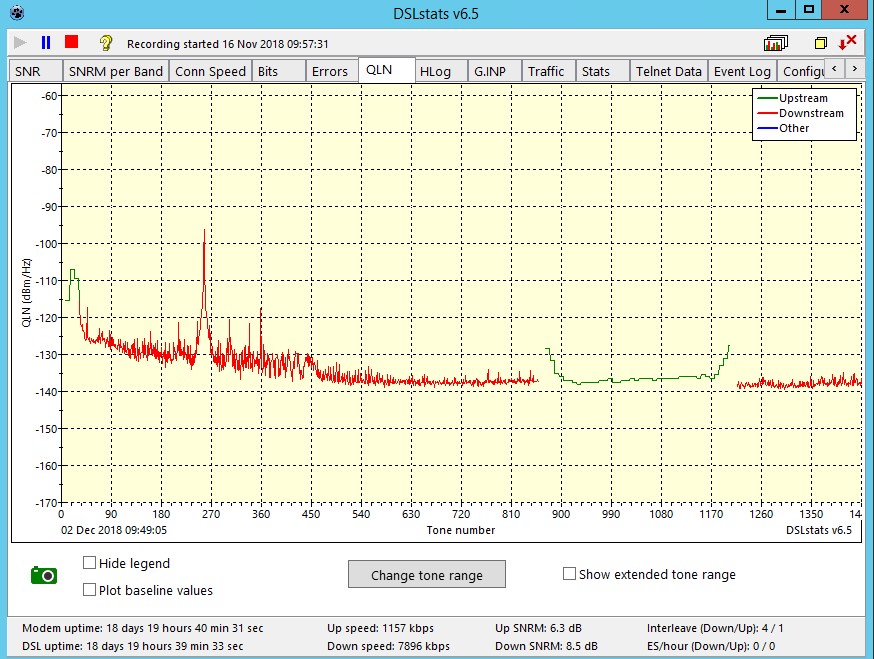
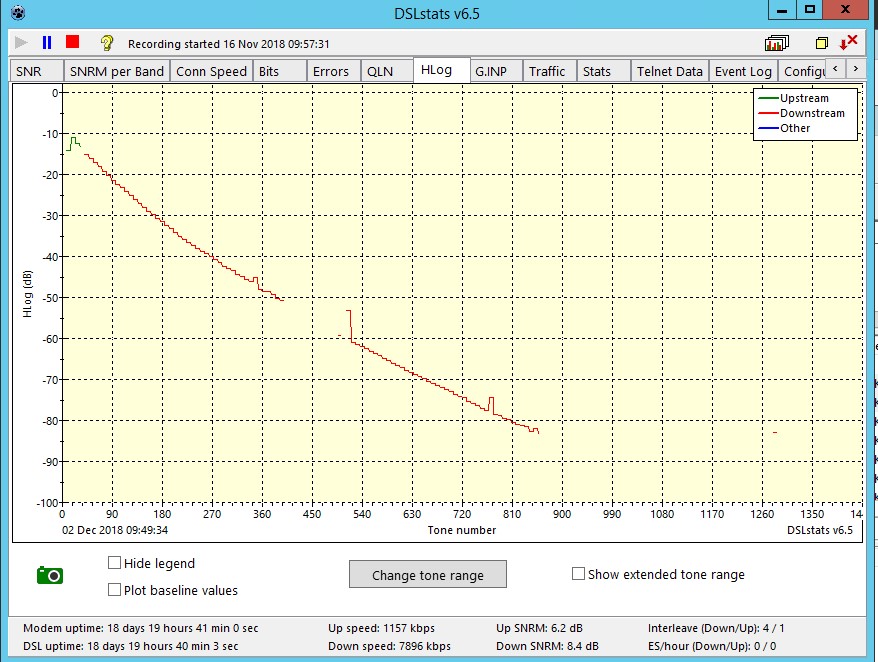
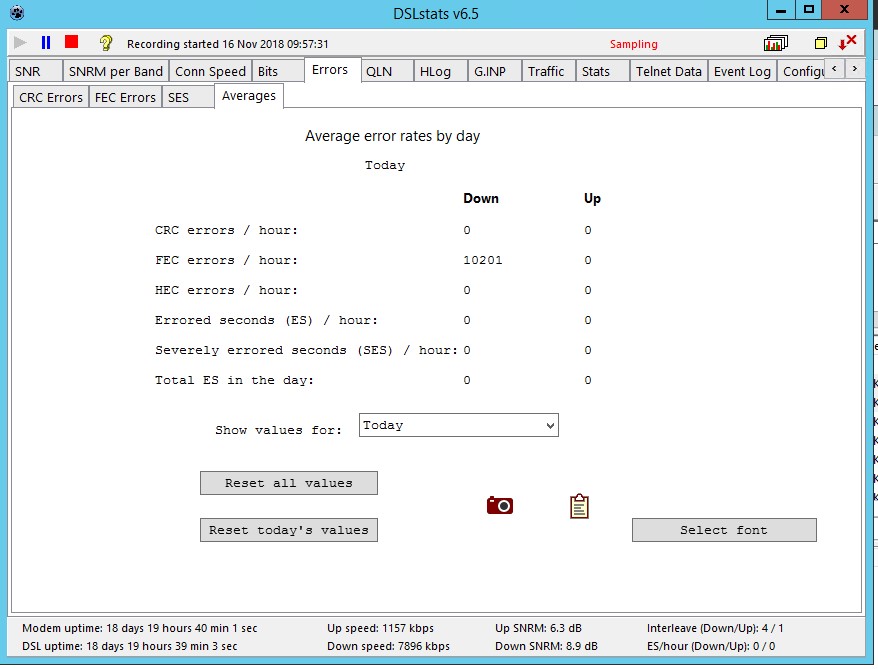
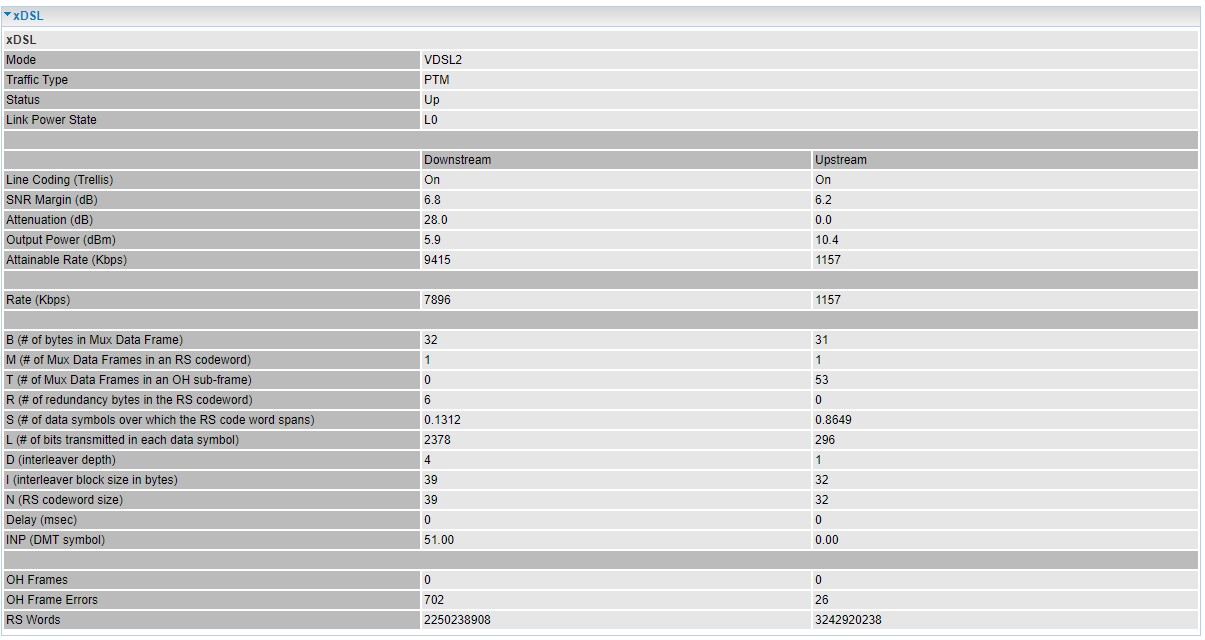
These were my previous Sky connection speeds
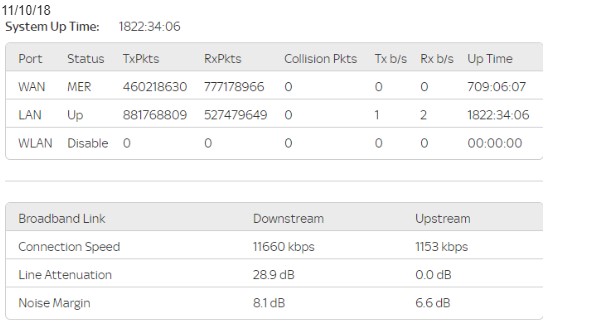
When I initially switched to VF
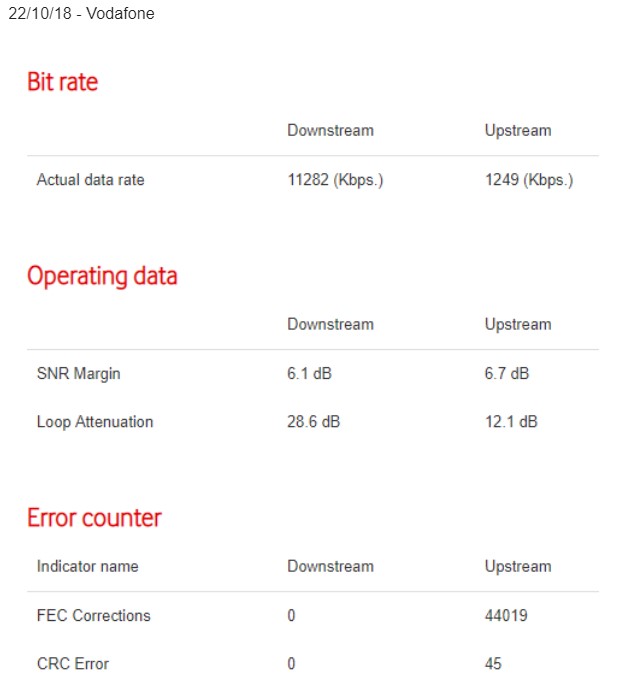
After two weeks, and line conditioning completed'
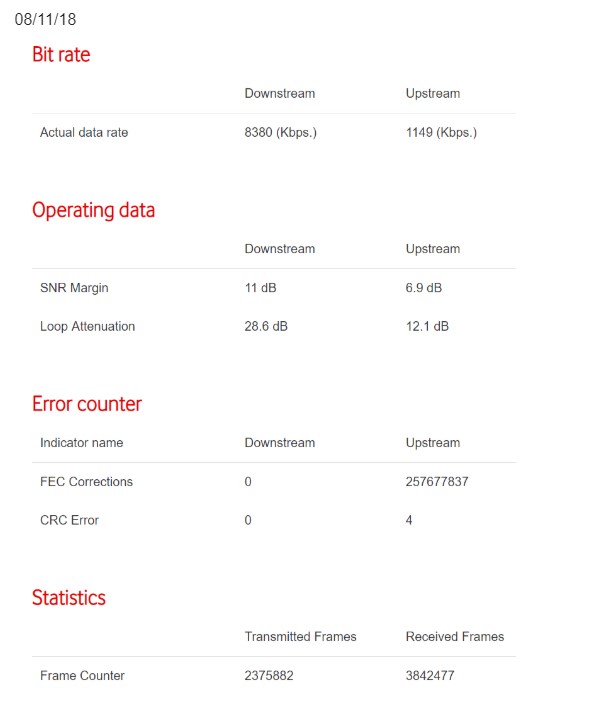
The only thing that has changed in my case is the LLU, as I'm on the same exchange and copper line, which is around 2 km away.
From my investigations, I believe that it the Interleave depth that my be causing my reduction in download speed since changing ISP.
Spoken to VF, who say that as I'm above the guaranteed minimum speed of 6.8Mbs, that they will not investigate further.
I replaced the VF modem with a Billion 8800NL which show an attainable sync rate of around 10Mbs, in the hope this would solve the issue, but 18 days on and no improvement.
2 utilities that I've used to monitor my connection are;
https://www.thinkbroadband.com/broadband/monitorin...
and
http://dslstats.me.uk/
These were my previous Sky connection speeds
When I initially switched to VF
After two weeks, and line conditioning completed'
The only thing that has changed in my case is the LLU, as I'm on the same exchange and copper line, which is around 2 km away.
From my investigations, I believe that it the Interleave depth that my be causing my reduction in download speed since changing ISP.
Edited by rfsteel on Sunday 2nd December 11:08
Gassing Station | Computers, Gadgets & Stuff | Top of Page | What's New | My Stuff