
Aux Input for e46 - troubleshooting
Discussion


Please could I ask for some help from the collective on getting a basic aux input up and running on my e46 M3?
The car is a 2003, with the sat nav head unit (with mini disc), HK audio and DVD nav. It came with an Alpine KCA420i + Intravee install in the boot in place of the original CD mulichanger. That install has been ok but I am on my third hard-drive based ipod which is also now giving up the ghost and with spotify and BBC 6music taking up my listening time now doesn’t really work for me.
I’m not looking for anything flash, I just want a simple headphone lead that I can then plug into my phone, or connect to a cheapo Bluetooth device.
I have tried to connect to the aux input on the headunit using a cable sourced from ebay (pic below). I was feeling pretty pleased with myself having wrestled off the trim, aircon vents and the headunit itself but it hasn’t worked and no amount of faffing has woken it up (I have pressed the mode button to cycle through). It’s supposed to be plug and play.
(link to cable https://www.ebay.co.uk/itm/BMW-Aux-in-Adapter-E39-...
Does anyone have any tips to get the aux cable up and running? Can I enable the port through the intravee somehow? I thought the intravee setup might be interfering with it but unplugging that didn’t seem to help.
Secondly, is there a better option with my current install for getting an aux in? I have seen a Bluetooth unit for £90 that plugs into the CD changer socket in the boot (I think), and promises to provide some additional functionality such as next track from the steering wheel. Alternatively can I say plug an aux lead into the intravee and do away with the ipod? Or do I need an intravee switch for that?
Any help greatly appreciated!

The car is a 2003, with the sat nav head unit (with mini disc), HK audio and DVD nav. It came with an Alpine KCA420i + Intravee install in the boot in place of the original CD mulichanger. That install has been ok but I am on my third hard-drive based ipod which is also now giving up the ghost and with spotify and BBC 6music taking up my listening time now doesn’t really work for me.
I’m not looking for anything flash, I just want a simple headphone lead that I can then plug into my phone, or connect to a cheapo Bluetooth device.
I have tried to connect to the aux input on the headunit using a cable sourced from ebay (pic below). I was feeling pretty pleased with myself having wrestled off the trim, aircon vents and the headunit itself but it hasn’t worked and no amount of faffing has woken it up (I have pressed the mode button to cycle through). It’s supposed to be plug and play.
(link to cable https://www.ebay.co.uk/itm/BMW-Aux-in-Adapter-E39-...
Does anyone have any tips to get the aux cable up and running? Can I enable the port through the intravee somehow? I thought the intravee setup might be interfering with it but unplugging that didn’t seem to help.
Secondly, is there a better option with my current install for getting an aux in? I have seen a Bluetooth unit for £90 that plugs into the CD changer socket in the boot (I think), and promises to provide some additional functionality such as next track from the steering wheel. Alternatively can I say plug an aux lead into the intravee and do away with the ipod? Or do I need an intravee switch for that?
Any help greatly appreciated!
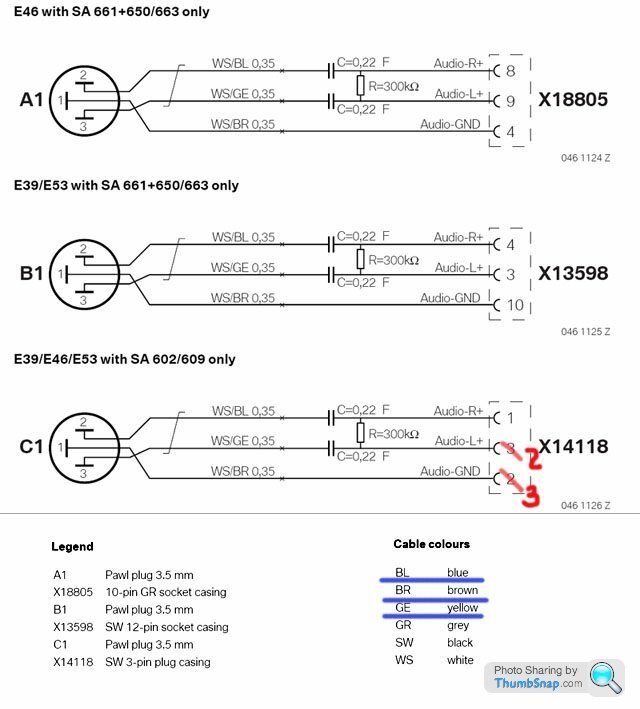
It worked! The wires were a different colour to the diagram but trial and error did the job. My l and r channels are currently reversed but I can figure out the right combination in the fullness of time. Initially the stereo would show aux then immediately flick back to iPod, but disconnecting the intravee fixed that. The intravee and alpine kca420i will be going on eBay.
Thanks for your help
Thanks for your help
Further developments:
Last night while driving the red battery indicator flashed up briefly on the dash. After a short while it came back on for a little longer, went away but then came back permanently.
Googling suggests this may be an issue with the alternator as the light indicates the battery is no longer being charged by the car.
Could my dodgy wiring effort on the aux cable be the culprit? I’ve never had this issue previously despite the car’s battery running flat on numerous occasions due to lack of use... my plan is to trial and error the wires until I have the sound coming out of the correct channels.
Thanks in advance for any help!
Last night while driving the red battery indicator flashed up briefly on the dash. After a short while it came back on for a little longer, went away but then came back permanently.
Googling suggests this may be an issue with the alternator as the light indicates the battery is no longer being charged by the car.
Could my dodgy wiring effort on the aux cable be the culprit? I’ve never had this issue previously despite the car’s battery running flat on numerous occasions due to lack of use... my plan is to trial and error the wires until I have the sound coming out of the correct channels.
Thanks in advance for any help!
Gassing Station | BMW General | Top of Page | What's New | My Stuff