
Help, can't get Thrustmaster wheel to work in AC on VR
Discussion


Folks, a bit of help for this VR noob please.
As per thread title, the wheel works in Assetto Corsa without VR fine... eventually, now.
So the problem I'm having is maybe some settings in Oculus for my Rift S or something.
Playing Assetto Corsa through Oculus with the wheel (Thrustmaster T300 RS) just isn't working, prat just sits there with hands on the wheel, no buttons or controls do anything.
What am I missing? Any ideas?
I'm ashamed to admit I've spent more time trying to crack this than I should have, not ready to give up and throw everything out the window yet!
Oh, in case this matters, this is via the Steam platform/launcher thing.
Thanks.
As per thread title, the wheel works in Assetto Corsa without VR fine... eventually, now.
So the problem I'm having is maybe some settings in Oculus for my Rift S or something.
Playing Assetto Corsa through Oculus with the wheel (Thrustmaster T300 RS) just isn't working, prat just sits there with hands on the wheel, no buttons or controls do anything.
What am I missing? Any ideas?
I'm ashamed to admit I've spent more time trying to crack this than I should have, not ready to give up and throw everything out the window yet!
Oh, in case this matters, this is via the Steam platform/launcher thing.
Thanks.
Thanks Bloomen, but no luck there.
In VR mode, I can navigate all the way through Assetto Corsa, even the settings and as soon I press the Drive button all the controls, steering wheel, keyboard, mouse, Rift controllers, everything is completely dead with the driver just sitting there and the engine ticking over.
After spending so much time on this with multiple un-installs, re-installs to various levels, going all the way back to everything removed (including Steam!) and researching/trawling through many forums I'm just about ready to give up and send the thing back and just get a bigger (heavily expensive) monitor.
It is even more frustrating being this close and seeing all the posts on various forums from people successfully running the same wheel on AC in VR.

In VR mode, I can navigate all the way through Assetto Corsa, even the settings and as soon I press the Drive button all the controls, steering wheel, keyboard, mouse, Rift controllers, everything is completely dead with the driver just sitting there and the engine ticking over.
After spending so much time on this with multiple un-installs, re-installs to various levels, going all the way back to everything removed (including Steam!) and researching/trawling through many forums I'm just about ready to give up and send the thing back and just get a bigger (heavily expensive) monitor.
It is even more frustrating being this close and seeing all the posts on various forums from people successfully running the same wheel on AC in VR.
Thanks again Bloomen, yes tried all those... and more probably, many rabbit holes visited.
Checked everything, multiple times, no joy.
Anything I did had no effect on the end result.
I can't help feeling there is something simple that I've missed or there's an extra obvious (not to me) step.
I think it's time to cut my losses after spending most of the weekend on it.
At least adding another monitor won't be as problematic or have I just jinxed myself!!!
While I'm a VR noob, I can and have messed with PC's and gaming a bit in the past so I do have a little knowledge, nowhere near as much as many though.
Checked everything, multiple times, no joy.
Anything I did had no effect on the end result.
I can't help feeling there is something simple that I've missed or there's an extra obvious (not to me) step.
I think it's time to cut my losses after spending most of the weekend on it.
At least adding another monitor won't be as problematic or have I just jinxed myself!!!
While I'm a VR noob, I can and have messed with PC's and gaming a bit in the past so I do have a little knowledge, nowhere near as much as many though.
Many thanks Craste. 
I’ll try anything now but in all the screens I’ve ploughed thru’s these past few days I never came across this one.
Please can you let me know where that is or how I can get it (I will explore further again myself this evening)?
I’m using AC as opposed to ACC, newly purchased and downloaded last week, if that makes any difference.
I’ll try anything now but in all the screens I’ve ploughed thru’s these past few days I never came across this one.
Please can you let me know where that is or how I can get it (I will explore further again myself this evening)?
I’m using AC as opposed to ACC, newly purchased and downloaded last week, if that makes any difference.
Vanya said:
Many thanks Craste.
I’ll try anything now but in all the screens I’ve ploughed thru’s these past few days I never came across this one.
Please can you let me know where that is or how I can get it (I will explore further again myself this evening)?
I’m using AC as opposed to ACC, newly purchased and downloaded last week, if that makes any difference.
You're welcome mate, its a nause when you can't get somthing to work - thats why sometimes with a console its better you don't have to go through all this malarky!I’ll try anything now but in all the screens I’ve ploughed thru’s these past few days I never came across this one.
Please can you let me know where that is or how I can get it (I will explore further again myself this evening)?
I’m using AC as opposed to ACC, newly purchased and downloaded last week, if that makes any difference.
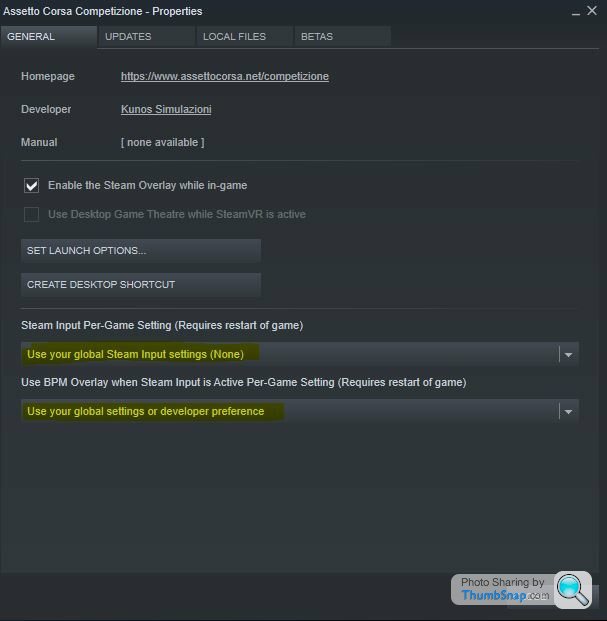
Click here in yellow and select properties.

you can also verify the integrity of the files too to make sure all is well. (from the local files tab withing the same part of Steam)

That’s great, and thanks for understanding my frustrations Craste.
I’ll definitely give that all a whirl and report back either way.
I appreciate the time and help with the screen grabs etc, fantastic of you.
It’s interesting that these settings need to go into Steam and not the settings in Oculus, so that’s the innocent party in this saga.
Ha ha... in my mind I was thinking the T300RS or Oculus (or most likely me) or any combination of those was the source of the problem.
I convinced myself the issue was with Oculus and Rift S as during my many processes of elimination the wheel worked fine with AC and Oculus/Rift disconnected.
I’ll definitely give that all a whirl and report back either way.
I appreciate the time and help with the screen grabs etc, fantastic of you.
It’s interesting that these settings need to go into Steam and not the settings in Oculus, so that’s the innocent party in this saga.
Ha ha... in my mind I was thinking the T300RS or Oculus (or most likely me) or any combination of those was the source of the problem.
I convinced myself the issue was with Oculus and Rift S as during my many processes of elimination the wheel worked fine with AC and Oculus/Rift disconnected.
Craste,
Just trying to think logically, I have nothing set as a controller in Steam, the wheel still works in AC though.
Steam has detected my T300RS but when I go into the controller settings they are only for a game pad or console controller thingy.
I did try to set those anyway but because I left some actions blank as I ran out of buttons Steam wouldn't save what I set.
Is this part of the problem do you think?
I have checked the settings in your first screen shot, the screen I see is identical with the same settings except I unchecked the "Use Desktop Game Theatre while SteamVR is active" option.
BTW, SteamVR is not engaged.
Cheers,
V.
Just trying to think logically, I have nothing set as a controller in Steam, the wheel still works in AC though.
Steam has detected my T300RS but when I go into the controller settings they are only for a game pad or console controller thingy.
I did try to set those anyway but because I left some actions blank as I ran out of buttons Steam wouldn't save what I set.
Is this part of the problem do you think?
I have checked the settings in your first screen shot, the screen I see is identical with the same settings except I unchecked the "Use Desktop Game Theatre while SteamVR is active" option.
BTW, SteamVR is not engaged.
Cheers,
V.
What the hell Craste... that worked!!!
But how?
I didn't change anything based on your 1st screen shot except the option I unchecked (Use Desktop Game Theatre while SteamVR is active).
I don't know whether Steam VR was active or not!
The 2 items you highlighted were already set that way when I opened that screen.
I wasn't able to set up anything on Steam for a controller as mentioned above.
Oh and I did verify the local files integrity.
I don't understand how or why but I can tell I'm super grateful to you my fellow PH-er not to mention very relieved.
You sir not only deserve several virtual pints but real pints also as I have just rushed into Amazon to cancel my order for a 34" monitor and thusly saving me my bank balance around a grand!!! Luckily I was till able to cancel the order. (I really wanted that monitor but not for nearly a thousand quid.)
I'm not going to admit how many hours I've spent on this since last Thursday so you know it's bad.
Thank you so so much.
But how?
I didn't change anything based on your 1st screen shot except the option I unchecked (Use Desktop Game Theatre while SteamVR is active).
I don't know whether Steam VR was active or not!
The 2 items you highlighted were already set that way when I opened that screen.
I wasn't able to set up anything on Steam for a controller as mentioned above.
Oh and I did verify the local files integrity.
I don't understand how or why but I can tell I'm super grateful to you my fellow PH-er not to mention very relieved.
You sir not only deserve several virtual pints but real pints also as I have just rushed into Amazon to cancel my order for a 34" monitor and thusly saving me my bank balance around a grand!!! Luckily I was till able to cancel the order. (I really wanted that monitor but not for nearly a thousand quid.)
I'm not going to admit how many hours I've spent on this since last Thursday so you know it's bad.
Thank you so so much.

Yes I couldn’t agree more, in between the slanging matches and topics that often degrade which I do not participate in it still proves to be a great site for help and advice.
I will definitely add you on Steam however, in spite of your nickname I suspect you are more advanced than I am.
If you recommend RFactor 2 I’ll give it a try.
Please bear in mind my gaming CV is as follows: Doom in it’s first iteration 93-95, Command & Conquer also in it’s first iteration 95-97 and HALO CTF (online) 03-05!!!
So yeah, this is my first foray into racing sims and easy meat to anyone else on the grid.
Vanya said:
Yes I couldn’t agree more, in between the slanging matches and topics that often degrade which I do not participate in it still proves to be a great site for help and advice.
I will definitely add you on Steam however, in spite of your nickname I suspect you are more advanced than I am.
If you recommend RFactor 2 I’ll give it a try.
Please bear in mind my gaming CV is as follows: Doom in it’s first iteration 93-95, Command & Conquer also in it’s first iteration 95-97 and HALO CTF (online) 03-05!!!
So yeah, this is my first foray into racing sims and easy meat to anyone else on the grid.
Rfactor2 isn’t the prettiest but you can download a load of fee cars and tracks from the Steam Workshop and some of them are great.
Enjoy!
Gassing Station | Video Games | Top of Page | What's New | My Stuff