
Infotainment update - Aston Installations Kit
Discussion


I think we can all agree the infotainment system in our Astons is a bit dated now, they were dated on the offset weren’t they. I love the sound of these cars, many would argue there’s no need for anything else apart from an open road and open window. The glorious V8 or V12 delivering all the audible entertainment needed.
 |https://thumbsnap.com/XZwWxk6L[/url]
However when I tapped the front carbon splitter causing a gash and the satnav now being totally out of date, I thought the time had come to invest in an upgrade. That’s where Aston Installations came in. Not being able to take the car to the UK, I thought I’d give it a go myself and ordered a kit comprising of CarPlay as well as front and rear cameras.
With lock-in and social distancing in place, it’s the perfect project I thought.
I spoke to James at A.I. and he reassured me it was something I could do, plus he was there if I had any questions during the install.
 |https://thumbsnap.com/N0LxU1c3[/url]
As promised the kit arrived quickly and everything was included, literally everything. James had written a comprehensive step by step guide as well as a video. So long as you follow this to the letter it’s a piece of cake. If you can follow a recipe, you can follow this.
 |https://thumbsnap.com/m10563CW[/url]
Dismantling the interior can be daunting but it’s all doable. The biggest headache was getting the new wiring loom through the access grommet in the rear bulkhead. If I was doing it again it would be a 5 min job, if that. At the time I must have spent an hour, including tea and cake. And the front bulkhead from the engine bay to drivers footwell, you need to get a camera cable through here too. Again time was wasted just faffing to find where the cable would come out. In the end I used a straightened coat hanger through the engine bay access grommet into the footwell. I could then see where the darn thing came out. Then I taped the camera cable to the wire and pulled it through, simple. Those were the only two bits of the installation that was a real faff.
 |https://thumbsnap.com/8apfbbnH[/url]
The whole job took two days, including taking the interior apart, the installation, checking it all worked and then putting the interior back together.
The best bit of all, the whole thing just works seamlessly, it’s a brilliant kit and solution to upgrading the infotainment. My phone just connects via Bluetooth and hey presto it just works.
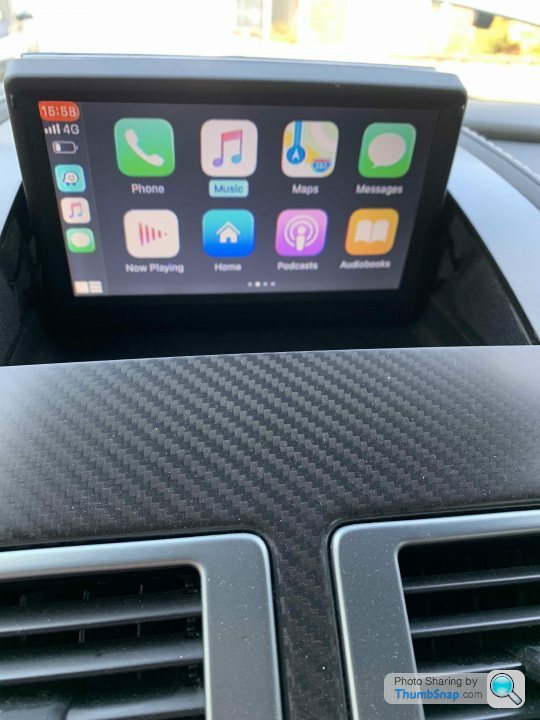 |https://thumbsnap.com/w7gVhNjI[/url]
If anyone is frustrated with their infotainment, I can highly recommend this kit. Plus it’s perfectly doable if you’re the kind of person who can still wire a plug.
Plus now is the perfect time to get it done whilst we're all in lock-down mode.
Stay safe everyone, better days are ahead! [url][url][url][url][url]
|https://thumbsnap.com/XZwWxk6L[/url]However when I tapped the front carbon splitter causing a gash and the satnav now being totally out of date, I thought the time had come to invest in an upgrade. That’s where Aston Installations came in. Not being able to take the car to the UK, I thought I’d give it a go myself and ordered a kit comprising of CarPlay as well as front and rear cameras.
With lock-in and social distancing in place, it’s the perfect project I thought.
I spoke to James at A.I. and he reassured me it was something I could do, plus he was there if I had any questions during the install.
|https://thumbsnap.com/N0LxU1c3[/url] As promised the kit arrived quickly and everything was included, literally everything. James had written a comprehensive step by step guide as well as a video. So long as you follow this to the letter it’s a piece of cake. If you can follow a recipe, you can follow this.
|https://thumbsnap.com/m10563CW[/url]Dismantling the interior can be daunting but it’s all doable. The biggest headache was getting the new wiring loom through the access grommet in the rear bulkhead. If I was doing it again it would be a 5 min job, if that. At the time I must have spent an hour, including tea and cake. And the front bulkhead from the engine bay to drivers footwell, you need to get a camera cable through here too. Again time was wasted just faffing to find where the cable would come out. In the end I used a straightened coat hanger through the engine bay access grommet into the footwell. I could then see where the darn thing came out. Then I taped the camera cable to the wire and pulled it through, simple. Those were the only two bits of the installation that was a real faff.
|https://thumbsnap.com/8apfbbnH[/url]The whole job took two days, including taking the interior apart, the installation, checking it all worked and then putting the interior back together.
The best bit of all, the whole thing just works seamlessly, it’s a brilliant kit and solution to upgrading the infotainment. My phone just connects via Bluetooth and hey presto it just works.
|https://thumbsnap.com/w7gVhNjI[/url]If anyone is frustrated with their infotainment, I can highly recommend this kit. Plus it’s perfectly doable if you’re the kind of person who can still wire a plug.
Plus now is the perfect time to get it done whilst we're all in lock-down mode.
Stay safe everyone, better days are ahead! [url][url][url][url][url]
Superb - I’m thinking of doing the same. Is everything plug and play, or is there any wire splicing/cutting involved?
I have a few questions:
- does the front camera have a wide view (for edging out of junctions)?
- does it use the existing screen? How is the resolution with Google maps?
- how quick is the system - I.e. flicking between CarPlay/cameras?
Thanks,
Nick
I have a few questions:
- does the front camera have a wide view (for edging out of junctions)?
- does it use the existing screen? How is the resolution with Google maps?
- how quick is the system - I.e. flicking between CarPlay/cameras?
Thanks,
Nick
Everything is plug and play and labelled accordingly. It all worked first time round. If you follow the instructions you can’t go wrong.
The front camera has 4 modes, ultra wide, wide, split screen left & right and down. I don’t see an issue coming out of a drive or road as you can almost see around corners! You can also step between the camera views with no delay.
There’s also no delay when you switch between sources. The rear camera overrides everything when you select reverse.
Regarding the resolution, I’ve not tried google maps yet. However the res is what it is, it’s OK.
The front camera has 4 modes, ultra wide, wide, split screen left & right and down. I don’t see an issue coming out of a drive or road as you can almost see around corners! You can also step between the camera views with no delay.
There’s also no delay when you switch between sources. The rear camera overrides everything when you select reverse.
Regarding the resolution, I’ve not tried google maps yet. However the res is what it is, it’s OK.
Awesome, thank you! It looks good - I looked at the Redpants demo on YouTube yesterday. My only reservation is about the number of controls - do you have a picture of these? I couldn't quite see in the video, but it looked like there were 3 different controllers that you had to use.
I fitted sat nav to an e46 BMW a while back, and that was a fairly big interior out job. Time consuming, but not too difficult - this sounds very similar.
The front camera looks like it could be very useful in London.
I fitted sat nav to an e46 BMW a while back, and that was a fairly big interior out job. Time consuming, but not too difficult - this sounds very similar.
The front camera looks like it could be very useful in London.
Regarding the controls. I thought long and hard about this.
The main CarPlay control is the one you’re going to use the most and I’ve sat that where James positioned it, just behind the ashtray and it sits comfortably there. Then there’s the front camera control. Realistically how often will you switch between the four modes. My conclusion was seldom as I’ll simply leave it in wide mode 99% of the time. So it’s positioned in the ashtray. Finally it’s the little source switch. This I see being used a fair bit so I didn’t want to position it the ashtray and having to flip that open to use it. So I positioned it by my seat control and I think this is the best place for it.
Thanks for the compliment regarding the wheels. Unfortunately I managed to scratch one whilst performing a good deed. Trying to get matching powder coat is another story.
The main CarPlay control is the one you’re going to use the most and I’ve sat that where James positioned it, just behind the ashtray and it sits comfortably there. Then there’s the front camera control. Realistically how often will you switch between the four modes. My conclusion was seldom as I’ll simply leave it in wide mode 99% of the time. So it’s positioned in the ashtray. Finally it’s the little source switch. This I see being used a fair bit so I didn’t want to position it the ashtray and having to flip that open to use it. So I positioned it by my seat control and I think this is the best place for it.
Thanks for the compliment regarding the wheels. Unfortunately I managed to scratch one whilst performing a good deed. Trying to get matching powder coat is another story.
NickXX said:
Superb - I’m thinking of doing the same. Is everything plug and play, or is there any wire splicing/cutting involved?
I have a few questions:
- does the front camera have a wide view (for edging out of junctions)?
- does it use the existing screen? How is the resolution with Google maps?
- how quick is the system - I.e. flicking between CarPlay/cameras?
Thanks,
Nick
1. Yes, it has 4 views.I have a few questions:
- does the front camera have a wide view (for edging out of junctions)?
- does it use the existing screen? How is the resolution with Google maps?
- how quick is the system - I.e. flicking between CarPlay/cameras?
Thanks,
Nick
2. Resolution is great even in my 2008 V8V
3. Instantaneous
UncleStig said:
Regarding the controls. I thought long and hard about this.
The main CarPlay control is the one you’re going to use the most and I’ve sat that where James positioned it, just behind the ashtray and it sits comfortably there. Then there’s the front camera control. Realistically how often will you switch between the four modes. My conclusion was seldom as I’ll simply leave it in wide mode 99% of the time. So it’s positioned in the ashtray. Finally it’s the little source switch. This I see being used a fair bit so I didn’t want to position it the ashtray and having to flip that open to use it. So I positioned it by my seat control and I think this is the best place for it.
Thanks for the compliment regarding the wheels. Unfortunately I managed to scratch one whilst performing a good deed. Trying to get matching powder coat is another story.
Would you mind posting pics of the controls when you get a mo ? just to see how they fit in with the rest of the interior.The main CarPlay control is the one you’re going to use the most and I’ve sat that where James positioned it, just behind the ashtray and it sits comfortably there. Then there’s the front camera control. Realistically how often will you switch between the four modes. My conclusion was seldom as I’ll simply leave it in wide mode 99% of the time. So it’s positioned in the ashtray. Finally it’s the little source switch. This I see being used a fair bit so I didn’t want to position it the ashtray and having to flip that open to use it. So I positioned it by my seat control and I think this is the best place for it.
Thanks for the compliment regarding the wheels. Unfortunately I managed to scratch one whilst performing a good deed. Trying to get matching powder coat is another story.
Many thanks

Hi All,
I too have been looking for a way to replace the dreaded Sat Nav for many years in my MY2007 Vantage.
I looked at the Aston Installations kits and yes it's excellent, but I wanted to try for a cheaper solution.
For me, I have found lots of DIY ideas out there, replacing the screen with a garmin, a third party unit etc, but I just wanted a way to a) keep the original system intact, so that I can still see it if necessary and b) get an HDMI signal in to it at the same time. Once I had that, I could put anything up on the screen and it would look stock, factory even.
A few months back I came across a thread on 6speedonline of a chap who had replaced the Sat Nav screen with a higher resolution screen and tapped into the feed that goes up to that screen so that he could keep the old sat nav signal as well as getting a new CarPlay signal. Basically the new screen has an HDMI interface and once you convert the cars existing RGB interface to HDMI, the world is your oyster (so to speak).
It sounds scary, but it's not, the mod process is documented and I have followed it and just converted mine, I built the components up ready and the install itself took a day with a total cost all of about £320 (which includes the commercial CarPlay interface with controller).
In addition, this mod is completely reversable, so if you ever wanted to revert back, it's easy to take the kit out and replace the original screen back in the pop up mechanism. Not that I want to though, because you still get complete acces to the old system and the car is none the wiser, so to speak.
If anyone is interested in a more DIY route, check out this thread on 6speedonline:
https://www.6speedonline.com/forums/aston-martin/4...
Please don't think I am knocking down this thread or Aston Installations at all, I have seen the installation it's a great bit of kit. And if you are not into too much DIY, it's probably the safer way to go.
When I found the original 6speed thread above, and the part where the originator, Jenninaj, re-routed the car's existing RGB sat nav signal to a new, higher resolution screen with HDMI, that for me was the ticket, at that point I knew that I could do what I wanted.
I've completed mine on the above thread, you will find me adding to it with info and also some additional info about my install as I am in the UK.
So if this helps anyone here, then great, I felt it was worth getting the info here on Pistonheads as well as across the pond.
If I have offended anyone, then please accept my apologies
I too have been looking for a way to replace the dreaded Sat Nav for many years in my MY2007 Vantage.
I looked at the Aston Installations kits and yes it's excellent, but I wanted to try for a cheaper solution.
For me, I have found lots of DIY ideas out there, replacing the screen with a garmin, a third party unit etc, but I just wanted a way to a) keep the original system intact, so that I can still see it if necessary and b) get an HDMI signal in to it at the same time. Once I had that, I could put anything up on the screen and it would look stock, factory even.
A few months back I came across a thread on 6speedonline of a chap who had replaced the Sat Nav screen with a higher resolution screen and tapped into the feed that goes up to that screen so that he could keep the old sat nav signal as well as getting a new CarPlay signal. Basically the new screen has an HDMI interface and once you convert the cars existing RGB interface to HDMI, the world is your oyster (so to speak).
It sounds scary, but it's not, the mod process is documented and I have followed it and just converted mine, I built the components up ready and the install itself took a day with a total cost all of about £320 (which includes the commercial CarPlay interface with controller).
In addition, this mod is completely reversable, so if you ever wanted to revert back, it's easy to take the kit out and replace the original screen back in the pop up mechanism. Not that I want to though, because you still get complete acces to the old system and the car is none the wiser, so to speak.
If anyone is interested in a more DIY route, check out this thread on 6speedonline:
https://www.6speedonline.com/forums/aston-martin/4...
Please don't think I am knocking down this thread or Aston Installations at all, I have seen the installation it's a great bit of kit. And if you are not into too much DIY, it's probably the safer way to go.
When I found the original 6speed thread above, and the part where the originator, Jenninaj, re-routed the car's existing RGB sat nav signal to a new, higher resolution screen with HDMI, that for me was the ticket, at that point I knew that I could do what I wanted.
I've completed mine on the above thread, you will find me adding to it with info and also some additional info about my install as I am in the UK.
So if this helps anyone here, then great, I felt it was worth getting the info here on Pistonheads as well as across the pond.
If I have offended anyone, then please accept my apologies
Edited by mad gadget on Tuesday 14th April 12:44
Edited by mad gadget on Tuesday 14th April 12:45
Much appreciated Mad - there's a few of us on here that love to try new things out and those that would prefer to leave it to the experts. Each to their own and all churches welcome :-)
As the cars get older there will be a lot more DIY, as people like you post these sorts of threads and there's less concern about damaging a relatively new car.
Will have a read through the thread with interest.
Cheers
Jonny
As the cars get older there will be a lot more DIY, as people like you post these sorts of threads and there's less concern about damaging a relatively new car.
Will have a read through the thread with interest.
Cheers
Jonny
Gassing Station | Aston Martin | Top of Page | What's New | My Stuff