
Can a monitor be too big?
Discussion


I'm thinking of getting a new monitor for working at home, mainly coding an reading/writing documents. My current one is 21" and pretty poor contrast so I either have to tilt it backwards or put the centre of the screen at eye level to read it clearly, and I'd also like something a bit bigger. The biggest I could fit on my desk would be a 32", would this be madness?
I have a 32” AOC monitor on my desk, which is great for me. This is really a matter of personal preference though, when I was looking some friends advised that 32” would be ‘too big’ or that the resolution meant that you would ‘see the individual pixels’ or such like - I brought it anyway and wouldn’t go back now.
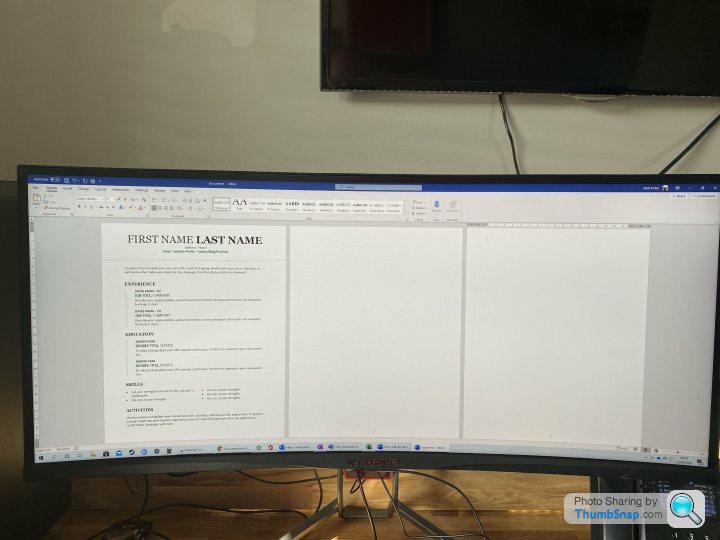
I've got 2x 34" and I'd say it's too much.
The outer left of the second monitor is relegated to "background youtube/spotify" duties.
Half of the screen shows excel columns A-Z. Brilliant stuff.
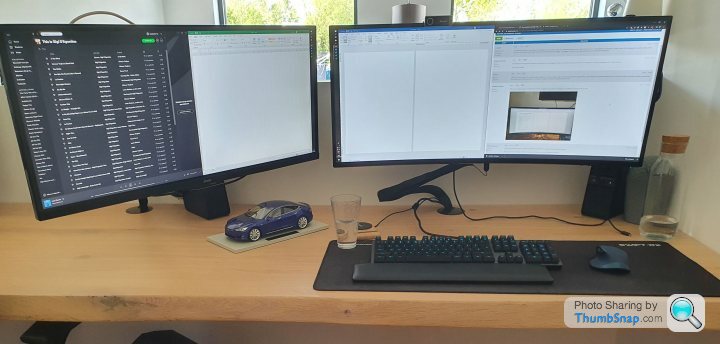
I'd say the ideal setup is a 34" + 27".
I had the setup but then had a spare 34" so decided to go this way.
Displaywars.com is a good website to get an idea of how much an upgrade a monitor is.
As you can see, a 27" wide and 34" ultrawide are the same height. The 34" is essentially a 27" with another 1/3 added to it, and it makes a lot of difference having two applications open next to each other.
I don't like curved monitors, one of mine isn't and the other very slightly, which I think is plenty.

The outer left of the second monitor is relegated to "background youtube/spotify" duties.
Half of the screen shows excel columns A-Z. Brilliant stuff.
I'd say the ideal setup is a 34" + 27".
I had the setup but then had a spare 34" so decided to go this way.
Displaywars.com is a good website to get an idea of how much an upgrade a monitor is.
As you can see, a 27" wide and 34" ultrawide are the same height. The 34" is essentially a 27" with another 1/3 added to it, and it makes a lot of difference having two applications open next to each other.
I don't like curved monitors, one of mine isn't and the other very slightly, which I think is plenty.
It partly depends on how you use windows on the monitors... I like to have the program snapped to the full monitor, so having an extra large monitor doesn't work for me - instead I have three 24" monitors next to each other and software which allows me to automatically move a programme from monitor to monitor at the press of a key so it is easy to flick one out of the way to a side screen when necessary... my graphics card will do something ridiculous like run 16 monitors - these three are all daisychained using mini DP / DisplayPort - from one socket on the graphic card, leaving three empty!
I would say if you have to significantly move your head/body to see the sides (or top/bottom) starting from viewing straight on it might be too large. I have 2x28" screens and sit reasonably close to them they pretty much fill my vision side to side (but not top to bottom: in that respect 3 28" screens in portrait mode might be better)
akirk said:
It partly depends on how you use windows on the monitors... I like to have the program snapped to the full monitor, so having an extra large monitor doesn't work for me - instead I have three 24" monitors next to each other and software which allows me to automatically move a programme from monitor to monitor at the press of a key so it is easy to flick one out of the way to a side screen when necessary... my graphics card will do something ridiculous like run 16 monitors - these three are all daisychained using mini DP / DisplayPort - from one socket on the graphic card, leaving three empty!
I can agree, there's software for that though?That said, I love working from home and having essentially "two" screens on a remote desktop, something which is often still hard to do with two smaller monitors..
Once you’ve used a large monitor, or even better 2 or 3 large monitors, you will wonder how you ever worked without them.
I have 2 monitors, (Dell P2414Hs) one horizontal, and the other vertical. Getting bigger and/or more monitors has got be one of the most productive things you can do to work on a PC. As long as your video card will support it. Mine will drive 4 monitors but it wasn’t cheap…. It was £450 at the time.

Home setup, in the dining room, but soon to find itself upstairs in the "office"
I have 2 monitors, (Dell P2414Hs) one horizontal, and the other vertical. Getting bigger and/or more monitors has got be one of the most productive things you can do to work on a PC. As long as your video card will support it. Mine will drive 4 monitors but it wasn’t cheap…. It was £450 at the time.
Home setup, in the dining room, but soon to find itself upstairs in the "office"
bucksmanuk said:
. Mine will drive 4 monitors but it wasn’t cheap…. It was £450 at the time.
Meh, mine is a 2nd hand AMD RX 570 4Gb. It will drive 4 screens so it's not pushed driving 2x4k screens. I think it cost me about £75. I could have bought a new one for about £150. So this has really come down over time. You could easily spend less than that!1x32" sounds fine. Quite like the setups above.
Personally, I have a 1x24" and a 1x17" which makes the total space maybe around 1x32". One advantage of two monitors over one is that if you drag a window to the top, it won't fill the entire space with the window, so I'll have one window maxed on the support screen (17") and one floating window at slightly smaller on the main screen. I could do the side drag thing but the window would feel too narrow.
Personally, I have a 1x24" and a 1x17" which makes the total space maybe around 1x32". One advantage of two monitors over one is that if you drag a window to the top, it won't fill the entire space with the window, so I'll have one window maxed on the support screen (17") and one floating window at slightly smaller on the main screen. I could do the side drag thing but the window would feel too narrow.
bucksmanuk said:
Once you’ve used a large monitor, or even better 2 or 3 large monitors, you will wonder how you ever worked without them.
I have 2 monitors, (Dell P2414Hs) one horizontal, and the other vertical. Getting bigger and/or more monitors has got be one of the most productive things you can do to work on a PC. As long as your video card will support it. Mine will drive 4 monitors but it wasn’t cheap…. It was £450 at the time.
Home setup, in the dining room, but soon to find itself upstairs in the "office"
I have a pair of 24" landscape screens, the laptop screen itself and then another 24" in portrait mode for reading emails and working on word documents.I have 2 monitors, (Dell P2414Hs) one horizontal, and the other vertical. Getting bigger and/or more monitors has got be one of the most productive things you can do to work on a PC. As long as your video card will support it. Mine will drive 4 monitors but it wasn’t cheap…. It was £450 at the time.
Home setup, in the dining room, but soon to find itself upstairs in the "office"
As someone else said, having multiple screens where you can maximise the app onto that screen is better than messing about stretching and aligning.
(Work in IT, creating scripts, referencing drawings and spreadsheets)
robbieduncan said:
bucksmanuk said:
. Mine will drive 4 monitors but it wasn’t cheap…. It was £450 at the time.
Meh, mine is a 2nd hand AMD RX 570 4Gb. It will drive 4 screens so it's not pushed driving 2x4k screens. I think it cost me about £75. I could have bought a new one for about £150. So this has really come down over time. You could easily spend less than that!https://www.amazon.co.uk/PNY-NVIDIA-Express-Profes...
I still go into offices and the staff are working on piddly little 19" screens, some are still 4/3 ratio.
I run a 27" iMac and it's a perfect size for me, any bigger and I'd be moving my head around to view, I do have a second 24" TV/monitor but that is mainly used for CCTV, news etc.
I run a 27" iMac and it's a perfect size for me, any bigger and I'd be moving my head around to view, I do have a second 24" TV/monitor but that is mainly used for CCTV, news etc.
ZesPak said:
akirk said:
It partly depends on how you use windows on the monitors... I like to have the program snapped to the full monitor, so having an extra large monitor doesn't work for me - instead I have three 24" monitors next to each other and software which allows me to automatically move a programme from monitor to monitor at the press of a key so it is easy to flick one out of the way to a side screen when necessary... my graphics card will do something ridiculous like run 16 monitors - these three are all daisychained using mini DP / DisplayPort - from one socket on the graphic card, leaving three empty!
I can agree, there's software for that though?droopsnoot said:
And no-one has eye trouble with sitting so close to such massive screens? I've wondered that, in the "show us" thread, so many massive screens that people sit close to.
I imagine not, or you wouldn't do it. All of a sudden my massive 22" widescreen monitor seems a bit pathetic.
No. Scaling the 3480x2160 to look like 3008x1692 looks great to me and makes the text sharp and a good size for me.I imagine not, or you wouldn't do it. All of a sudden my massive 22" widescreen monitor seems a bit pathetic.
Gassing Station | Computers, Gadgets & Stuff | Top of Page | What's New | My Stuff