
Home Network, Ethernet, Phone Sockets
Discussion


Hi all,
I like in a part old part modern house with a variety of solid and hollow walls. I would like to be able to have some Ethernet points put into rooms if possible and I have a fair few phone sockets which are no longer being used. Is there any way to utilise the internal phone cables for Ethernet use or would the cables need to be replaced ?
If it’s any use here are some photos of the phone sockets....
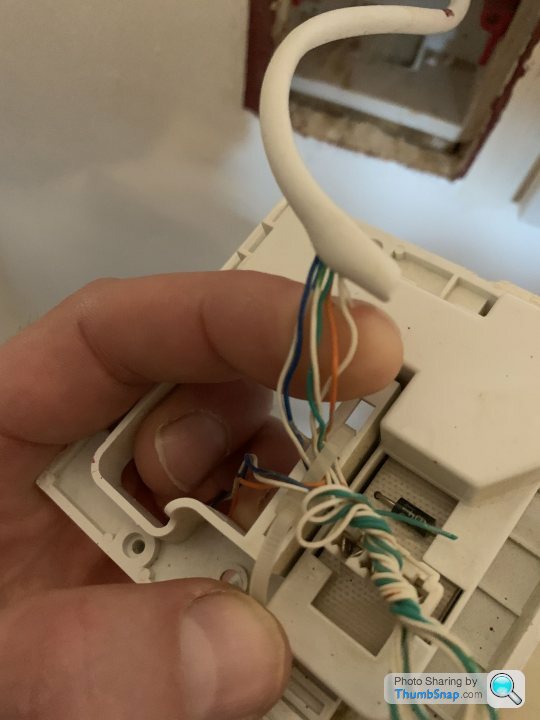


Lastly...what sort of cable is this ?

I like in a part old part modern house with a variety of solid and hollow walls. I would like to be able to have some Ethernet points put into rooms if possible and I have a fair few phone sockets which are no longer being used. Is there any way to utilise the internal phone cables for Ethernet use or would the cables need to be replaced ?
If it’s any use here are some photos of the phone sockets....
Lastly...what sort of cable is this ?
The orange cable is CAT5E which is what you need for good ethernet. It has 4 twisted pairs, looks like that one is also screened (FTP).
The telephone cables are only 6 core so not really suitable, do they run back to a central point? It is doable if they do, you can get away with just two pairs but will limit the bandwidth. You'll be better off using good wifi.
eg https://www.youtube.com/watch?v=Bx98ACGSSZs
The telephone cables are only 6 core so not really suitable, do they run back to a central point? It is doable if they do, you can get away with just two pairs but will limit the bandwidth. You'll be better off using good wifi.
eg https://www.youtube.com/watch?v=Bx98ACGSSZs

OK then doable but, you may get limited speeds, max 100mb if you're lucky, which is fine for most stuff. I'd test it first on the longest run and see what you get.
You'll need to punch it down at each end into a network jack. Pins 1,2,3 & 6 which are usually the orange pair and the green pair, you need to follow 568B wiring code. You'll need to substitute the colours and try and maintain the twisted pairs if you have them. Some of your cables are not twisted pair, you'll be lucky to get 10mb down those as they will pick up interference but, no harm in trying.
https://en.wikipedia.org/wiki/TIA/EIA-568
I've done this a few times and it worked for me.
You'll need to punch it down at each end into a network jack. Pins 1,2,3 & 6 which are usually the orange pair and the green pair, you need to follow 568B wiring code. You'll need to substitute the colours and try and maintain the twisted pairs if you have them. Some of your cables are not twisted pair, you'll be lucky to get 10mb down those as they will pick up interference but, no harm in trying.
https://en.wikipedia.org/wiki/TIA/EIA-568
I've done this a few times and it worked for me.
Edited by megaphone on Saturday 18th April 10:38
Jmracing66 said:
Excellent, thanks for your help...
I have pulled the connection box apart now there are 9 cables in total and a couple of cables have 8 strands, so I assume these ones would be more suitable ? Thanks again.


The top cable is data cable probably cat5 which is what you need I have pulled the connection box apart now there are 9 cables in total and a couple of cables have 8 strands, so I assume these ones would be more suitable ? Thanks again.
The lower picture is alarm cable which is normally stranded cable so is unlikely to work.
So the rule for this would be:
Anything less the 8 cores are not data
Anything not twisted in pairs is not data
Anything with more colours than Blue/White Green/White Orange/White Brown/White is not data.
Some data will have a foil jacket, like the orange cable
Some data cable will not, like the light grey cable
Some data cable will have a centre bit of plastic to maintain seperation and bend protection
All Data will pairs will have a main colour and then an matching white striped version - Blue/BlueWhite etc.
You can use data cable for phone lines but not really possible the other way round, (telephone cable is refered to as Cat3 grade)
Twists are very important as the electronics uses it to reject interference.
As others have said, the most important ones are for pins 1,2,3 & 6 - Orange and Green Pairs, this will give you upto 100mb/s, the other two (Blue & Brown) will all you to run to 1000mb/s (Giga Bit) But in the UK our current bottle-neck is the external speed coming to the house, so 100mb/s will be fine.
If terminating yourself, maintain the twists as close to the termination as possible, it helps the signal performance. I can tell instantly who did a termination just by looking at this as it is far less important in telephone lines. So electricians and telco guys tends (not all) to undo all the twists a long way back.
Anything less the 8 cores are not data
Anything not twisted in pairs is not data
Anything with more colours than Blue/White Green/White Orange/White Brown/White is not data.
Some data will have a foil jacket, like the orange cable
Some data cable will not, like the light grey cable
Some data cable will have a centre bit of plastic to maintain seperation and bend protection
All Data will pairs will have a main colour and then an matching white striped version - Blue/BlueWhite etc.
You can use data cable for phone lines but not really possible the other way round, (telephone cable is refered to as Cat3 grade)
Twists are very important as the electronics uses it to reject interference.
As others have said, the most important ones are for pins 1,2,3 & 6 - Orange and Green Pairs, this will give you upto 100mb/s, the other two (Blue & Brown) will all you to run to 1000mb/s (Giga Bit) But in the UK our current bottle-neck is the external speed coming to the house, so 100mb/s will be fine.
If terminating yourself, maintain the twists as close to the termination as possible, it helps the signal performance. I can tell instantly who did a termination just by looking at this as it is far less important in telephone lines. So electricians and telco guys tends (not all) to undo all the twists a long way back.
Edited by VEX on Monday 20th April 10:14
Gassing Station | Computers, Gadgets & Stuff | Top of Page | What's New | My Stuff