
Acer Aspire - screen gone wrong - options?
Discussion


My daughters Acer Aspire laptop, which she is using for home schooling has developed a strange screen issue (see pic). Anyone know if it is destined for the bin or fixable? It is only about 2 years old.
Laptop works when plugged into an external monitor via HDMI
Thanks
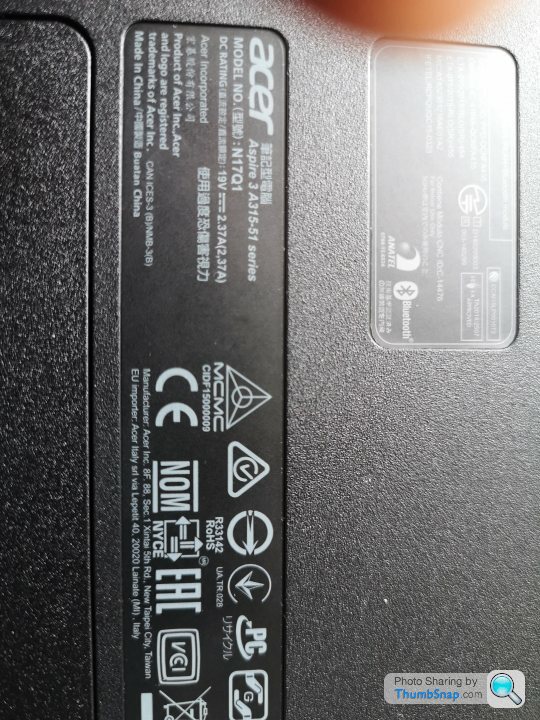

Laptop works when plugged into an external monitor via HDMI
Thanks
Edited by alfabeat on Sunday 17th May 16:05
Looks like the lid has been shut on something that was on top of the right side of the keyboard (or has been hit on the outside). You might get a replacement screen on fleebay for £50 but fitting is a fiddle and it might involve glue. Perhaps worth a shot if you are handy with a small screwdriver. Some idea of the process on a similar model:
https://youtu.be/Ar9OGg-9dvM
https://youtu.be/Ar9OGg-9dvM
Edited by colin79666 on Sunday 17th May 16:26
I'd check the warrantly if it's not that old but unfortunatly that looks like impact damage of some sort as per the above...
For now, you can connect to an external screen / TV and use that - get an external mouse and keyboard to keep it usable and so you can close the lid.
Laptop screens are usually fairly easy to swap out - just depends on cost of the new one!
For now, you can connect to an external screen / TV and use that - get an external mouse and keyboard to keep it usable and so you can close the lid.
Laptop screens are usually fairly easy to swap out - just depends on cost of the new one!
Looks like a mullered screen. This place has replacements:
https://www.laptop-lcd-screen.co.uk/shop/ACER-ASPI...
Check if it's a 1366x768 or a 1920x1080 screen: you might even be able to upgrade it. It's a fiddly job but not too difficult:
https://www.youtube.com/watch?v=VNnZU5IOyc4
https://www.laptop-lcd-screen.co.uk/shop/ACER-ASPI...
Check if it's a 1366x768 or a 1920x1080 screen: you might even be able to upgrade it. It's a fiddly job but not too difficult:
https://www.youtube.com/watch?v=VNnZU5IOyc4
I had just placed an order for this:
https://www.ebay.co.uk/itm/254487505717
Do you think that will work? I have asked the seller to double check...
https://www.ebay.co.uk/itm/254487505717
Do you think that will work? I have asked the seller to double check...
Edited by alfabeat on Sunday 17th May 18:20
alfabeat said:
I had just placed an order for this:
https://www.ebay.co.uk/itm/254487505717
Do you think that will work? I have asked the seller to double check...
Based on your pic, should be right. https://www.ebay.co.uk/itm/254487505717
Do you think that will work? I have asked the seller to double check...
Edited by alfabeat on Sunday 17th May 18:20

alfabeat said:
I had just placed an order for this:
https://www.ebay.co.uk/itm/254487505717
Do you think that will work? I have asked the seller to double check...
Well it looks as if it might be ok. The only advantage of the other site is that you might have been able to put a 1920x1080 screen in. The ebay place looks cheaper though. Note it's glossy screen - is the existing one the same?https://www.ebay.co.uk/itm/254487505717
Do you think that will work? I have asked the seller to double check...
Gassing Station | Computers, Gadgets & Stuff | Top of Page | What's New | My Stuff